
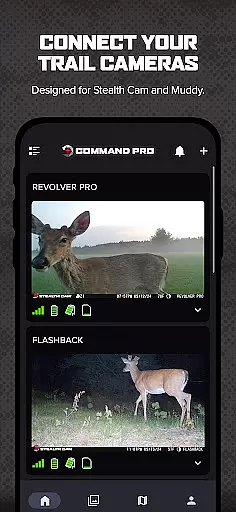
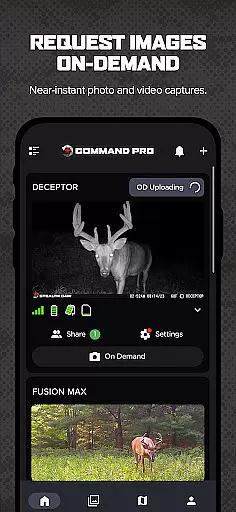
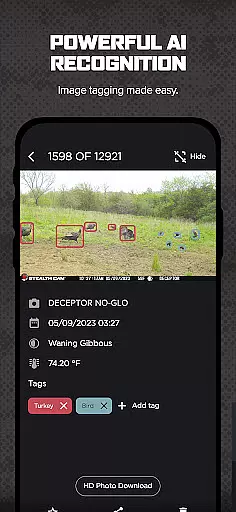
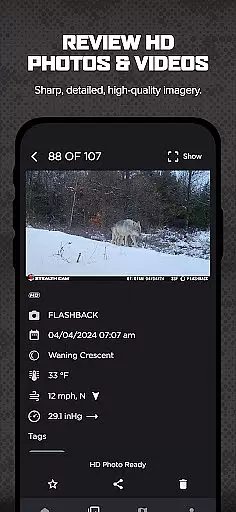
COMMAND PRO is a comprehensive mobile application designed for managing Stealth Cam and Muddy cellular trail cameras. This app allows users to effortlessly view, share, analyze, and configure their trail cameras. With the integration of AI subject recognition, weather, and solunar data, it enables users to identify patterns and monitor game movement like never before. One of its standout features is the On-Demand functionality, which lets users request high-definition photos and videos remotely, providing powerful monitoring capabilities.
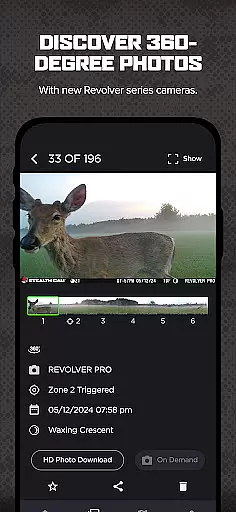
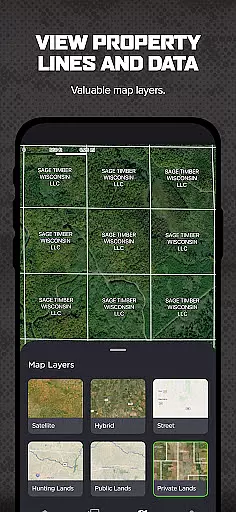
In addition to supporting standard trail cameras, COMMAND PRO also supports the advanced Revolver and Revolver Pro 360-degree cellular trail cameras. Users can review panoramic 360 and 180-degree images directly within the app. Enhanced mapping features, including property lines and hunting land maps, further augment scouting and planning efforts, making this app an essential tool for hunters and outdoor enthusiasts.
COMMAND PRO offers a wide array of features tailored for efficient camera management and advanced scouting. The app provides quick camera setup and activation, allowing users to easily add and manage all their Stealth Cam and Muddy cellular trail cameras. It includes tools for managing cellular data plans and billing directly from the app interface. Users can view panoramic 360 and 180-degree images from the new Revolver series cameras and request On-Demand HD photos and videos with just a button press.
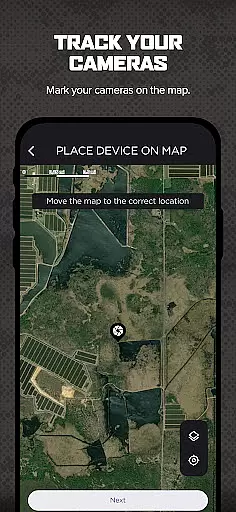
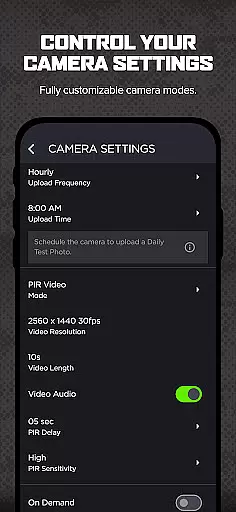
Advanced functionalities include AI-driven or manual tagging of images, downloading, reviewing, saving, and sharing high-definition media. The app's mapping capabilities are robust, offering layers such as property lines and hunting land maps, and enabling camera management and settings adjustments directly from the map screen. Additional features include setting transmission times, creating camera groups for better organization, sharing view-only access with other users, advanced filtering by AI tags, weather, solunar data, and time of day, night-time colorization for IR flash photos, and receiving push notifications for new photos.
Command Pro delivers an unparalleled level of gameplay realism and physics accuracy for outdoor enthusiasts. The app integrates advanced AI subject recognition with real-world environmental data such as weather patterns and solunar activity. This combination allows users to identify animal movement trends with scientific precision.
The app supports high-definition image and video capture from trail cameras, ensuring that every detail is recorded with clarity. With features like night-time colorization for IR flash photos, the app enhances image quality while maintaining authenticity. This attention to detail extends to its support for panoramic 360 and 180-degree images from Revolver series cameras, offering a complete view of the surroundings.
Users benefit from tools designed to improve scouting and hunting strategies. Advanced mapping layers, including property lines and hunting land maps, provide valuable context for camera placement and game tracking. These features ensure that hunters and wildlife observers can make informed decisions based on accurate representations of their environment.
Command Pro offers an intuitive control scheme that simplifies the management of Stealth Cam and Muddy cellular trail cameras. The app's design emphasizes ease of use, allowing users to set up and activate cameras quickly through a streamlined process. By scanning a QR code inside the camera, users can establish a connection in moments.
Once connected, the app provides comprehensive monitoring capabilities. Users can request On-Demand HD photos and videos with a single button press, making remote monitoring effortless. The interface also supports organizing cameras into groups, setting transmission times, and managing cellular data plans directly within the app.
This intuitive approach extends to advanced features like AI-driven tagging and image filtering by weather, solunar, and time of day. Push notifications for new photos ensure users never miss critical moments captured by their cameras. With these thoughtful controls, Command Pro empowers both novice and experienced users to efficiently manage their trail camera systems.
User-friendly interface
AI-driven image tagging
Remote HD photo capture
Advanced mapping tools
Comprehensive camera management
Subscription fees apply
Limited to compatible devices
Requires cellular plan
Complex setup for beginners
High data usage

Trick cliff dive backflips, stunts & doubles! Unparalleled real physics!
 4.50
4.50
This third edition of Skateboard Party features professional skater Greg Lutzka.
4.30
Exploring Football from a Unique Perspective
4.10
Vertical billiards game with single player
4.60
Mental skills exercise/training - improve your power of focus and concentration
4.4
Build a soccer club from scratch and see if you can conquer the World!
4.50
Realistic PvP Multiplayer Dart game blending sports games and simulation fun!
4.50
Master the arrow art in archer duels
4.50
The NFHS Network delivers high school sporting events from across the country.
2.10
Create and customize your own golf course in this charming management sim.
4.70
8 Pool Master is an interesting billiard game
4.70
Basketball Team Management Sim Coach a custom team and dunk your way to glory!
4.70
Grab the ball and play your Basketball career in this 3D Real-time Sport Game!
4.60
Basketball dunking fun !
4.50
Sports app that presents matches' details from the most important championships.
4.50
Beat against 8 ball masters from around the world.
4.40
Play eFootball™ with users around the world!
4.10
Relive the second baseball game in the Backyard Sports franchise!
4.00
Raise your duckling into a champion racer in this addictive pet & adventure game
3.90


User Reviews