
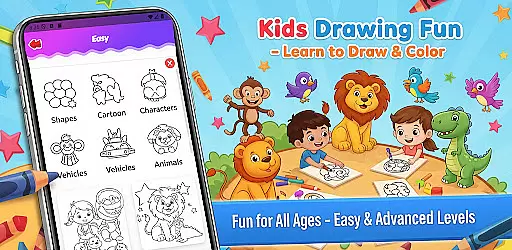
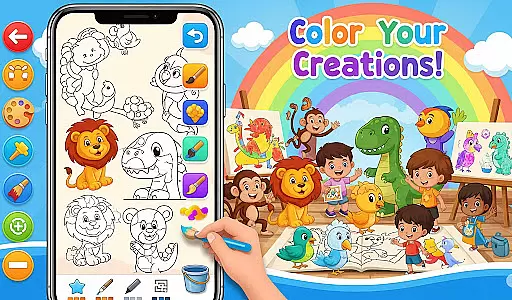
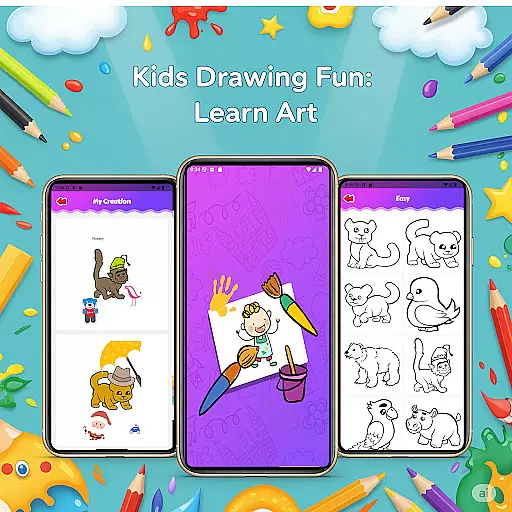
Fun Drawing & Color: Learn Art is an innovative educational app designed to make drawing and coloring both fun and instructional. This app caters to users of all ages, from beginners learning the basics to experienced artists honing their skills. With its ad-free interface, users can enjoy a seamless creative experience on both phones and tablets.
The app offers step-by-step drawing guides that simplify complex shapes into easy-to-follow lessons, covering subjects like animals, vehicles, and characters. It also includes vibrant coloring tools, customizable text options, and a variety of brush types for detailed artwork. Users can save their creations in a personal gallery, revisit them anytime, and progressively improve their skills with activities tailored to multiple skill levels.
Whether you're looking to learn new techniques or simply express your creativity, Fun Drawing & Color: Learn Art provides a complete toolkit for artistic exploration. Its intuitive design and comprehensive features make it an ideal choice for anyone seeking a premium drawing experience without interruptions.
Fun Drawing & Color: Learn Art stands out with its rich set of features designed to enhance creativity and learning. One of the key highlights is the step-by-step drawing guides, which break down complex drawings into manageable steps, making it easier for users to follow along and build confidence in their abilities.
In addition to guided lessons, the app offers a wide array of customization options. Users can experiment with different brush types, pencil colors, and text styles, allowing for endless creative possibilities. The inclusion of stickers and a full color palette further enhances the ability to personalize each piece of art. Practical tools such as the eraser, undo, and redo functions ensure that mistakes can be easily corrected, encouraging experimentation without fear of permanent errors.
Another standout feature is the personal gallery, where users can save and revisit their artwork. This not only helps track progress over time but also serves as a source of inspiration for future projects. With compatibility across Android devices and a completely ad-free experience, Fun Drawing & Color: Learn Art ensures a smooth and enjoyable creative process for everyone.
In the realm of educational drawing apps, content authority and curriculum alignment are crucial for ensuring that learning is both effective and credible. Fun Drawing & Color: Learn Art positions itself as not just a creative outlet, but also an authoritative source for art education.
The app offers step-by-step drawing guides that cover a wide array of subjects, including animals, vehicles, objects, food, and characters. These lessons are crafted to build foundational drawing skills using simple shapes, which aligns well with general art curricula that emphasize basic forms and structures before advancing to complex designs.
Moreover, the presence of multiple skill levels within the appu2014from beginner to advancedu2014ensures that users can progress at their own pace, mimicking the structured learning path found in traditional art education settings. This tiered approach helps maintain alignment with various stages of artistic development.
By providing a comprehensive suite of tools like stickers, text styles, brush types, and color palettes, the app encourages creativity while still adhering to educational principles. The ability to save and revisit artwork in a personal gallery further reinforces learning by allowing users to track their progress over time.
Gamification has become a pivotal element in modern educational tools, merging enjoyment with pedagogy to enhance user engagement and retention. Fun Drawing & Color: Learn Art incorporates gamification seamlessly into its framework, making the process of learning art both enjoyable and productive.
One of the standout features is the use of playful stickers and fun fonts, which serve as motivational elements. Users can decorate their drawings with colorful stickers and add text with various font styles, colors, and sizes. These features not only make the creation process more engaging but also tap into the reward centers of the brain, encouraging continued use.
The app's tiered skill levels act as a gamified progression system, where users 'level up' from beginner to advanced activities. This mirrors common gaming mechanics that drive players to achieve higher ranks or unlock new levels, thus maintaining interest and motivation.
Additionally, the personal gallery feature functions similarly to a trophy room, where users can view and edit their saved artwork anytime. This creates a sense of accomplishment and ownership over oneu2019s creations, reinforcing positive learning behaviors. By integrating these gamified elements, Fun Drawing & Color: Learn Art successfully blends entertainment with education, offering a dynamic platform for artistic growth.
User-friendly interface
Wide range of tools
Step-by-step tutorials
No ads or subscriptions
Suitable for all ages
Limited advanced features
Requires Android device
No social sharing
Premium price tag
Offline functionality only

The Squirrels have been learning how to look after animal, now it's your turn!
 3.90
3.90
Draw shapes, mix colors, and dodge traps to defeat foes in the vibrant Art Zone!
4.5
Creating emotional connections
4.5
Enjoy the fun kid's hospital play game with Cocobi, the little dinosaurs!
4.00
A cube building game for small (and large) builders.
4.40
Featuring the Numberblocks
3.60
Enjoy coloring with wide variety of 1000+ coloring games for kids & drawing game
4.50
Explore Fantasy Land, get to know the world and create stories!
4.30
3D school bus driving game for kids!
4.50
Stack the States® 2 makes learning US geography fun!
4.50
Toddler Learning Games, Learn: Colors, Shapes, Puzzles, ABC ... ►NoAds!◄
4.50
Fun game for preschoolers to learn addition, subtraction, counting and math!
4.50
Build your own BRIO railway!
4.30
Endless runner fun packed with animal facts, exciting wildlife, & adventure.
4.10
Baby Phone Game for Kids & Toddlers to Learn Sounds, Numbers, ABCs, Phone Calls
3.80
Create, design & explore Mia’s avatar game world! Dress up a dreamhouse you love
3.80
Join the pirate math adventure!
3.60
Create stories and build your own virtual world for your avatar!
3.00
Join Rus and his friends to save Pear Island!
4.3


User Reviews