
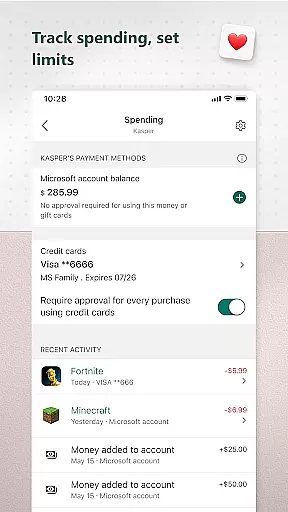
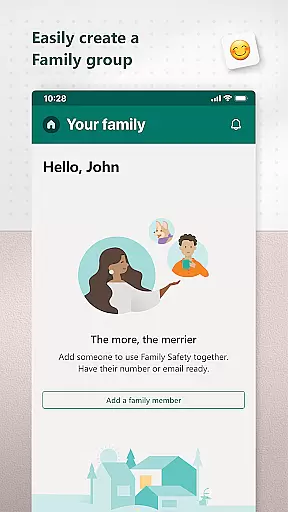
Microsoft Family Safety is a comprehensive parenting app designed to help families develop healthy digital habits while ensuring children's safety online. The app allows parents to set up parental controls, manage screen time, and filter inappropriate content across multiple devices including Android, Xbox, and Windows.
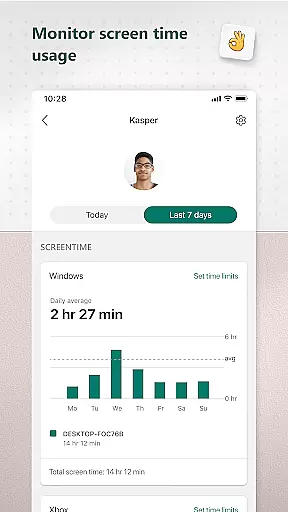
One of the key features is its activity reporting system, which provides weekly summaries of children's screen time and app usage. This helps parents stay informed about their kids' digital activities and initiate meaningful conversations. Additionally, the app offers content filters for kid-friendly browsing on Microsoft Edge and enables blocking of inappropriate apps and games, making it an essential tool for modern parenting.
Microsoft Family Safety stands out with its robust feature set tailored for both parents and children. For parents, the app offers detailed activity reports that track screen time and app usage, helping them understand their family's digital habits. These reports are delivered weekly via email, providing a clear overview of each child's online activity.
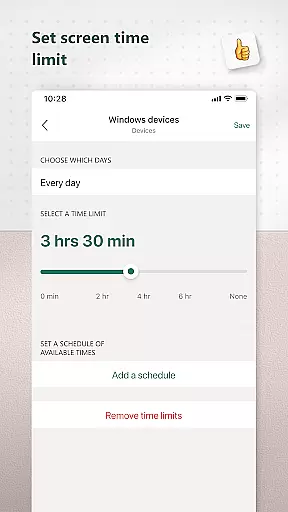
The app also excels in screen time management. Parents can set specific time limits for individual apps and games on Android, Xbox, and Windows devices. Moreover, device-level screen time controls allow setting overall usage limits. Content filtering ensures safe browsing by restricting access to inappropriate websites and apps, creating a secure digital environment for children to explore.
When it comes to parenting apps, content credibility is paramount. Microsoft Family Safety ensures that all information and guidance provided are backed by child development experts and tech specialists. This guarantees that the advice and controls you apply to your children's digital lives are not only effective but also age-appropriate and beneficial for their growth.
The app offers features like activity reports and screen time management, which are designed based on extensive research into healthy digital habits. These tools help parents understand their family's online activity and manage screen time effectively, promoting a balanced lifestyle for children.
Moreover, the app includes content filters that allow safe exploration of the internet. Parents can set up web filters for kid-friendly browsing on Microsoft Edge and block inappropriate apps and games. This ensures that children access only age-appropriate content, giving parents peace of mind about their kids' online safety.
By adhering to strict privacy standards, Microsoft Family Safety respects user data and provides meaningful choices about data collection and usage. This commitment to privacy reinforces the credibility of the app, assuring parents that their family's data is handled responsibly and securely.
Tracking a child's growth in the digital world is crucial for modern parenting, and Microsoft Family Safety excels in providing accurate growth tracking. The app's activity reporting feature gives parents detailed insights into their children's screen time and online usage, helping them guide their kids toward healthier digital habits.
With weekly email summaries, parents receive comprehensive reports that outline their children's digital activities. These reports serve as conversation starters between parents and kids, allowing for open discussions about online behavior and time management. By understanding how their children interact with technology, parents can make informed decisions about digital allowances.
Microsoft Family Safety also enables precise control over screen time through app and game limits on various platforms, including Xbox, Windows, and Android. Parents can set specific time restrictions and receive notifications when their child requests more time, ensuring that screen time remains balanced and constructive.
The app's device management capabilities further enhance growth tracking accuracy by allowing parents to set screen time limits across multiple devices. This holistic approach ensures that children develop healthy relationships with technology, fostering both independence and responsibility as they grow.
User-friendly interface
Comprehensive activity reports
Multi-device compatibility
Effective content filtering
Weekly email summaries
Limited iOS support
Requires child consent
Some features need premium subscription
Occasional syncing issues
Complex permission settings

Comprehensive Parental Control & Child Safety — Hear & Protect Your Child World
 4.30
4.30
Educational resource for parents to inspire creativity in their children.
4.00
With BabyCam you can monitor your baby using your mobile phone, tablet, PC or TV
4.40
Fake call application designed for parents and adults to discipline their children through the children's police.
4.20
A simple way to track your baby’s breastfeeding, diaper changes, sleep patterns.
4.90
3D Baby size, Fruit comparisons, Smart Checklist, Trending Names & Training.
4.90
FamilyMode helps you manage your family’s digital lives—at home or on the go.
4.30
Screen Time, App and Web Block & Monitoring, Location Tracker
3.60
GPS tracker app: Simple GPS phone tracker for fast family location tracking
4.60
Track Pregnancy, Baby Feeding, Sleep, Diaper Changes, Postpartum Health & More!
4.80
Pregnancy+ App has helped 80m moms track their pregnancy with info & support!
4.80
Family GPS locator app — child location tracker. GPS kids tracker, family safety
4.70
It is a screen time management tool for games and mobile applications
4.50
Babysitting video camera - Turn your two phones or tablets into a single nanny.
4.40
Find unique + popular baby names for your little peanut.
4.30
Cherish every beat - capture your baby's heart sounds with our app
4.30
Protect kids online safety through GPS tracking,screen time control,app blocking
4.20
Limit screen time, Block Apps & Games, Monitor with Parental control app
4.20
Parental Control including Screen time control, GPS tracking, App/Game blocker.
3.90


User Reviews