
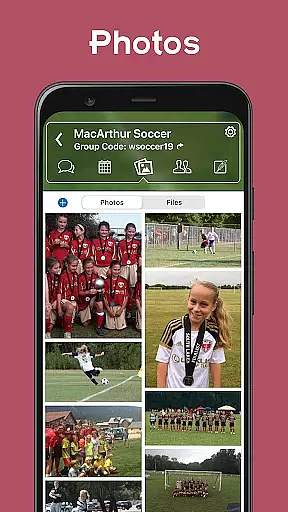
TeamReach is a comprehensive communication and management solution designed specifically for sports teams, clubs, and groups. This app serves as a centralized platform where coaches, managers, players, and parents can efficiently communicate and organize activities. With features like team messaging, scheduling, instant updates, availability checks, event details, polls, and photo sharing, TeamReach ensures that everyone stays informed and connected.
The app eliminates the need for scattered communications through texts, emails, or phone calls by providing a secure environment where contact information remains private. Whether it's coordinating game times, practice schedules, or last-minute changes, TeamReach keeps all members of the team on the same page. Its versatility extends beyond sports, making it suitable for various groups such as Boy Scouts, church organizations, schools, and more.
By streamlining communication and organization, TeamReach saves time and reduces confusion, allowing teams to focus on what truly matters – performance and camaraderie. The app is free to use, intuitive, and designed with user safety in mind, ensuring a seamless experience for all members involved.
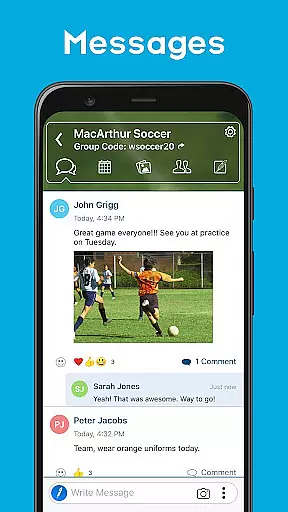
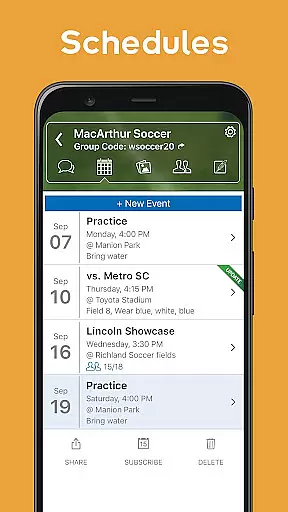
TeamReach offers an array of robust features tailored to enhance team communication and coordination. One of its standout capabilities is the centralized messaging system, which consolidates all communications into one place, reducing the chances of missed messages and ensuring everyone is on the same page. Additionally, the scheduling feature provides clear timelines and locations for games and practices, complete with reminders, maps, and weather forecasts, helping teams stay organized and punctual.
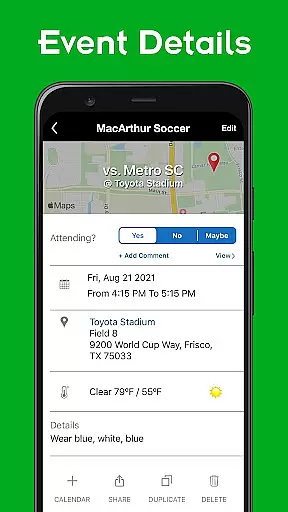
Another significant feature is the ability to send instant updates regarding any last-minute changes, whether it's related to game times, locations, cancellations, or uniform requirements. This real-time notification system ensures that no critical information slips through the cracks. Moreover, the app allows for easy availability checks, enabling team managers to quickly determine who can attend specific events. Event details are meticulously laid out, including driving directions, forecasts, and attendee lists, ensuring everyone is well-prepared.
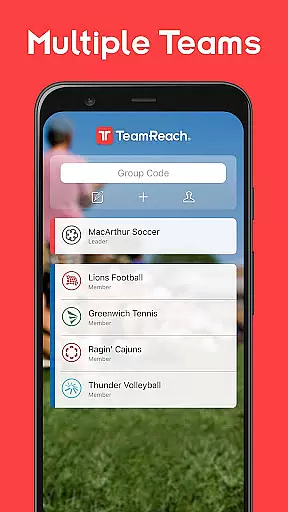
TeamReach also includes interactive elements such as polls, which facilitate quick decision-making on various topics like practice times or gear choices. The photo-sharing feature provides a convenient space for viewing, sharing, and downloading images, fostering a sense of community among team members. With support for multiple teams or groups, calendar integration, and effortless event sharing, TeamReach stands out as a versatile and indispensable tool for any team or group looking to improve their communication and organizational efficiency.
Gameplay realism in sports applications like TeamReach is crucial for delivering an authentic experience. The app achieves this by providing real-time updates and event details that mirror the actual conditions and requirements of a sports team. This includes instant notifications about game times, location changes, and even uniform colors.
TeamReach employs a system that ensures all communications are timely and accurate, much like how physics engines in sports games ensure realistic player movements and environmental interactions. By centralizing all essential information, such as schedules, availability requests, and event specifics including driving directions and forecasts, the app creates a virtual environment that closely aligns with real-world sports management.
The value to users is significant; they can trust that the information they receive is precise and reflective of real-life events. This minimizes confusion and enhances the ability of teams to operate smoothly, ensuring everyone involved is on the same page at all times.
Ultimately, the realism provided by TeamReach translates into tangible benefits for its users. Coaches, players, and parents can focus more on the game and less on logistics, knowing that last-minute changes will be communicated swiftly and clearly, just as one would expect from advanced physics simulations in action-packed sports video games.
An intuitive control scheme is vital for any application, especially one designed for managing sports teams like TeamReach. The app's design focuses on ease of use, allowing coaches, players, and parents to communicate efficiently without unnecessary complexity. With features such as straightforward messaging and scheduling systems, it simplifies the user experience significantly.
TeamReach implements an accessible interface where creating and reaching out to teams takes only seconds. Users can join groups by entering a simple code, eliminating the need for exchanging personal contact details. This streamlined approach ensures that even those who may not be tech-savvy can navigate and utilize the app effectively.
For users, this means less time spent figuring out how to use the app and more time engaging with their teams. The simplicity reduces the learning curve and fosters quicker adoption among all members of a group or club, enhancing overall communication and organization.
In essence, the intuitive nature of TeamReachu2019s controls empowers users to manage their teams confidently. By removing barriers to effective communication and coordination, it allows them to concentrate on what truly matters u2013 enjoying and succeeding in their sports activities while maintaining safety and privacy.
User-friendly interface
Comprehensive scheduling
Instant notifications
Secure communication
Versatile usage
Limited advanced analytics
No video conferencing
Basic design layout
Occasional bugs
Dependent on internet

Feel combo thrills in Challenge! Aim, strategize, and master your billiard skill
 4.60
4.60
Score stunning goals and outsmart defenders on your path to football glory!
4.40
Trick cliff dive backflips, stunts & doubles! Unparalleled real physics!
4.50
Extreme Downhill Freeriding
3.20
Play the hit multiplayer Carrom Disc Pool board game and become the best!
4.60
Real-time 1v1 basketball game! Dunk, shoot & win like MVP basketball superstars!
4.70
The ultimate Golf game! Compete in 6 player real-time multiplayer golf battles!
4.70
Be a wrestling Superstar
4.40
Sports app that presents matches' details from the most important championships.
4.50
Play online multiplayer or PvP Pool games and compete with your friends!
4.80
Play darts against the world!
4.70
Social casino meets sportsbook - more than a bet app for social sports betting!
4.60
Modern arcade style pool game with single player, Relaxed game of 8 ball.
4.60
BE A SOCCER HERO! Pass, Shoot & Score your way to legendary status!
4.50
Build a soccer club from scratch and see if you can conquer the World!
4.50
Beat against 8 ball masters from around the world.
4.40
NEOGEO's masterpiece game is now available in the app!
4.20
Advanced Shotgun Shooting Simulator: Skeet, Trap, Sporting and Bird Hunting
4.20
Play eFootball™ with users around the world!
4.10


User Reviews