

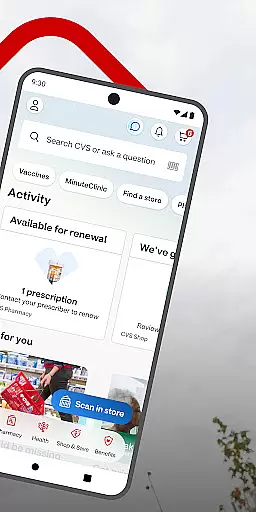
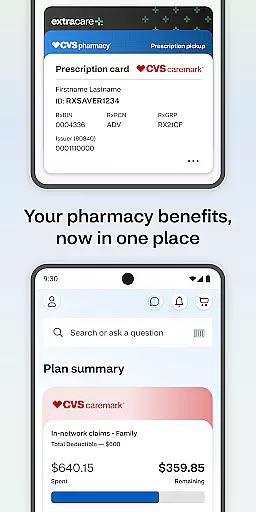
CVS Health® is a comprehensive medical app designed to simplify healthcare and shopping experiences. The app enables users to easily manage prescriptions, access exclusive deals, and schedule health services. With features like ExtraCare® integration, users can save money while staying healthy. The app also provides convenient telehealth options, allowing users to video chat with healthcare providers anytime.
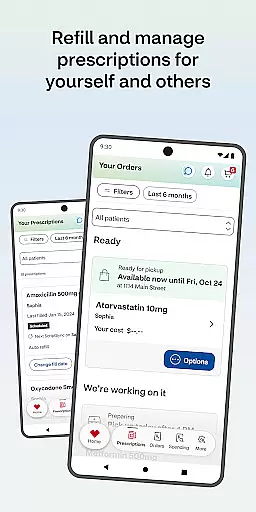
One of the standout capabilities is its prescription management system, which allows users to order refills, check drug interactions, and even have medications delivered. CVS Health® consolidates all family pharmacy needs in one place, making it easier for users to stay organized. Additionally, users can schedule vaccines and medical care at nearby CVS Pharmacy® or MinuteClinic® locations, ensuring timely healthcare access.
This app is particularly useful for individuals who want to streamline their healthcare routines while saving both time and money. Whether it's managing prescriptions, accessing weekly deals, or scheduling clinic visits, CVS Health® offers a complete solution for maintaining personal and family health.
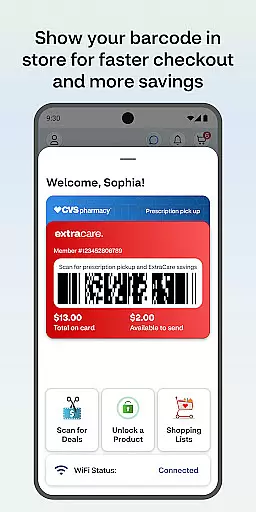
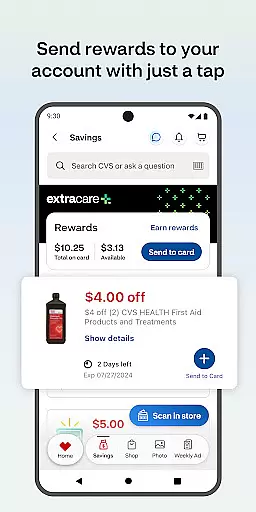
CVS Health® stands out with its diverse range of features tailored to enhance user convenience. One key feature is the ExtraCare® program, which allows users to save on purchases and access personalized deals. By linking their ExtraCare® card, users can unlock app-only discounts and manage all their coupons and rewards in one place. This seamless integration ensures users never miss an opportunity to save.
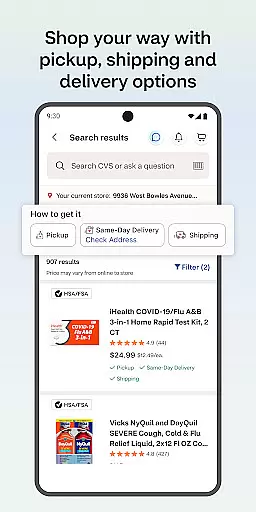
Another significant feature is the app's robust prescription management system. Users can scan barcodes for faster pharmacy pickups, pay for medications, and even opt for home delivery. The app also supports medication tracking, enabling users to order refills, check statuses, and review prescription histories. Additionally, users can check drug interactions and access detailed medication information, promoting safer medication use.
The app further extends its functionality by offering telehealth services. Users can schedule virtual consultations with healthcare providers 24/7, find nearby MinuteClinic® locations, and view wait times for more efficient planning. These features collectively ensure that users have continuous access to essential healthcare services, making CVS Health® a versatile tool for modern healthcare management.
In the realm of digital health solutions, the credibility of medical content is paramount. The CVS Health app excels in this area by providing users with verified information and expert-reviewed healthcare services. This ensures that every piece of content, from drug interactions to health care service details, is accurate and reliable.
The app offers an extensive library of medication information, all reviewed by healthcare professionals. Users can check drug interactions and get detailed insights into their prescriptions, which empowers them to make informed decisions about their health regimen. This level of detail and verification is crucial for managing personal and family health effectively.
Moreover, the ability to schedule vaccines and medical care through the app adds another layer of trust. Each service is backed by CVS Pharmacyu00ae or MinuteClinicu00ae, guaranteeing that users receive care from certified professionals. This seamless integration of expert-reviewed content and accessible healthcare services makes CVS Health a dependable tool for everyday health management.
Teleconsultation has become an essential feature in modern healthcare apps, offering convenience without compromising on quality. The CVS Health app provides high-quality teleconsultation services, allowing users to video chat with healthcare providers 24/7. This ensures that professional medical advice is always within reach, no matter the time or place.
One of the standout features is the ease with which users can connect with healthcare providers. With just a few taps, they can initiate a video consultation, making it simple to get medical guidance whenever needed. This immediacy is particularly beneficial for non-emergency situations where quick advice can prevent complications.
Additionally, the app supports finding nearby MinuteClinicu00ae locations for in-person visits, complete with wait times and scheduling options. This blend of virtual and physical healthcare access points underscores the app's commitment to delivering comprehensive and flexible healthcare solutions. By prioritizing both convenience and quality, CVS Health sets a high standard for teleconsultation services.
User-friendly interface
Comprehensive prescription management
Exclusive savings and deals
24/7 telehealth services
Integrated family health management
Limited to CVS customers
Background GPS may drain battery
Delivery fees for prescriptions
Some features require latest OS
Notifications can be intrusive

Explore human anatomy with this rich learning experience.
 4.00
4.00
Donating blood and platelets is easier than ever with The American Red Cross.
4.80
An easy way to earn money donating plasma. Book a visit, sit back, and get paid.
3.80
Secure video visits with your VA care team from anywhere
4.50
Personalized hearing experience and health data tracking
4.50
Log your symptoms in the MyZio app — the perfect companion to the Zio monitor!
4.60
The world's best selling 3D Human Anatomy app with groundbreaking 3D technology
2.00
Pelvic Floor Muscle Exercises
4.80
Hear far away sounds, conversations, TV and surrounding sounds more clearly.
4.70
CPR Timer for High Performance AHA BLS / ACLS
5.00
Spruce is the leading platform for HIPAA-compliant communication and care.
4.90
Enables quick access to medical data and contacts in case of emergency (ICE)
4.70
ASCCP Management Guidelines- There’s an app for that!
4.60
Modivcare members can book and manage trips.
4.50
Assess and treat left neglect more effectively in stroke and brain injury rehab.
4.30
Over 1,200 review questions and 5 exams—pass the NREMT with EMT Review Plus!
4.10
Hearing aid app for Android solves your hearing problems.
4.00
Conveniently receive lab results, schedule lab appointment and pay your bills
3.70
Care Simplified by MyChart
3.40


User Reviews