
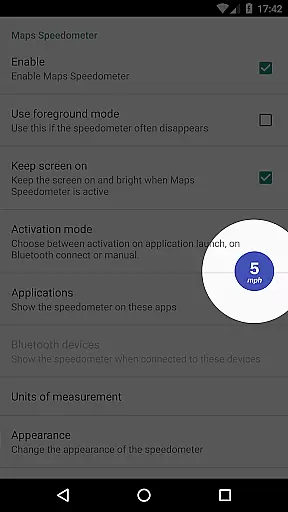
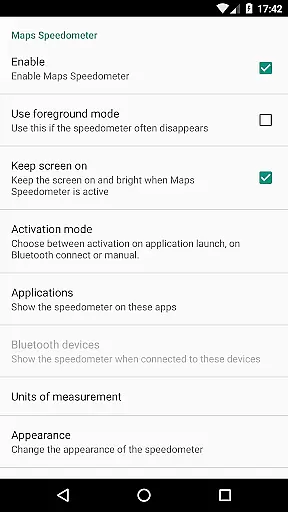
Maps Speedometer is a versatile travel companion that displays your current speed in real-time as an elegant overlay on your device. This innovative app automatically activates when your chosen navigation or any other app is in use, ensuring you always have critical speed information at a glance. The overlay is highly customizable, allowing users to adjust its size, transparency, position, and even choose between different measurement units such as mph, km/h, or knots.
Beyond its primary function, Maps Speedometer offers seamless integration with Bluetooth devices, enabling automatic display when connected. Its commitment to user privacy is evident as it operates without advertisements, internet access requirements, or backdoors that compromise personal data. Whether driving through unfamiliar roads or simply monitoring your speed during daily commutes, this app provides essential information discreetly and efficiently, enhancing both safety and convenience for travelers.
Maps Speedometer stands out with its array of practical features designed to enhance user experience while maintaining privacy and security. One of its key functionalities is the automatic show-and-hide feature, which intelligently detects when a selected app becomes active or inactive, displaying the speedometer overlay accordingly. Additionally, it responds to Bluetooth connections, making it ideal for hands-free navigation setups in vehicles.
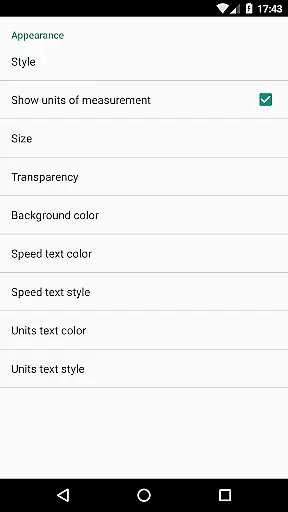
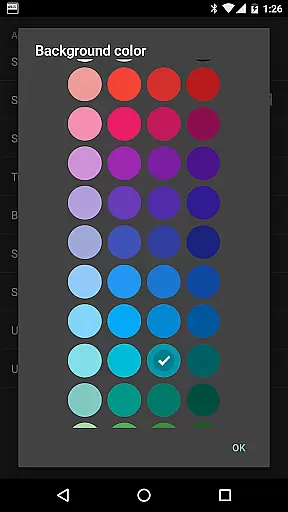
The customization options are extensive, allowing users to tailor the appearance and behavior of the overlay to their preferences. You can choose from various measurement units (mph, km/h, knots), adjust transparency levels, resize the overlay, and even change colors and styles. Furthermore, the overlay's position is fully adjustable by simple drag-and-drop gestures. These features collectively ensure that Maps Speedometer integrates smoothly into any app environment on your device, providing valuable speed information without obstructing your view or compromising your privacy.
Booking authenticity is a crucial aspect of any travel-related application, ensuring that all reservations and bookings made through the app are legitimate and trustworthy. Maps Speedometer, while not a booking app per se, enhances your travel experience by providing accurate speed information as you navigate through different routes.
This application automatically detects when your chosen navigation app is active and displays an elegant overlay with a speedometer, ensuring that the information presented is both relevant and timely. The use of Accessibility services allows the app to detect the current active app, enabling it to show the overlay only when necessary and with apps selected by you in the configuration.
Users can trust that the speed data displayed by Maps Speedometer is reliable, thanks to its no-nonsense approach to privacy and functionality. With no advertisements or internet access required, there's a guarantee that your private information remains secure, reinforcing the authenticity of your travel data.
The ability to adjust transparency, size, position, and colors of the overlay ensures that users have a personalized and unobtrusive experience. This level of customization supports the authenticity of the user interface, allowing for seamless integration with various navigation apps without compromising on usability or design.
Price transparency in travel applications refers to the clear display of costs associated with bookings and services, ensuring users are fully aware of what they are paying for. Although Maps Speedometer does not involve monetary transactions, it offers transparency in its operational features, which adds value to your travel experience.
The app provides a comprehensive list of features at no cost, clearly stating that there are no advertisements or hidden fees. This upfront communication about the appu2019s functionalitiesu2014such as automatic display based on app activity or Bluetooth connection, adjustable settings, and compatibility with any installed appu2014ensures users understand exactly what they are getting.
Maps Speedometer also emphasizes transparency in its technical operations. By detailing its use of Accessibility services solely for detecting the current active app, users can be confident that the app performs its intended function without hidden agendas or unnecessary data collection.
Furthermore, the app's support for various units of speed measurement (mph, km/h, kn) and its adjustable overlay options contribute to an overall transparent user experience. Users can tailor the app to their preferences, knowing exactly how each feature works and what it offers, thus enhancing their travel and navigation activities without any unexpected surprises.
User-friendly interface
Highly customizable settings
No ads or internet required
Automatic activation based on app usage
Supports multiple measurement units
Limited Android Auto support
Requires Accessibility permissions
Overlay may interfere with some apps
No built-in speed limit alerts
Bluetooth detection might vary across devices

INDOT Trafficwise is a traffic and traveler information mobile app.
 4.00
4.00
OFFLINE detailed information about the Florida National and State Parks
4.0
Tide Table Chart provides quick and easy access to high and low tide forecasts.
3.20
GPS Live Satellite Earth to find route navigation and current location map
4.00
It drives. You ride.
4.90
Easily rent a car at over 9,500 locations with the Enterprise car rental app.
4.60
The best way to book travel
4.60
Frontier’s Android app makes travelling easier than ever before!
4.70
Book your whole trip in one app.
4.80
Manage your travel on Delta with access to boarding passes, flight info & more.
4.80
Find your perfect somewhere with last minute hotel & travel deals!
4.80
Bus tickets at unbeatable prices with routes across the US. All aboard FlixBus!
4.70
View current Montana road conditions, cameras, plows, and timelapse videos.
4.70
The United app puts valuable travel information in the palm of your hand.
4.70
Get all MTA services, Subway, Bus, LIRR, Metro-North and More all in one place.
4.60
MyTSA gives you 24/7 access to info that passengers frequently request from TSA.
4.10
A Camino de Santiago Guidebook from St. Jean Pied de Port to Santiago
3.60
Every Diners, Drive-in & Dives location in one place! Your guide to Flavortown!
3.00
The #1 Parent App in Brevard County
4.1


User Reviews