
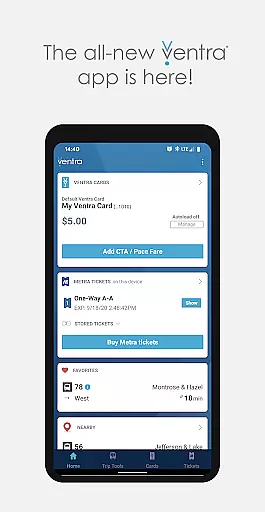
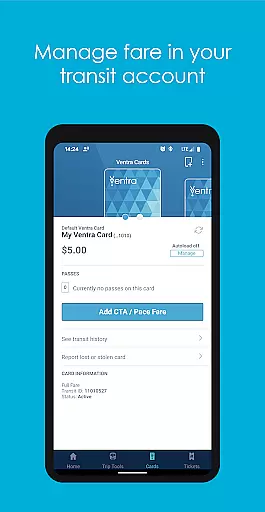
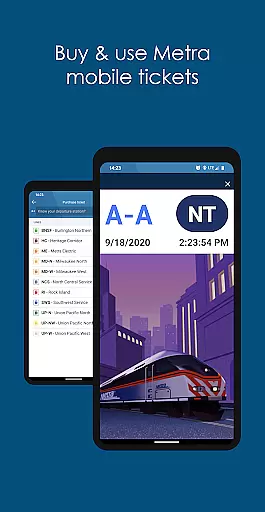
Ventra is a comprehensive transit app designed for seamless travel across Chicago's public transportation systems, including CTA, Metra, and Pace buses and trains. The app allows users to manage their fares effortlessly by checking balances, loading value or passes instantly, and toggling the autoload feature on Ventra Cards. Additionally, it offers mobile ticketing for Metra trains, real-time account notifications, and live arrival/departure updates from all three transit services in one convenient location.
With its user-friendly interface, Ventra simplifies daily commutes by providing essential tools such as purchasing Metra tickets directly through the app using pre-loaded transit value. Whether you're commuting to work or exploring the city, Ventra ensures that your transit experience remains smooth and efficient while eliminating the need for physical tickets or cards.
Ventra stands out with its robust set of features tailored for Chicago commuters. One key functionality is the ability to check your Ventra Card's balance and available passes in real time, ensuring you're always prepared for your journey. Users can also instantly load value or passes onto their Ventra Card's transit account, offering unparalleled convenience compared to traditional methods.
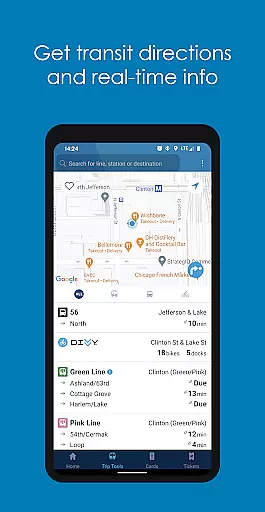
The app further enhances accessibility by enabling mobile ticketing for Metra trains, allowing users to purchase and store tickets digitally. Real-time notifications keep users informed about when they need to reload fare or buy additional tickets, preventing unexpected disruptions during travel. Moreover, Ventra consolidates live arrival/departure information from CTA, Metra, and Pace into a single platform, making trip planning easier than ever before.
Map accuracy is crucial for any navigation app, and Ventra excels in this area by providing precise transit information for Chicago's CTA, Metra, and Pace services. The app ensures that users can rely on the displayed data to make informed decisions about their travel plans.
Ventra achieves its high level of map accuracy through real-time updates from transit authorities, ensuring that any changes in schedules or routes are promptly reflected within the app. This allows commuters to plan their journeys with confidence, knowing they have access to the most current transit information available.
For users, this means less time spent waiting and more assurance when catching buses and trains. Whether you're a daily commuter or a visitor exploring Chicago, having accurate maps at your fingertips helps streamline your travel experience significantly.
Effective route planning is essential for efficient travel, and Ventra offers robust tools to help users navigate Chicago's complex transit system. By integrating real-time arrival and departure information, the app enables users to plan their trips down to the minute, ensuring timely arrivals at their destinations.
The app provides multiple route options, allowing users to choose based on their preferences such as shortest travel time or least transfers. Additionally, it supports features like setting favorite stops and receiving notifications about service disruptions, which further enhance the route planning process.
With Ventra's comprehensive route planning capabilities, users can enjoy stress-free commutes, knowing they have reliable guidance throughout their journey. This functionality not only saves time but also enhances overall satisfaction with public transportation services.
User-friendly interface
Instant fare loading
Real-time notifications
Mobile ticketing
Comprehensive transit info
Limited to Chicago area
Occasional bugs
Requires internet
No offline mode
Metra-specific features

Start your next adventure confidently using our Accurate Compass App
 3.70
3.70
Offline maps & GPS for hiking, travel, fieldwork & outdoor adventures
4.70
All of NHSA's trail information at your fingertips for the 2025-2026 season
4.2
Get directions, Maps, GPS navigation & GPS Maps using GPS App
4.10
LIRR and Metro-North tickets and trips
4.80
Drive safe with real-time speed camera radar, police, and traffic alerts
3.80
Explore with GPS Navigation with GPS offline, voice GPS, speed camera radar
4.60
Explore Earth with live GPS, satellite view & street navigation
3.60
Live Satellite view app for find GPS navigation Direction and live location map
3.70
Truck Safe GPS Navigation & Maps: Parking, Fuel, Diesel, Weight Station
4.80
Find trails, organize your locations and navigate with offline maps.
4.60
Navigate with your watch and keep the phone in your pocket!
4.60
Use GPS maps or search by property owner, address or parcel to view parcel data
4.30
Get matched with a nearby driver — you’ll be on your way in minutes.
4.30
Route schedules, maps, and real-time tracking of MTA buses in New York City.
4.20
Use GPS Maps and GPS Voice Navigation to find your way and get directions
4.10
Get route map navigation with 3D satellite view, and live earth camera streaming
3.70
Your real-time window to the world. Explore anywhere, anytime.
3.30
Find 93 Octane Gas: Locate Gasoline Stations Selling Premium 93 Octane or Higher
4.1


User Reviews