
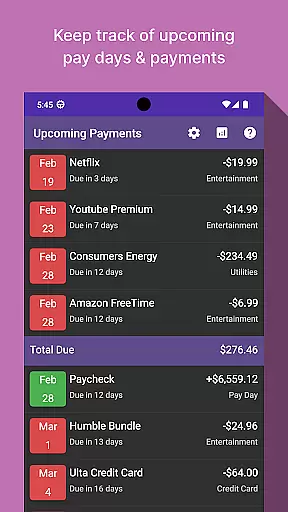
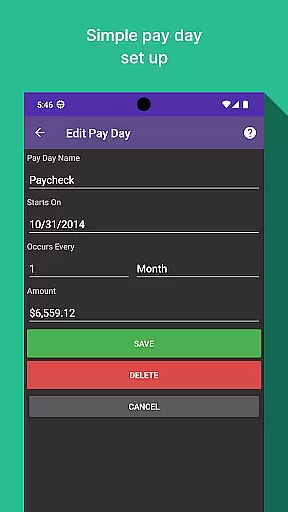
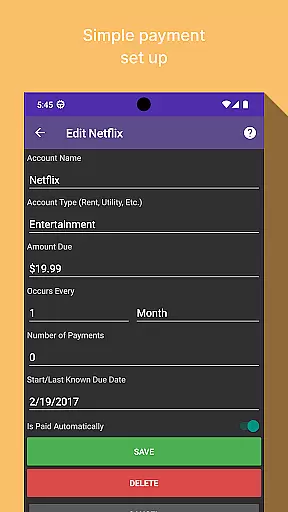
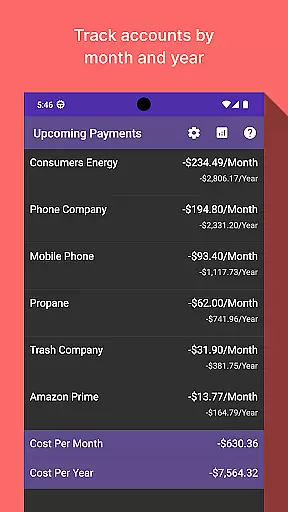
Bill Manager is a comprehensive financial management application designed to help users stay on top of their upcoming bills. The app provides timely reminders about pending payments, calculates the amounts due, and tracks paydays to ensure users never miss a payment deadline.
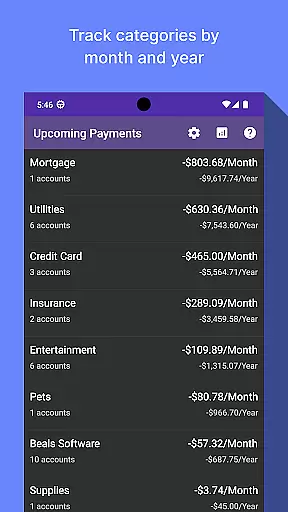
One standout feature is its analytics view, which allows users to monitor expenses by category and account on both monthly and yearly bases. This functionality helps users gain better insights into their spending patterns and make informed financial decisions. Whether you're managing personal finances or tracking shared household expenses, Bill Manager offers valuable tools for maintaining financial health.
Bill Manager stands out with its robust set of features tailored for effective bill management. The app's primary function is to notify users of upcoming bills, detailing the amount due and the respective deadlines. This ensures that users can plan their finances accordingly and avoid late fees.
In addition to bill tracking, the app includes an advanced analytics module. Users can visualize their spending habits through detailed reports categorized by month and year. These insights empower users to identify areas where they can cut costs and optimize their budget. With its user-friendly interface and powerful features, Bill Manager is an indispensable tool for anyone looking to take control of their financial obligations.
Account and fund security is a critical aspect of any financial application, ensuring that users' sensitive information remains protected. Bill Manager employs advanced encryption protocols to safeguard your data against unauthorized access. This means that all your bill details, payment schedules, and personal information are encrypted both in transit and at rest.
In addition to encryption, the app implements multi-factor authentication to further secure your account. By requiring more than just a password to access your account, it significantly reduces the risk of unauthorized access. This added layer of security ensures that only you can make changes to your billing information or view your financial details.
Users benefit from peace of mind knowing their financial data is handled with utmost care. With regular security updates and proactive monitoring, Bill Manager stays ahead of potential threats, providing a secure environment for managing your bills. This commitment to security empowers users to focus on their financial planning without worrying about data breaches.
A seamless transaction experience is essential for any finance app, allowing users to manage their bills efficiently and effectively. Bill Manager offers an intuitive interface where users can easily track upcoming bills, view payment amounts, and monitor due dates up to their next payday. This streamlined approach eliminates the guesswork involved in bill management, making it accessible even for those who are not tech-savvy.
The app also provides timely notifications and reminders about pending payments, ensuring you never miss a due date. These alerts can be customized according to your preferences, offering flexibility in how you receive important financial information. Additionally, the analytics view allows users to gain insights into their spending patterns by categorizing expenses and presenting them in easy-to-understand monthly and yearly reports.
By combining user-friendly features with powerful analytical tools, Bill Manager enhances the overall transaction experience. Users can take control of their finances with confidence, knowing they have accurate and up-to-date information at their fingertips. This comprehensive approach not only simplifies bill management but also supports better financial decision-making.
User-friendly interface
Comprehensive bill tracking
Detailed expense analytics
Customizable notifications
Secure data management
Limited free features
Occasional sync issues
No multi-currency support
Basic customer support
High premium cost

Companies owe you money.
 4.80
4.80
Get a cash advance instantly. File taxes & cover unexpected bills in minutes.
4.60
Manage and cancel subscriptions, lower bills, track expenses, create budgets.
4.60
Change the way you money with Credit Genie
4.30
No credit check, no interest, no worries.
4.70
Earn cash back. Build credit.
4.60
Check EBT, SNAP, WIC balances, manage food stamps, and save money with benefits
4.80
Join 12M+ users. Instant cash advances, personal loans, build credit, save money
4.80
Wells Fargo Mobile allows you to access your investment and bank accounts.
4.80
The Citi Mobile® App lets you manage your accounts virtually anytime, anywhere
4.80
No credit checked needed.
4.80
Pay rent on your schedule.
4.70
Your Big Financial Friend
4.70
Our Chase Mobile App makes it easy for you to bank on the go 24/7.
4.60
Car Insurance Made For You.
4.50
Make Real Cash by Playing Games! Fetch Playful Rewards, Win & Triumph
4.50
All your crypto & stocks in one secure and trusted app.
4.40
Make your paycheck work harder for you with Perpay.
4.10
Venmo is the fun and easy way to pay and get paid.
4.10


User Reviews