
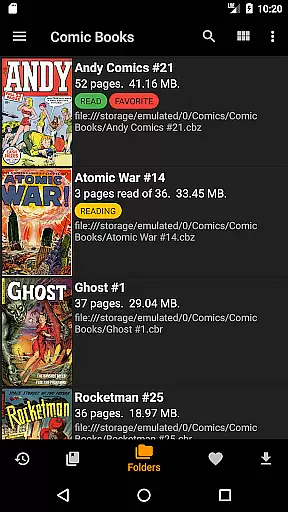
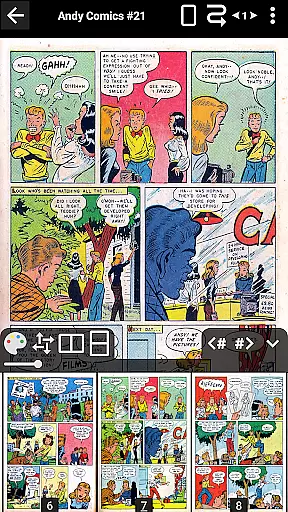
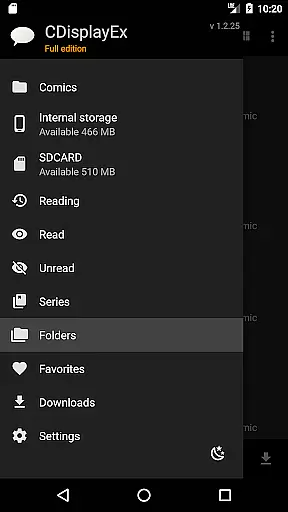
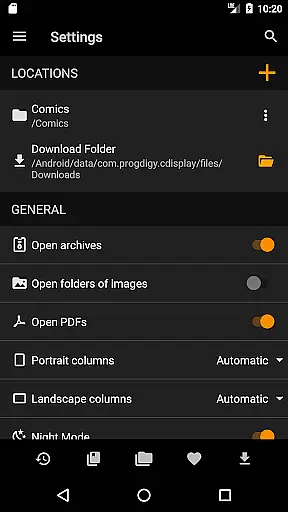
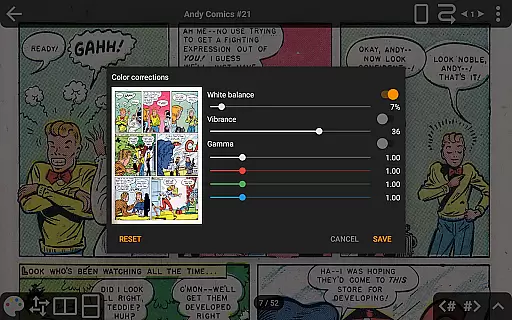
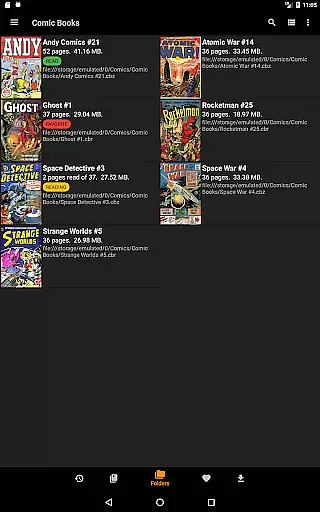
CDisplayEx Comic Reader is a versatile and efficient comic book reader designed for comic enthusiasts. It supports all major comic formats including .cbr, .cbz, and .pdf files, providing an optimal reading experience. The application loads comics instantly and ensures smooth page transitions.
Beyond basic reading capabilities, CDisplayEx offers advanced features such as continuous page scrolling in both horizontal and vertical directions, advanced scaling options, and support for bookmarks. It also includes night mode, multi-language interface options, and integration with cloud services like OneDrive and Dropbox in its Pro version.
Whether you're browsing your local folders or managing an extensive library, this app provides powerful tools to organize and access your collection easily. Its network connectivity allows users to preload files and read them offline, making it perfect for on-the-go reading.
CDisplayEx Comic Reader stands out with its comprehensive feature set tailored for comic lovers. The app's ability to handle various comic formats ensures that users can enjoy their entire collection without compatibility issues. Instant loading and fluid navigation enhance the overall reading experience significantly.
One of the key highlights is the advanced page scaling and continuous scrolling options, which allow readers to customize their viewing preferences. The Pro version extends functionality by integrating with popular cloud services like OneDrive, Dropbox, and Mega, enabling seamless access to comics stored online.
Additional features include S-Pen support for precise navigation, a built-in library management system, and the ability to connect to network shares. These functionalities make CDisplayEx not just a reader but a complete comic management solution, catering to both casual readers and avid collectors.
CDisplayEx Comic Reader offers an extensive and versatile comic library that caters to a wide array of preferences. The application supports all popular comic book formats, including .cbr, .cbz, and .pdf files, ensuring that users have access to a vast selection of reading materials. This compatibility allows the app to deliver a diverse range of comics, from classic superhero tales to niche Manga, satisfying both casual readers and dedicated enthusiasts.
The app's integrated library management system enhances the user experience by organizing comics into series and suggesting the next album in a collection. This feature not only simplifies navigation but also encourages exploration within one's library. Additionally, the ability to browse through folders and use an integrated search function ensures that finding specific volumes is quick and effortless, making it easy for users to manage large collections.
By supporting network shares and offering options to preload files onto mobile devices, CDisplayEx extends its reach beyond local storage. Users can connect to various cloud services such as Onedrive, Dropbox, Komga, Kavita, and Mega, further expanding their access to digital comics. This connectivity ensures that readers always have their favorite titles at hand, regardless of location or device limitations.
Authenticity and proper licensing are crucial aspects of any digital content platform, and CDisplayEx Comic Reader takes these matters seriously. The app provides users with genuine comic book experiences by ensuring that all supported formats are read accurately and without alterations to the original content. This commitment to preserving the integrity of comic books helps maintain the creators' artistic expressions and intentions.
While CDisplayEx does not directly handle licensing, it empowers users to access their legally acquired comics through various means. By allowing connections to personal cloud storage accounts like Onedrive, Dropbox, and others, the app enables readers to enjoy their purchased or authorized content seamlessly. This approach respects copyright laws while providing a convenient reading experience.
It is important to note that CDisplayEx has had to adapt to changes in service requirements, such as Google Drive's CASA Level 3 Assessment. Although this certification impacted the app's ability to access Google Drive after June 15, the developers have proactively maintained support for alternative services. This demonstrates their dedication to delivering authentic content experiences while complying with evolving industry standards and regulations.
User-friendly interface
Supports multiple formats
Instant loading speed
Advanced scaling options
No ads in Pro version
Limited free features
Google Drive support ending
Pro version is paid
Interface may feel dated
Occasional bugs reported

Webtoons, comics, web novels, and e-books are all here! RIDI, my own space to enjoy stories
 4.30
4.30
Pocket Toons: Free Webtoons, Comics, & Manga - New Chapter Drops Everyday
4.30
The most popular comic book reader.
4.40
Artists wanting to use decent hand reference on the go, this app is for you!
4.70
Comic Book Identifier Value - Scan comics & prices. Your comic book price guide!
4.50
Read official webcomics, webtoons, Korean manga & webnovels
3.70
Official from Japan
4.80
Crunchyroll Manga—unlimited, uninterrupted reading with offline access & more!
4.50
The largest manga, comics, and manhwa community with millions of fans!
4.50
This application will enable donated users only function in Perfect Viewer.
4.90
File management and show images, comics and pictures in compressed cbr, pdf file
4.70
Instant access to over 30,000 Marvel comics with new issues added every week.
4.70
Manga reader for manga, manhua, manhwa & webtoon, online & offline, update daily
4.50
SQUARE ENIX's official Manga app!
4.40
Pose Tool 3D for the Artists, create any human figure pose quickly for your art.
4.00
Read officially manga titles from Japan including Attack on Titan
3.80
Create your personalized cartoon comic strips & comic books.
3.20
The best app for digital comics - Welcome to Lezhin!
3.10
You can create comics, manga and manwha using AI with Arcstory comic book maker
2.70


User Reviews