



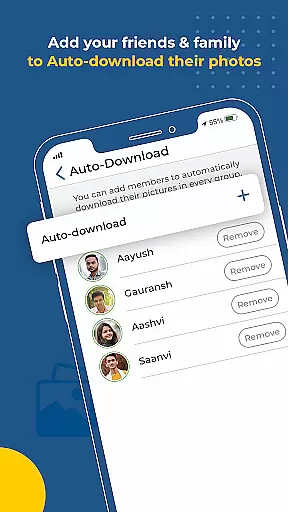
Kwikpic is an innovative photo-sharing app designed specifically for events. It uses advanced AI technology to streamline the process of photo management, making it effortless and efficient. The app's core functionality revolves around instant face matching, tagging, and notifying users, ensuring that photos are quickly sorted and delivered to the right people.
One of Kwikpic's standout features is its ability to maintain photo quality during uploads, eliminating concerns about resolution loss. Whether you're organizing a wedding, conference, birthday party, or vacation, this app simplifies the task of managing hundreds of photos. By leveraging facial recognition, Kwikpic automatically categorizes images, making it easy to share high-quality pictures with friends, family, and event guests.
The app also provides valuable analytics, such as tracking total impressions and downloads, giving users insights into how their photos are being received. This feature-rich platform is ideal for anyone looking to preserve memories without the hassle of manual photo sorting.
Kwikpic offers a comprehensive suite of features tailored to enhance the event photography experience. At its core, the app utilizes cutting-edge facial recognition technology to instantly match faces in photos, tag individuals, and notify them. This ensures that every participant receives their pictures promptly without any manual intervention.
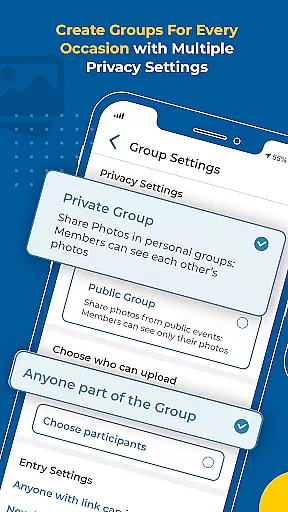
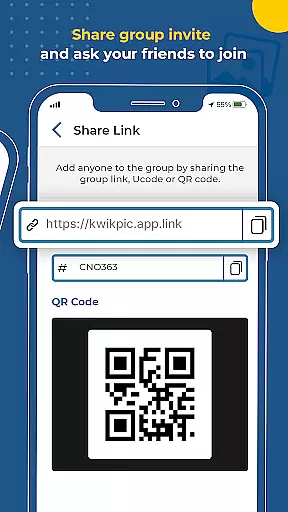
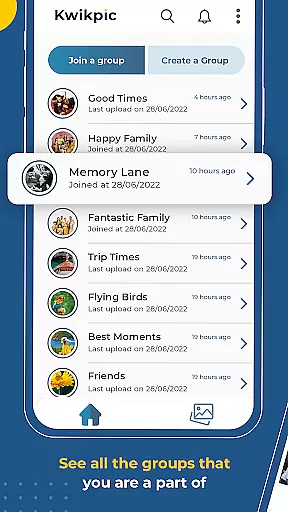
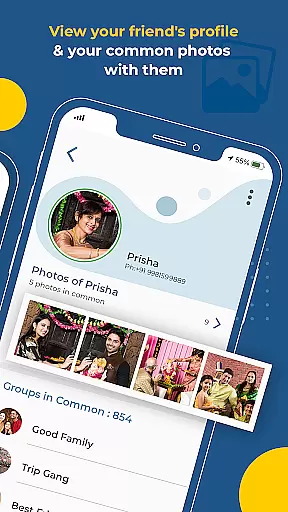
In addition to facial recognition, Kwikpic supports seamless integration with various cloud storage platforms like Google Drive. Users can upload images directly from their gallery or preferred cloud services, maintaining the original quality of each photo. The app also facilitates group sharing by identifying common photos among members, allowing for collaborative photo albums.
Analytics play a crucial role in understanding user engagement. Kwikpic provides detailed metrics on impressions, downloads, and other interactions, empowering users to gauge the impact of their shared content. These robust features collectively make Kwikpic an indispensable tool for modern event photography.
Task creation and detail customization are essential features for any event management app, allowing users to organize their activities efficiently. Kwikpic offers a unique approach by enabling users to create tasks related to photo sharing and management. This includes uploading photos from various sources such as the gallery or cloud storage platforms like gDrive.
The app's AI technology simplifies task customization by automatically sorting and delivering photos using face recognition. Users can tag individuals in pictures, ensuring that each person receives their respective images without manual intervention. This feature not only saves time but also enhances the accuracy of photo distribution among friends, family, and guests.
Moreover, Kwikpic provides detailed analytics on total impressions and downloads, giving users insights into how their shared photos perform. These metrics help users understand engagement levels and optimize future photo-sharing strategies accordingly. With these capabilities, Kwikpic transforms routine photo management tasks into streamlined processes with high precision and personalization.
Reminder settings play a crucial role in ensuring timely execution of tasks within an event management application. In Kwikpic, reminder functionalities enhance user experience by notifying participants about important actions such as uploading new photos or checking recently shared albums. This proactive approach keeps everyone engaged and informed throughout the event lifecycle.
Beyond basic notifications, Kwikpic leverages its advanced AI-driven face-matching technology to alert users when they appear in newly uploaded pictures. By instantly tagging individuals and sending them notifications, it guarantees no significant moment goes unnoticed. Such personalized alerts foster stronger connections between event attendees and encourage active participation in capturing memories.
Additionally, customizable reminder options allow users to set preferences according to their schedules and priorities. Whether itu2019s receiving daily summaries or instant updates upon photo uploads, Kwikpic ensures flexibility while maintaining seamless communication channels among all stakeholders involved in the event photography process.
Effortless photo sorting
High-quality image uploads
Instant face matching
Comprehensive analytics
Cloud storage integration
Limited customization options
Premium features require subscription
Occasional notification delays
Interface may feel complex
Dependent on internet connectivity

An App for Bhutanese
 4.4
4.4
Create Birthday Cards in Birthday Invitation Maker and Birthday Card Creator App
3.00
CUE Live utilizes ultrasonic sound waves to sync devices at CUE enabled events
4.80
Community for Mods, Addons, Melsaves, Melmods for Melon Playground
4.0
Purchase line-skip passes, drinks, cover, and more at bars and clubs
3.50
Invitation card maker for birthday party & Wedding. Digital greeting card editor
4.90
The KRUU app - plan, celebrate, remember
4.80
The Official Football Ticketing App for Fans in Qatar
4.3
Buy tickets for any event!
3.90
Find tickets to upcoming concerts, sports events, festivals, shows, attractions
4.70
Text message invitations for birthday party, wedding, graduation, baby shower +
4.60
Everything you need for the Best Thursday Ever.
4.40
Invitation Card Maker, Design & share wedding, birthday & party invites fast
4.40
Meet people over dinner
4.40
Get live football here
4.30
Introducing the official Magic: The Gathering app for mobile.
4.20
The Official App
4.1
Digital Income Wallet of the Final Libertadores 2025
4.2
Thanksgiving Wishes, Thanksgiving Stickers & Animated GIF for Whatsapp Stickers
4.4


User Reviews