
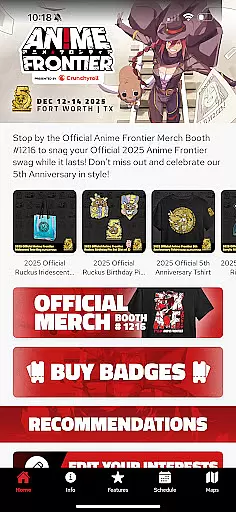
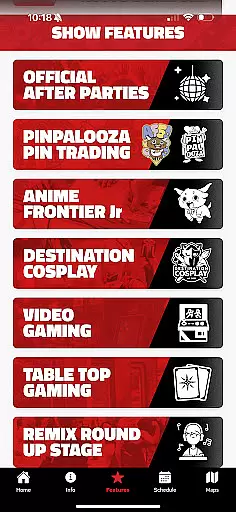
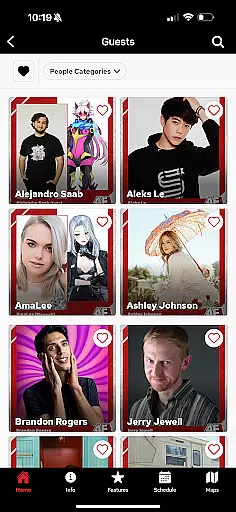
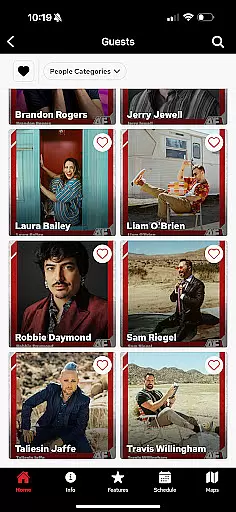
Anime Frontier 2025 is a comprehensive mobile companion designed specifically for anime convention attendees. This app serves as your ultimate guide to the event, providing real-time updates on guests, schedules, exhibitors, artists, and panels.
With Anime Frontier 2025, you can easily locate your favorite exhibitors and guests through detailed booth and table numbers. The app's reminder feature ensures you never miss important panels by allowing you to create a personalized schedule. Stay informed with the latest news about special guests and show features, and navigate the convention center effortlessly using the app's practical maps.
This digital tool is invaluable for maximizing your convention experience, whether you're a casual attendee or a dedicated fan looking to make the most of every moment at Anime Frontier.
The Anime Frontier 2025 app offers an array of features that enhance your convention experience. One of its standout capabilities is the detailed guest and exhibitor information, complete with booth and table numbers, helping you quickly find who and what you're looking for.
Another key feature is the customizable event reminders. You can set alerts for panels and events you don't want to miss, ensuring you have a personalized schedule tailored to your interests. The app also provides up-to-the-minute news updates, keeping you informed about any changes or highlights during the event.
Additionally, Anime Frontier 2025 includes easy-to-read maps of the convention center, making navigation simple and stress-free. These features collectively ensure that you have all the information you need at your fingertips, enhancing both convenience and enjoyment throughout the convention.
Task creation and detail customization are essential features for event attendees who want to maximize their experience. The Anime Frontier Mobile App excels in this area by offering users the ability to create personalized schedules tailored to their interests. This ensures that attendees can efficiently plan their day without missing out on key panels, guest appearances, or exhibitor booths.
The app allows users to browse through a comprehensive list of events, guests, and exhibitors, providing detailed information about each entry. Users can easily add these items to their personal schedule with just a few taps. Each task or event added includes specific details such as time, location, and a brief description, ensuring users have all the necessary information at their fingertips.
What sets this feature apart is the level of customization available. Attendees can set up reminders for each event they add to their schedule, ensuring they receive timely notifications to keep them on track. Additionally, the app's intuitive interface makes it easy to adjust plans on the fly, allowing users to adapt to any last-minute changes in the convention schedule.
By leveraging these capabilities, users can enjoy a stress-free convention experience, focusing on what truly mattersu2014immersing themselves in the vibrant world of anime. The Anime Frontier Mobile App transforms the way attendees interact with event content, making it an indispensable tool for convention-goers.
Reminder settings play a crucial role in ensuring that attendees do not miss out on important events during conventions like Anime Frontier. The app provides robust reminder functionalities that help users stay informed and punctual, enhancing their overall event experience.
Users can customize reminder settings for each panel, guest appearance, or exhibitor visit they wish to attend. The app offers multiple notification options, including alerts that can be set for specific times before an event starts. This flexibility ensures that attendees receive timely reminders, reducing the risk of overlooking scheduled activities.
Beyond basic notifications, the app also allows users to tailor reminder preferences to suit their personal schedules. For instance, users can choose to receive daily summaries of their planned activities, providing a convenient overview of their itinerary. This feature is particularly useful for those attending multi-day events, where keeping track of numerous activities can become overwhelming.
Ultimately, the reminder settings in the Anime Frontier Mobile App serve as a personal assistant, guiding users through the bustling environment of a convention. By ensuring that attendees are always aware of upcoming events, the app helps them make the most of their time, creating memorable experiences without the stress of manual time management.
User-friendly interface
Real-time updates
Customizable schedule
Detailed maps
Comprehensive guest info
Limited offline functionality
Occasional bugs
Heavy on battery
Needs constant updates
Some features locked

Audio guide companion APP for SEE's Michelangelo's Sistine Chapel
 3.50
3.50
CUE Live utilizes ultrasonic sound waves to sync devices at CUE enabled events
4.80
Fantasy of Lights Event App
5.00
Invitation card maker for birthday party & Wedding. Digital greeting card editor
4.90
TV Garden is a video player to play your own TV streams from around the world!
4.1
Clubs, Festivals, Discounted Tickets, Guest Lists & VIP Tables
4.90
Track birthdays, habits & goals. Unlimited countdowns and count-ups
4.20
Design Invitations & Cards for Any Occasion
4.80
TV Garden - World Live TV : Play & cast your videos seamlessly!
3.20
Create Wedding Invitation and Wedding Anniversary Cards using our app
4.60
Connect with an ecosystem of 5M+ eventgoers and organizers.
4.50
Microsoft Build is an annual developer conference hosted by Microsoft
4.20
Rocket Monkey - Space rocket launch schedule for launch sites around the world
4.20
The world's largest selection of tickets is now at your fingertips
3.90
Instant photo sharing for every occasion
3.80
The Official App
3.70
Create Birthday Cards in Birthday Invitation Maker and Birthday Card Creator App
3.00
Mobile Event Guide for Greater NY Dental Meeting
4.4
The Official Football Ticketing App for Fans in Qatar
4.4


User Reviews