



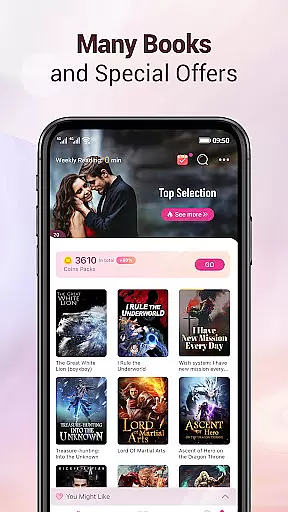
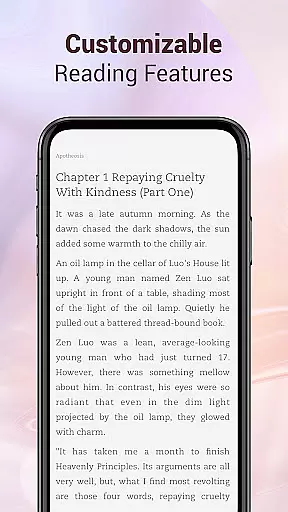


Mobilis is a comprehensive fiction reading app designed for book enthusiasts. It offers an extensive collection of novels across multiple genres including fantasy, martial arts, romance, urban, and campus themes. The app updates its library daily with new chapters released in seconds, ensuring readers have continuous access to fresh content. With features like personalized recommendations, offline downloads, and customizable reading settings, Mobilis aims to be the ultimate reading companion for fiction lovers.
The app provides a quality reading experience through simulated 3D page turning, adjustable fonts, background options, and night mode. Additionally, it supports intelligent synchronization of reading progress and notes across devices via user accounts, making it convenient for users who switch between devices. Whether you're looking for popular online fictions or niche genres, Mobilis caters to diverse reading preferences with its well-organized categories and smart recommendation system.
Mobilis stands out with its massive collection of fictions, covering both popular and niche genres. The app's library is meticulously categorized into male and female sections, selected books, and various lists, ensuring that users can easily find their preferred reads. Its smart recommendation system suggests titles based on user preferences, enhancing the discovery process.
The app prioritizes user experience with its quality reading features. Readers can customize their interface with simulated 3D page turning, different fonts, background colors, and night mode. Offline download capabilities allow users to access their favorite books without an internet connection. Furthermore, Mobilis ensures that all content is presented with exquisite book covers and neat layouts, providing a visually pleasing experience.
Mobilis also offers personalized services and intelligent synchronization. Users can personalize their reading environment by selecting from various skins, fonts, and background colors. Reading progress and notes are automatically synced and saved in the user's account, allowing seamless transitions between devices. This feature-rich app strives to enhance every aspect of digital reading.
Mobilis offers an extensive e-book library that caters to a wide array of interests, ensuring that every fiction lover finds something to their taste. The app includes popular online fictions across various themes such as fantasy, martial arts, romance, urban tales, and campus stories, all readily available for readers.
With daily updates and new chapters released in seconds, Mobilis guarantees that its library remains fresh and engaging. This constant influx of content not only enhances the reader's experience but also upholds the credibility of copyright authenticity by working closely with authors and publishers to provide legitimate access to a vast collection of books.
The app further refines its massive library through fine classification, including male and female sections, selected books, and smart recommendations. This meticulous organization allows users to navigate easily and discover new favorites while ensuring that the integrity and legality of the content are maintained at all times.
Understanding the importance of a quality reading experience, Mobilis provides comprehensive format compatibility, allowing readers to enjoy their favorite books without limitations. Whether it's through simulated 3D page turning or customizable features like switching fonts and backgrounds, the app ensures that every user can tailor their reading session according to personal preferences.
In addition to aesthetic customizations, Mobilis supports offline downloads, which means you can access your books anytime, anywhere, without needing an internet connection. This feature is particularly beneficial for those who travel frequently or have limited data access, making sure that your reading journey is never interrupted.
Furthermore, the app presents exquisite book covers and neat content layouts, enhancing visual pleasure and readability. By offering these personalized services alongside intelligent synchronization of reading progress and notes across devices, Mobilis truly delivers a seamless and enjoyable reading experience that meets the diverse needs of its audience.
User-friendly interface
Extensive book selection
Customizable reading settings
Offline reading capability
Intelligent synchronization
Limited non-fiction content
Occasional ads in free version
Subscription fees for premium
Heavy app size
Requires constant updates

Flora of Virginia Project (www.floraofvirginia.org)
 5.00
5.00
Sea tide predictions for all coastal U.S. locations.
4.3
This is the pro version King James bible Offline that we have
4.70
"When tweetle beetles fight, it's called a tweetle beetle battle."
4.90
King James Bible read offline, AI Priest, Bible Quiz, Guiding Prayers & Plans
4.80
Build family tree & discover DNA, family history heritage, origins and ancestors
4.60
Fast loot guide for ARC Raiders. Simple tips, stats, maps, and item details.
4.3
Premium reader for ePub, PDF, and more. TTS and translation. Great on any screen
3.50
Learn to tie more than 200 knots in 3D!
4.90
A lightweight reader for comics and mangas files (.cbr, .cbz, .cbt, .pdf, ...)
4.80
The Original Tropical Freshwater Aquarium Fish And Plant Care Guide
4.80
Read the KJV Bible with Strong’s offline: reading plans, audio Bibles, and more.
4.70
Discover Stars and Planets: Live Map Shows Current Constellations in Full Detail
4.70
Daily Devotional Widgets & Hourly Verses. Listen to Bible & Watch Holy Stories
4.70
"Five Dr. Seuss titles in one omBook!"
4.60
Master AKC Rally signs with in-depth hints, diagrams, and expert guidance.
4.50
Read the Quran in Arabic alongside its translation, with color coded Tajweed.
4.50
Shop over 13 million new and used books at up to 80% off list price
4.20
Unlock more features in Lithium and show your support. Expand for details.
4.00


User Reviews