
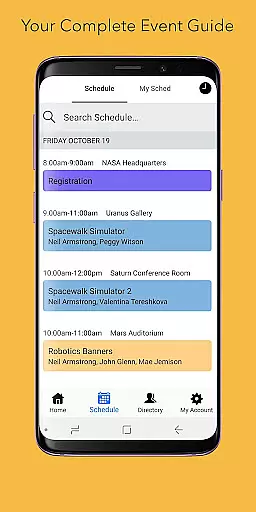
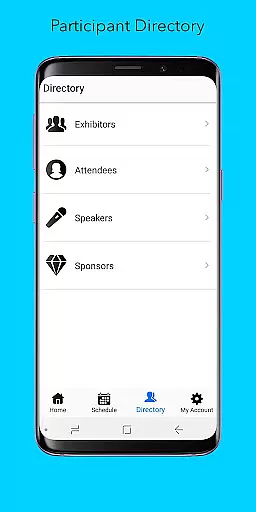
Sched is a comprehensive event management platform designed to streamline session registration and attendance tracking for complex multitrack events. The app allows event organizers and attendees to manage all event details in one place, ensuring a seamless experience. With features like full scheduling, personalization options, speaker directories, and offline caching, Sched enhances the overall event experience by providing essential information conveniently at users' fingertips.
Whether you're an event organizer looking to improve attendee engagement or a participant wanting to maximize your event experience, Sched offers tools that cater to both needs. Its user-friendly interface and robust functionality make it an ideal choice for conferences, conventions, and festivals, helping transform how people interact with and remember events.
Sched stands out with its array of features tailored to optimize event management and participation. One of its core functionalities is the full schedule view, which lets users browse the entire event schedule without needing a physical guide. This feature saves time and ensures attendees never miss important sessions.
Another significant feature is the ability to personalize event experiences. Attendees can create and modify schedules online and access them via mobile devices. Additionally, the directory feature provides detailed profiles of speakers and exhibitors, enhancing networking opportunities. Offline caching further adds convenience by storing schedules locally, ensuring uninterrupted access even without an internet connection.
These features collectively contribute to making events more engaging and efficient, demonstrating Sched's commitment to transforming event experiences through innovative technology.
Task creation and detail customization are essential features for event management platforms like Sched. This functionality allows event organizers to create detailed sessions, workshops, or meetings with specific information such as time, location, speaker details, and session descriptions.
Sched offers an intuitive interface where users can easily input and adjust session details. Organizers can categorize events into tracks, set up reminders, and even add multimedia content to session descriptions. The platform supports rich formatting options, enabling the addition of links, images, and documents to make each session more informative and engaging for attendees.
The value of this feature lies in its ability to enhance both organizer efficiency and attendee experience. For organizers, having a centralized place to manage all event details significantly reduces logistical challenges. Attendees benefit from clear, well-structured information that helps them plan their schedules effectively, ensuring they don't miss out on key sessions that match their interests.
Ultimately, Sched's robust task creation and customization capabilities ensure that every event runs smoothly, providing a seamless experience from planning to execution.
Reminder settings play a crucial role in keeping attendees informed and engaged throughout an event. By allowing users to set up timely notifications, platforms like Sched help ensure that participants never miss important sessions or updates.
Sched provides flexible reminder options that can be customized according to user preferences. Attendees can choose to receive alerts at various intervals before a session startsu2014whether it's 10 minutes prior or a day in advance. These reminders can be delivered through push notifications, emails, or both, catering to different user habits and ensuring maximum reach.
This feature not only enhances attendee satisfaction by keeping them on track but also boosts session attendance rates. Organizers benefit from higher engagement levels, while attendees enjoy a stress-free experience knowing they will be promptly reminded of their commitments.
In summary, Sched's comprehensive reminder settings empower users to fully immerse themselves in the event without worrying about missing out on valuable content, thus enriching the overall event experience.
User-friendly interface
Comprehensive scheduling
Offline access
Personalized experiences
Robust directory
Limited free features
Requires account creation
Occasional sync issues
Premium cost
Complex setup

CUE Live utilizes ultrasonic sound waves to sync devices at CUE enabled events
 4.80
4.80
Fantasy of Lights Event App
5.00
Local events, contests, and giveaways for local dads
3.70
Listen Full Quran MP3 Offline - Qibla Compass, Salah Timing & 99 Names of Allah
4.60
Find EDM shows near you! See your favorite artists live, and discover new music.
4.90
Text message invitations for birthday party, wedding, graduation, baby shower +
4.60
TV Garden - World Live TV : Play & cast your videos seamlessly!
3.20
Introducing the official Magic: The Gathering app for mobile.
4.20
TodayTix is the easiest way to get tickets to the best shows in your city.
4.90
Plan your wedding for free on the go: vendors, budget, website and checklists!
4.80
Design Invitations & Cards for Any Occasion
4.80
Find tickets to upcoming concerts, sports events, festivals, shows, attractions
4.70
Buy and Sell Tickets for Concerts, Sports, and Theater.
4.70
Get live football here
4.30
The Official App
3.70
The Official App
4.5
TV Garden is a video player to play your own TV streams from around the world!
4.5
The Official Football Ticketing App for Fans in Qatar
4.5
Soft Proxy for Your Online World
4.5


User Reviews