
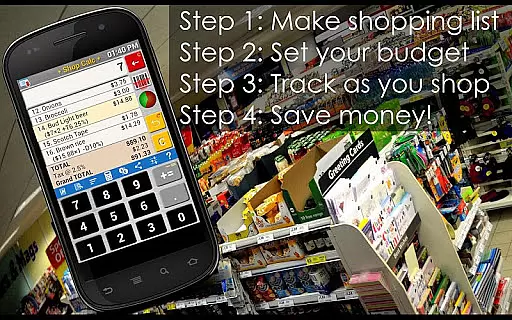



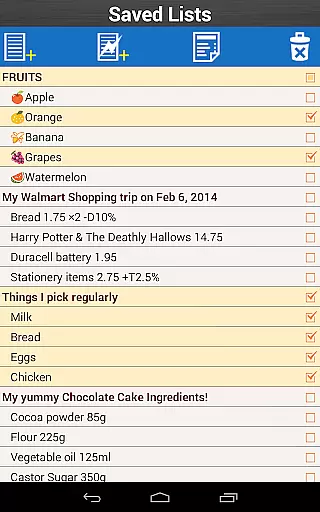
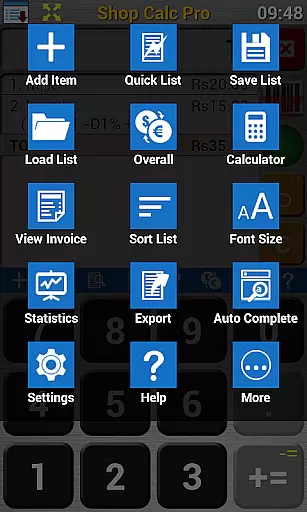
Shop Calc Pro is a comprehensive shopping list application designed to simplify and enhance your grocery shopping experience. This app allows users to create detailed shopping lists with integrated price calculation, budget control, and tax and discount tracking. With multiple methods for generating shopping lists including barcodes, voice input, free text, and item pickers, Shop Calc Pro caters to various user preferences. The app's standout feature is its ability to generate a realistic shopping bill at any time, complete with taxes and discounts applied both at the item and overall level. Additionally, it supports saving multiple shopping lists and exporting them in various formats, making it an invaluable tool for travelers due to its multi-currency support.
The Pro version offers enhanced functionalities over the free version, such as being ad-free, requiring no device permissions, and providing unlimited saved lists. It also includes barcode support, voice input, and a 4-row keyboard akin to calculators or phones. These features ensure that users can efficiently manage their shopping habits while enjoying a seamless and customizable user experience.
Shop Calc Pro stands out with its robust set of features tailored to optimize the shopping experience. One of its primary advantages is the ability to store commonly shopped items under categorized lists, automatically building a database of products along with their most recent prices and associated taxes. This feature saves time and ensures accurate budgeting. The quick list entry mode allows for rapid typing of shopping lists, while numerous settings enable customization according to individual and regional preferences.
Furthermore, the app provides extensive export options, allowing users to send their shopping lists via email or Bluetooth in various formats. Its lightweight design requires absolutely no permissions and can be moved to an SD card, ensuring minimal impact on device resources. Additional functionalities include using the app for continuous addition tasks like keeping track of game scores or calculating total sales prices. The inclusion of Emoji support on certain Android versions adds a personalized touch to product names. Overall, Shop Calc Pro combines practicality with innovation, delivering a versatile tool that adapts to diverse user needs.
Shop Calc Pro offers an extensive system for organizing and categorizing shopping items, ensuring users can efficiently manage their grocery lists. The app allows you to store commonly shopped items under categorized lists, making future shopping trips more streamlined.
Beyond simple categorization, the app builds a database of products that you frequently purchase, complete with the most recent prices and associated taxes. This feature not only saves time but also enhances your shopping experience by remembering crucial details on your behalf.
The app supports multiple methods for generating shopping lists, including barcodes, voice input, free-type text, and item pickers. These diverse options ensure that users can create lists in the manner most convenient for them, enhancing both speed and accuracy.
With unlimited saved lists and support for various export formats, Shop Calc Pro ensures that managing and sharing your shopping lists is hassle-free. Whether you're planning a single trip or organizing multiple lists for different purposes, this app provides the tools necessary to keep everything in order.
One of Shop Calc Pro's standout features is its ability to generate a realistic shopping bill at any time, complete with taxes and discounts applied both at the item level and overall. This functionality ensures complete pricing transparency, allowing users to track their spending and stay within their pre-set budget.
The app goes beyond basic price tracking by offering advanced budget control features. Users can set budgets for their shopping trips and receive real-time feedback on their spending, helping them make informed decisions while shopping.
Support for multiple currencies adds another layer of convenience, especially for travelers who need to manage expenses across different regions. This feature ensures that users can rely on accurate and consistent pricing information regardless of location.
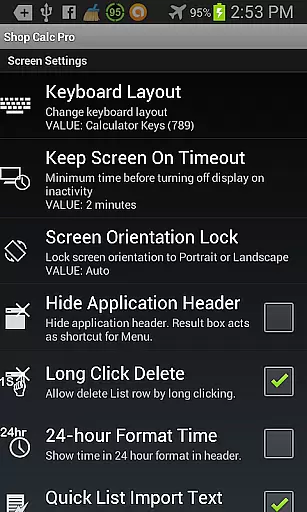
Additionally, Shop Calc Pro provides numerous settings to customize the app's behavior according to individual and regional preferences. These customization options enhance the user experience by allowing personalized configurations that suit specific shopping habits and requirements.
User-friendly interface
Comprehensive budget control
Voice input capability
Unlimited saved lists
Multi-currency support
Limited barcode functionality
No automatic price fetching
Accent-dependent voice detection
Requires third-party software for barcodes
Premium version cost

World’s simplest mobile payment solution for machines.
 4.50
4.50
Shop daily deals, browse best sellers, and have a laugh along the way.
4.50
Earn Cashback and maximize your savings when you shop and book your travel plans
3.90
wholesale stores
4.10
Get paid to shop groceries & more when you become an Instacart shopper.
4.20
Shop online now, pay later. Flexible payments made to fit your budget.
4.50
Unlock the latest from Nike & Jordan. Shop sneakers & apparel for all athletes.
4.70
Shop for apparel: From jeans to dresses, to kids fashion and mens clothing!
4.80
Flexible payments, big savings
4.80
Save with Coupons and Promotions
4.90
Buy fashion, beauty, home, & more! Save with amazing shopping deals & discounts.
4.80
Shop anywhere, manage payments, get cashback, discover Klarna Card & more.
4.80
Shop the latest items & unique used goods. Sell pre-loved items and earn money.
4.70
Shop designer clothing, shoes & accessories from the World of Ralph Lauren
4.70
Lowe’s Knows Home Improvement
4.70
Buy & sell local items. Find amazing deals. Join the largest mobile marketplace!
4.40
Shop. Earn. Redeem. Repeat!
4.30
Shop fashion, shoes, home, designer handbags, beauty & more on the Belk app.
4.00
Buy now, pay later with flexible payments made to fit your budget.
4.00


User Reviews