
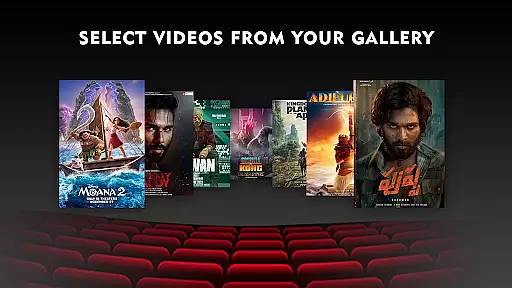
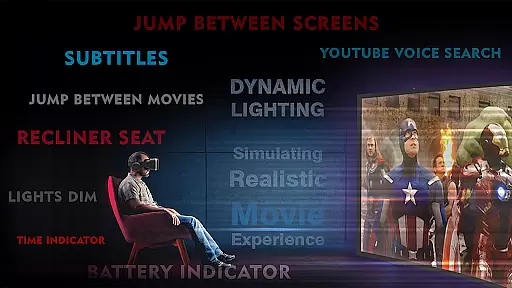
VR Player Plus - Movie Theatre is a premium virtual reality movie player that delivers an immersive Imax screen-like experience. Designed for VR enthusiasts, this app allows users to watch videos, movies, and shows with exceptional control and stunning spatial surround sound.
The app stands out with its unique seat selection feature, enabling viewers to choose different angles and screen sizes, mimicking a real cinema environment. Compatible with various VR headsets including Google Cardboard, Irusu VR, and Shinecon VR, it supports 4K and 2K video playback with advanced rendering algorithms for smooth performance.
Whether you're at home or on the go, VR Player Plus transforms your smartphone into a personal virtual theater, making it perfect for users seeking a true cinematic experience in a virtual setting.
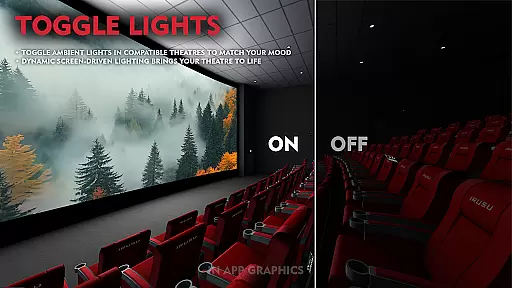
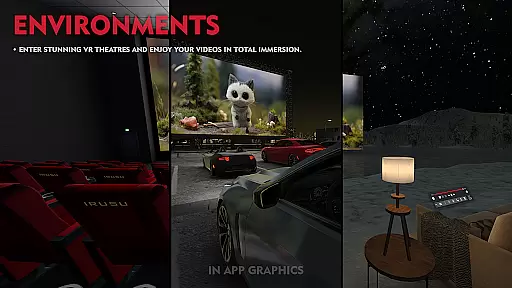
VR Player Plus offers an array of sophisticated features designed to enhance the virtual reality viewing experience. The app provides multiple theater environments, from lake views to traditional cinema settings, allowing users to customize their viewing atmosphere.
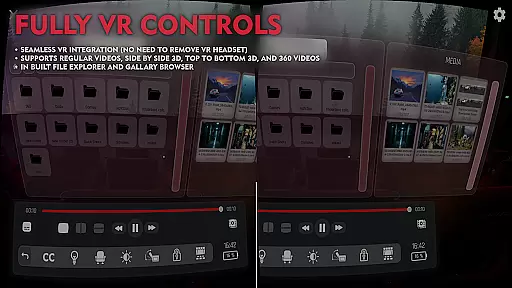
With support for various VR video formats including regular, side-by-side, and top-bottom configurations, the app ensures compatibility with diverse content types. Its fully integrated VR controls and built-in file browser make navigation seamless, while the seat selection function offers optimal viewing angles.
Additional notable features include 3D spatial audio technology for immersive sound, a responsive video seek bar for easy navigation, and a seat recliner option for added comfort. These comprehensive features create a truly captivating VR cinema experience.
In the realm of virtual reality entertainment, content diversity is key to maintaining user engagement. VR Player Plus - Movie Theatre offers an extensive range of environments and theatres, from serene lake views to classic cinema settings, ensuring that users can enjoy their favorite shows in a setting that suits their mood.
Supporting various video formats including regular, side by side, and top-bottom VR videos, this application caters to all preferences, providing a rich library that enhances the sense of presence within the virtual space. The inclusion of 4K and 2K video support ensures high-quality visuals that are crisp and lifelike.
Moreover, the app's commitment to freshness is evident through its continuous updates and improvements. With features like automatic aspect ratio adjustment and optimized UI, users can expect a seamless and modern interface that evolves with technological advancements.
The anticipation of future updates promises even greater control and customization options, keeping the content offering both varied and current, which is essential for sustained user interest and satisfaction.
User engagement duration and retention are critical metrics for any entertainment platform, and VR Player Plus - Movie Theatre excels in these areas by providing an immersive Imax screen experience. By simulating the grandeur of a big theater screen with seat selection capabilities, it allows viewers to enjoy movies from different angles and screen sizes, enhancing the feeling of being present in a real cinema.
The integration of spatial surround sound technology creates a breathtaking audio experience that complements the visual feast, encouraging longer viewing sessions. Users can easily navigate through videos using the video seek bar, while the advanced video rendering algorithm ensures smooth playback without lag, provided the smartphone has adequate processing power.
Furthermore, the simple and clean GUI facilitates easy control over movie playback, contributing to a hassle-free user experience that keeps users coming back. As the developers actively seek feedback and implement user suggestions, the application fosters a community-driven approach that promotes loyalty and long-term usage.
With ongoing enhancements and responsive customer support, VR Player Plus - Movie Theatre not only captures attention but also retains it, making it a go-to choice for VR movie enthusiasts looking for a premium home cinema experience.
Immersive Imax experience
Wide VR format support
Intuitive seat selection
Advanced video rendering
Spatial surround sound
Requires compatible headset
High-end device preferred
Limited free features
Occasional minor bugs
Subscription fees apply

The OFFICIAL PeeWee Purpdrank Soundboard!
 4.80
4.80
Stream over 80 hours of exclusive mashups and remixes by DJ Rehab.
4.4
Atomus is a 10-finger multi-touch interactive visualizer.
4.30
Create melty bead designs by numbers, photos or your imagination
4.40
Colorful flows will relax and calm you down, or get you trippy and creative!
4.90
Collaboration with popular VTubers
4.5
Come and watch short dramas, reels with diverse genres!
4.40
Raise Christmas Magic with daily missions, magical scanners, and kindness.
4.4
Watch Reels, Drama Shorts & TV Series Anytime. Download DramaWave Now!
4.70
Catalog & tracker of your DVD, Blu-ray & Digital Movie and TV Collection Library
4.80
5 funny and lovely ponies waiting for you to style them!
4.80
Fun brain twisting challenge with trending Whirlpool Filter.
4.70
Live TV, sports & holiday movies — stream on phone, tablet & TV
4.60
The Xbox app keeps you connected to your gaming community.
4.50
Create and play realistic-looking mock Emergency Alert System messages.
4.30
Start EVP/Spirit Box tonight: real EMF, offline, recording. One-time purchase.
4.10
Watch New Episodes & Live TV
3.80
Stream videos to VIDAA & VEWD TVs from Hisense, Sharp, Skyworth, Vestel & TiVo
3.00
Air Horn - Siren Sounds Prank, Fun way to wake up your Friends and Family
4.0


User Reviews