
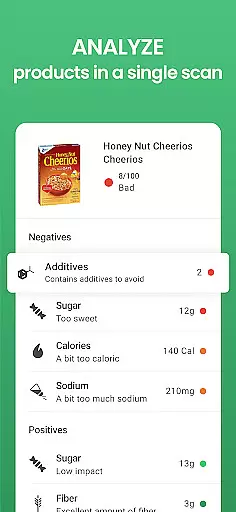
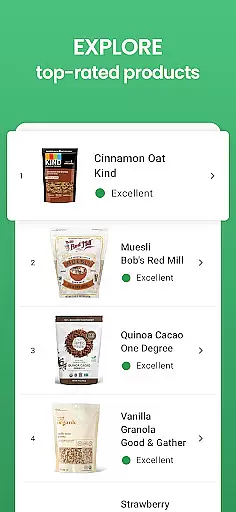


Yuka is a leading health and fitness application designed to empower consumers with clear information about the products they use daily. With over 77 million users, this app specializes in scanning food, beauty, and personal care items to analyze their ingredients and assess their impact on your health. Using a simple color-coded system, Yuka provides instant evaluations of products, categorizing them as excellent, good, mediocre, or poor based on objective criteria such as nutritional value, additives, and organic composition.
In addition to its core scanning functionality, Yuka offers detailed insights into each product's health implications, helping users make informed purchasing decisions. Whether you're evaluating the safety of a food item or checking the risk levels of cosmetic ingredients, Yuka ensures transparency in an otherwise confusing marketplace. Its independence from brand influence and commitment to scientific research makes it a trusted companion for health-conscious individuals.
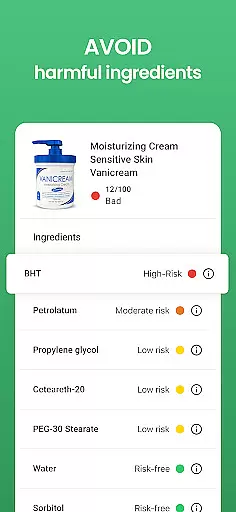
Yuka stands out with its comprehensive evaluation system that covers three key areas: food, beauty, and personal care products. For food items, the app evaluates nutritional quality, additive content, and organic certification across a database of 3 million products. In the beauty and personal care categories, Yuka analyzes ingredient risks using current scientific data, covering 2 million unique products. Each item receives a detailed grade supported by explanations, ensuring users understand why a product scored well or poorly.
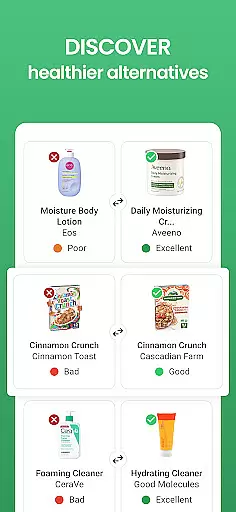
A notable feature of Yuka is its ability to recommend healthier alternatives for products with negative grades. These recommendations are entirely independent, free from manufacturer influence, making them reliable choices for improving your well-being. Additionally, Yuka avoids advertisements and sponsorships, maintaining complete objectivity in its evaluations. This dedication to transparency and user empowerment sets Yuka apart in the crowded health and fitness app market.
Yuka offers personalized planning by evaluating food, beauty, and personal care products to help users make informed choices about their health. The app deciphers product ingredients through a simple color code system that rates each item as excellent, good, mediocre, or poor based on its impact on health.
The personalized aspect comes from the app's ability to recommend healthier alternatives for products with negative grades. This feature is particularly useful in the food category, where every product is assessed according to nutritional value, additives, and organic dimension, ensuring that users can tailor their purchases to their dietary needs and preferences.
In the beauty section, Yuka analyzes all product ingredients and assigns a level of risk based on current scientific research. This empowers users to avoid potentially harmful substances, thus personalizing their beauty regimen to align with their health standards.
By providing detailed information pages for each product, Yuka ensures that users understand the rationale behind each grade. This transparency allows users to plan their consumption patterns around scientifically-backed evaluations, leading to more personalized and health-conscious decisions.
Progress visualization in Yuka is achieved through clear, color-coded evaluations that provide at-a-glance insights into the health impacts of various products. With over 77 million users, this feature has proven essential for those seeking to visualize their journey towards better health choices.
For food items, Yuka evaluates nutritional value, additives, and organic dimensions, translating complex data into an accessible visual format. Users can easily track improvements in their food selections over time, seeing a shift from poor or mediocre ratings to good or excellent ones as they make healthier choices.
Similarly, in the realm of beauty products, Yuka's analysis of ingredient risks helps users visualize their progress away from harmful chemicals. As users opt for safer alternatives, they can witness a tangible shift in their product choices, reinforcing positive behavior changes.
Additionally, Yuka's independence ensures unbiased evaluations, enhancing the reliability of the progress users visualize. By avoiding advertisements and brand influence, Yuka guarantees that the visualized progress is genuinely reflective of improved health choices, making the visualization not just a guide but a trustworthy marker of personal growth.
User-friendly interface
Comprehensive product database
Independent evaluations
Detailed health insights
No advertisements
Limited offline functionality
Premium subscription required
Regional availability issues
Occasional scanning errors
Dependent on label accuracy

a fun app full of surprises :)
 4.70
4.70
Get alert about getting out of desired heart rate zone.
4.10
Binaural Beats - Fully Customizable Waves - Pure Sound - No Loops
4.50
Using Recognise™ has been shown to reduce pain, and improve performance.
4.5
You deserve easy access to important insurance information. Download for FREE.
4.70
Track sleep cycle, relax with white noise, sleep sounds & smart alarm clock
3.80
Fast Body building & Weight Loss. Home Workouts with Daily Coach, No Equipment.
4.30
Pedometer that gives you sweatcoins for steps. It pays to walk!
4.10
Jogging app for calorie counter and distance tracker. Running app to lose weight
4.20
Get lasting results with Chair Yoga, Wall Pilates, and Walking workouts!
4.60
Effortlessly and naturally release anxiety by harnessing the power of your brain
4.60
Your portable blood pressure tracker. Record, monitor, and analyze BP anytime.
4.30
Interval timer for High Intensity Interval Training, Tabata and Circuit Training
4.20
Monitor, analyze, track, and convert blood sugar & help you control diabetes.
4.10
GloryFit is a companion app for the smart bracelet.
3.60
The Sleep Miracle Sound Machine: Soothes baby to sleep with a gentle "Shhh"
3.00
Sync your activities of the most popular sports tracking services
2.70
Use your watch as a bike computer, heart rate monitor and cycling power meter
2.50
Transform your body and soul with DBFFitness, with a 40-day fitness journey.
4.1


User Reviews