
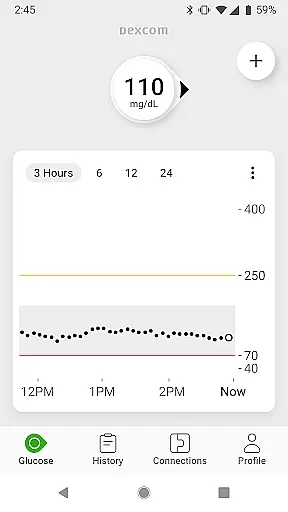
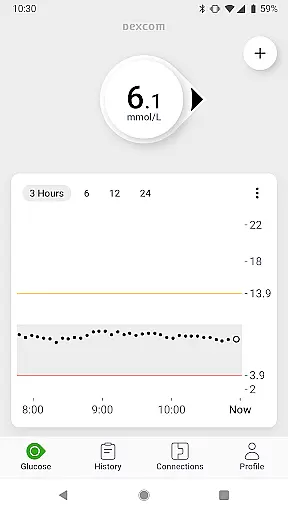
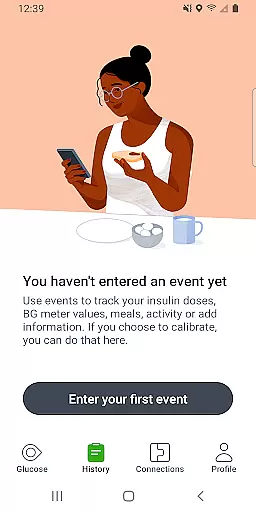
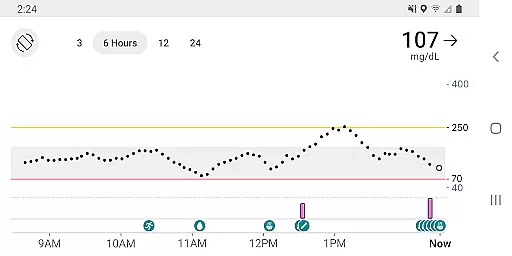
The Dexcom G7 app is a vital tool for individuals managing diabetes, providing real-time glucose monitoring without the need for fingersticks. This Health & Fitness application supports an integrated approach to diabetes care by delivering continuous glucose data directly to a compatible smart device every five minutes.
With customizable alerts for high or low glucose levels and remote monitoring capabilities, users can maintain better control over their condition. The app also allows sharing of glucose data with followers and healthcare teams, ensuring comprehensive support from loved ones and professionals alike.
Designed for use with the Dexcom G7 CGM System, this app empowers users with actionable insights into their glucose trends, aiding in more informed treatment decisions under professional guidance.
Dexcom G7 stands out with its advanced features tailored for diabetes management. The system's low-profile wearable sensor seamlessly integrates with a user’s lifestyle while providing accurate glucose readings up to every five minutes.
Users benefit from customizable alerts that warn of potential glucose excursions, alongside remote monitoring options that keep them connected to care teams via compatible devices. Additionally, the Quick Glance feature offers convenience by displaying glucose information on a smartphone’s lock screen.
Integration capabilities extend to third-party health apps and lifestyle devices, enriching the user experience through consolidated health data visualization. These features collectively enhance proactive diabetes management and foster collaboration between patients and healthcare providers.
The Dexcom G7 Continuous Glucose Monitoring (CGM) System offers personalized planning by providing real-time glucose data every 5 minutes. This empowers users to make informed decisions about their diabetes management.
With customizable alerts, the system warns users of high or low glucose levels, allowing for timely interventions. These alerts are tailored to individual needs, ensuring a personalized experience that adapts to each user's unique health requirements.
Remote monitoring and reporting options further enhance personalized planning by keeping users connected to their care teams. This ensures that healthcare professionals can provide guidance based on accurate and up-to-date information, leading to more effective treatment plans.
Dexcom G7 app provides progress visualization through its comprehensive trend graph feature. Users can easily track their glucose levels over time, identifying patterns and making necessary adjustments to their treatment plans.
In addition to glucose data, the app displays health and activity data from connected apps and devices. This holistic view allows users to understand how different factors affect their glucose levels, promoting better lifestyle choices.
Quick Glance functionality enables users to view their glucose data directly on the lock screen of their smart device. This instant access to vital information supports continuous progress tracking throughout the day, enhancing user engagement with their health management.
Real-time glucose tracking
Customizable alert settings
Remote monitoring access
Data sharing with healthcare teams
Integrated digital health tools
Requires compatible device
Fingerstick verification needed
Limited to specific regions
Potential connectivity issues
Dependent on internet connection

SportWerks - Workout Tracker for Wear OS Watches
 3.90
3.90
Easy reconstitution calc for mixing peptides and creating protocols
4.70
A simple way to calculate peptide doses and also to convert different units.
4.0
See what's really going on inside your head! Real time EEG graphs from your Muse
4.40
The Sleep Miracle Sound Machine: Soothes baby to sleep with a gentle "Shhh"
3.00
Turn your steps into cash, gift cards & rewards with our step counting pedometer
3.80
Personal step counter for you, private and accurate
4.50
Workouts for everyone
4.70
Control your blood pressure, heart rate and blood sugar in a fast way.
4.00
sobriety counter app to help and motivate people to stop drinking alcohol.
4.90
Walk. Earn: Get rewarded for every step! Walk, move, and earn real rewards.
4.70
Build Healthy Habits!
4.60
Get lasting results with Chair Yoga, Wall Pilates, and Walking workouts!
4.60
Pilates, Calisthenics, Yoga
4.50
Track heart rate & HRV in 30s! Get live health insights and anomaly alerts
4.40
beat yesterday.
4.00
Understand your body’s most meaningful messages and transform your health.
3.90
Measure real-time wrist & ambient temperature with your Galaxy Watch (Wear OS)
3.20
Your plan in your pocket 24/7
3.00


User Reviews