
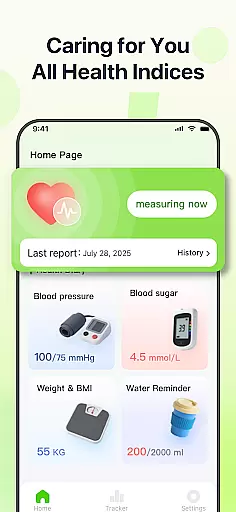
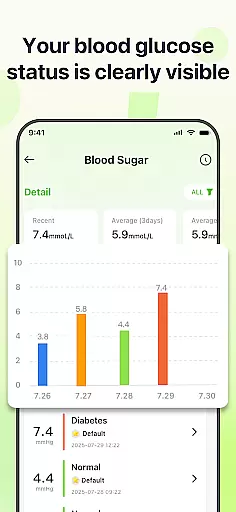
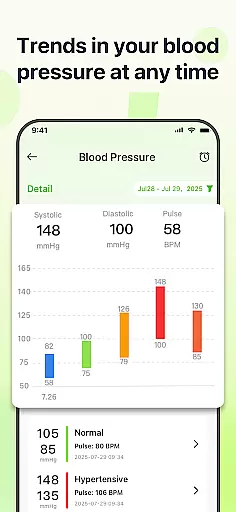
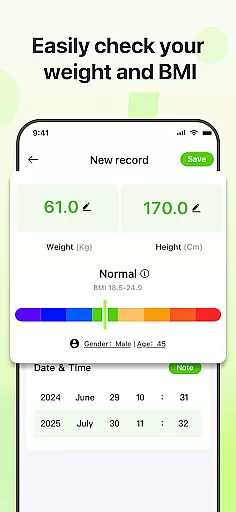
PulseSense is a comprehensive health tracking app designed to simplify wellness management. It allows users to effortlessly log key metrics such as blood pressure, glucose levels, and heart rate while providing intelligent reports tailored to personal data. With sleek trend visualizations spanning days to years, the app helps uncover patterns and track progress over time.
Privacy is at the core of PulseSense. The app ensures complete data security by keeping all records on the device with end-to-end encryption. No accounts or cloud storage are required, making it an ideal choice for individuals seeking a secure health companion. Whether managing chronic conditions or building healthy routines, PulseSense consolidates all health metrics into one intuitive platform.
PulseSense offers a robust set of features that cater to various health tracking needs. Users can log multiple metrics, including blood pressure, glucose levels, and heart rate, with ease. The app provides sleek visualizations that display trends over days, weeks, months, and years, enabling users to identify patterns and make informed decisions about their health.
Personalization is another standout feature. PulseSense generates intelligent health reports and actionable lifestyle recommendations based on user data. Additionally, users can attach custom notes and tags to entries for added context. To enhance usability, the app includes reminders for maintaining consistent habits and supports offline functionality, ensuring privacy without requiring internet access.
Personalized planning in health applications refers to the ability to tailor health goals and strategies based on individual user data. PulseSense excels in this area by offering intelligent health reports and personalized lifestyle recommendations. These are crafted specifically to align with the trends and patterns observed in the user's logged health metrics.
The app allows users to effortlessly log various health parameters such as blood pressure, glucose levels, and heart rate. By analyzing this data, PulseSense provides customized insights that help users manage chronic conditions like hypertension or diabetes more effectively. This personalization ensures that each user receives relevant advice that can lead to improved health outcomes.
Additionally, PulseSense enables users to attach personal notes and custom tags to their entries, adding context to the numerical data. This feature enhances the personalized planning aspect by allowing for a more nuanced understanding of health trends. Users can set reminders to reinforce healthy habits, ensuring they stay consistent with their wellness journey.
Progress visualization is a crucial feature in health apps, providing users with a clear and intuitive way to track their health journey over time. PulseSense offers sleek trend visuals that span days, weeks, months, and years, making it easy for users to uncover patterns and track progress.
These visualizations are not just about displaying raw numbers; they transform data into actionable insights. Users can view their logged metrics such as blood pressure, glucose levels, and heart rate through comprehensive graphs and charts. This helps in identifying trends that might not be apparent from isolated data points, thus enabling more informed health decisions.
Moreover, PulseSense consolidates all health metrics into one app, eliminating the need to switch between different tools. This unified approach simplifies the tracking process and enhances user engagement. With its focus on intuitive visualizations, PulseSense empowers users to take control of their health by providing them with a clear picture of their progress, reinforcing their commitment to maintaining healthy routines.
User-friendly interface
Advanced trend analysis
Strong privacy controls
Actionable health insights
Customizable logging options
No direct measurement tools
Limited integration with devices
Premium features may cost extra
Requires manual data entry
Not a medical diagnostic tool

Insanity blocks of intense physical activity, short breaks of 30 seconds.
 4.2
4.2
Wall Pilates at home & Pilates workout for beginners for core and weight loss.
4.80
Memory, mind & logic exercises. Puzzle games, IQ & brain test for kids & adults
4.50
Monitor, analyze, track, and convert blood sugar & help you control diabetes.
4.10
Pilates, Calisthenics, Yoga
4.50
Looking to take control of your health? Our psychology-based programs can help.
4.10
Easy to use step counter, calorie counter helps lose weight, count steps offline
4.80
Point, scan, and unlock truth in every bite.
4.50
Comprehensively record and manage your health
4.50
Beauty Care, Makeup & Skin Care Scanner | Pregnancy App For A Mom | Healthy Baby
5.00
sobriety counter app to help and motivate people to stop drinking alcohol.
4.90
App to stop smoking slowly or now with a motivational badges and helpful tips
4.80
Load the bar with this barbell & plate calculator. It's leg day, not brain day!
4.70
For Absolute Novices to Strength Training. Simple. Effective.
4.40
Grow with self-tests and personal routine.
4.30
Dexcom G7 Continuous Glucose Monitoring
3.70
GloryFit is a companion app for the smart bracelet.
3.60
Text notifications, button control, heart monitor & more for your Amazfit.
2.40
Optimization for TRT & Enhanced Athletes
4.5


User Reviews