


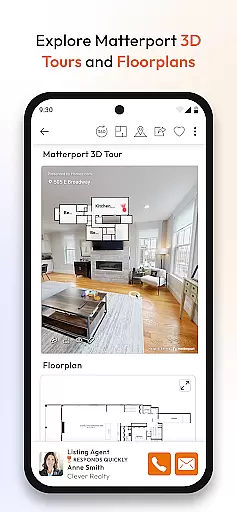


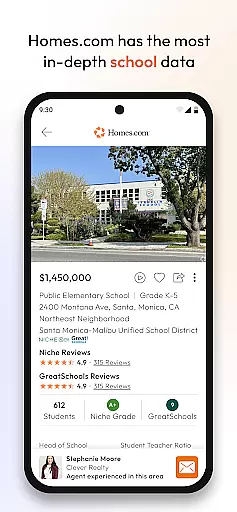
Homes.com Real Estate Search is a comprehensive homebuying platform designed to simplify the property search process for both homebuyers and real estate agents. The app provides access to homes for sale and rent across the U.S., complete with detailed neighborhood insights, school data, and historical property photos.
With advanced collaboration tools, users can co-shop with family and friends while agents can manage leads and communicate with clients seamlessly. Homes.com also offers exclusive features for agents through Homes Pro, allowing them to build their brand, share listings on social media, and create comparative market analyses (CMAs).
This app is ideal for anyone navigating the homebuying process, whether you're a first-time buyer or an experienced agent looking to streamline your business and provide top-tier service.
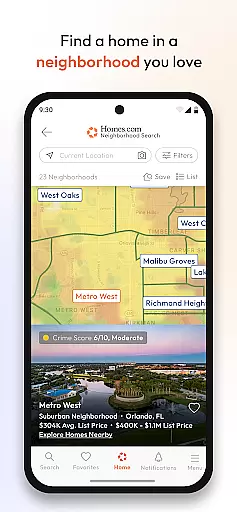
Homes.com stands out with its robust set of features tailored for both homebuyers and agents. For buyers, the app offers an intuitive map search function, mortgage calculators, and detailed neighborhood overviews including schools, parks, walk scores, and local amenities. These features ensure that users have all the information needed to make informed decisions.
For real estate agents, Homes Pro provides tools to collaborate with clients in real time, manage leads efficiently, and enhance their professional profiles. Agents can showcase their expertise through detailed bios, listing histories, and even videos. Additionally, the app allows agents to share listings directly to social media platforms and generate CMAs quickly.
The combination of these features creates a seamless experience that benefits both homebuyers and agents, making Homes.com a versatile tool in the real estate market.
Property listing authenticity is a cornerstone of any reliable real estate application, ensuring users have access to accurate and verified property information. Homes.com Real Estate Search excels in this area by sourcing its listings directly from MLSs and their data providers, guaranteeing the reliability of the homes for sale or rent displayed on the platform.
The app provides current and historical listing photos, allowing users to see how properties have changed over time when available. This feature not only enhances transparency but also helps potential buyers make informed decisions based on visual evidence of property conditions.
Furthermore, Homes.com offers detailed neighborhood overviews curated by an in-house team of researchers and photographers. These overviews include insights into nearby schools, parks, walk scores, restaurants, and social events, all of which contribute to verifying the authenticity of the listings by giving users a comprehensive understanding of the areas they are interested in.
By prioritizing property listing authenticity, Homes.com ensures that both homebuyers and agents can trust the information provided, streamlining the homebuying process and fostering a more efficient and transparent real estate market.
Home management features in real estate apps like Homes.com Real Estate Search provide essential tools that help users organize and streamline their homebuying journey. One standout feature is the robust directory that allows users to find qualified buyer agents specializing in their specific search areas, enhancing the overall experience by connecting buyers with experts who understand local markets.
Homes.com also includes advanced collaboration tools designed to simplify co-shopping with friends, family, and chosen agents. Users can actively review feedback in real time, trade notes on homes, and manage communications efficiently, freeing themselves from the chaos of scattered emails and missed calls.
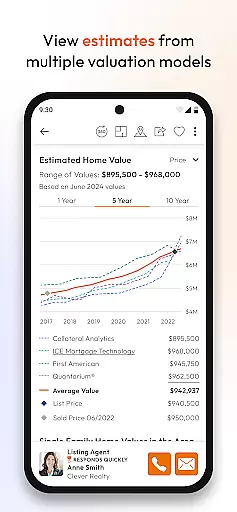
In addition to collaboration, the app offers mortgage calculators and home value estimates from multiple sources, empowering users to estimate monthly payments and understand the financial aspects of purchasing a home. These tools collectively ensure that users can manage their home search process effectively.
For agents, Homes Pro extends these home management features by enabling them to manage leads, collaborate with clients, and create Comparative Market Analyses (CMAs) within minutes. By integrating these capabilities, Homes.com supports both homebuyers and agents in managing their tasks seamlessly, ultimately leading to a more organized and successful homebuying experience.
User-friendly interface
Comprehensive property data
Advanced collaboration tools
Robust agent support features
Detailed neighborhood insights
Limited international listings
Occasional GPS inaccuracies
Premium features require subscription
High learning curve for new users
Some data may not be up-to-date

Map-based search app for apartments and homes for rent.
 4.60
4.60
The official app for Home Assistant. Control your home anywhere in the world.
4.30
Calculate baluster spacing with ease and precision.
4.5
Convert your Phone to HiSense Smart TV Remote Control
4.70
Control the scent and ambiance of your home and car, right from your phone.
4.50
AI Home Designer & Room Planner: Decorate your interior space with AI
4.40
Security App with HD Video, 2-way Audio, and event detection for Home monitoring
4.40
An easier way to make payments and maintenance requests from anywhere.
3.50
Houses for Sale & Homes for Rent: Buy Homes, Rent Apartments & Sell Real Estate
4.80
Connect with reliable pros for maintenance services, plumbing, and home design!
4.80
Turn old phones into security cameras, baby monitors, pet cams, and more.
4.70
Looking for the perfect apartment finder app? Find beautiful rental homes here!
4.60
Resident Center, powered by Buildium, is designed with simplicity in mind.
4.50
The Merkury Smart app makes it easy to control your smart devices.
4.50
Make your phone a surveillance camera remote with a home camera app for Android!
4.40
Control your Vivint Smart Home with the next generation Vivint App.
4.30
Universal Tv Remote Control for all Tv. Cast for chromecast & all Tv Controller
4.20
Find paints using a Color Muse & ColorSnap® Match
3.60
Universal TV remote Control for Roku TV brands via WiFi remote
4.1


User Reviews