
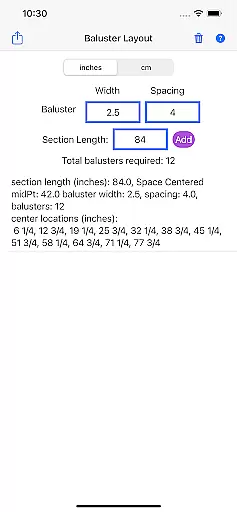
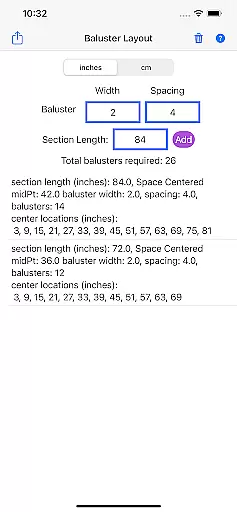
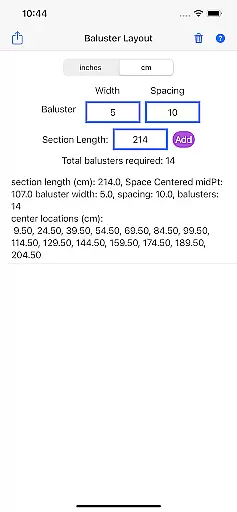
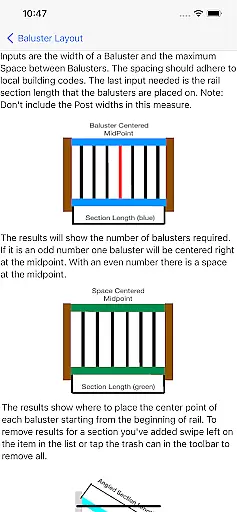
Baluster Layout is a specialized application designed for deck and stair builders who need precise calculations for baluster spacing. This app simplifies the process by allowing users to input railing length, baluster width, and desired spacing to automatically calculate optimal placement while adhering to building code requirements.
One of the standout features of Baluster Layout is its ability to handle complex projects with multiple railing sections, each having unique dimensions. Whether you are working on a small DIY project or a large commercial build, this app ensures that every section of your railing meets safety standards and looks visually appealing.
The app is particularly useful in scenarios where precision and compliance are critical. By automating the calculation process, it saves time, reduces errors, and helps builders avoid costly mistakes, making it an essential tool for both professionals and enthusiasts alike.
Baluster Layout offers a comprehensive set of features tailored to make baluster installation projects more efficient and accurate. One of the key functionalities is the precision spacing calculator, which determines the optimal distance between balusters to ensure compliance with building codes. This feature eliminates the need for manual calculations, saving time and reducing the risk of errors.
In addition to handling single railing sections, the app supports projects with multiple rail sections, each with its own unique dimensions. Users can choose their preferred units of measurement, either inches or centimeters, providing flexibility to match project specifications. The detailed results section breaks down the number of balusters needed for each section and their exact placement, offering a clear guide for installation.
By focusing on accuracy and ease of use, Baluster Layout stands out as an innovative solution in the House & Home category. Its ability to streamline complex calculations and provide detailed outputs ensures that users can complete their projects efficiently while meeting all necessary safety standards.
In the realm of home improvement and construction, having accurate project data is crucial. Baluster Layout provides precise calculations tailored to your specific project needs. The app ensures that all baluster spacing measurements comply with building codes, offering peace of mind for both professional builders and DIY enthusiasts.
By inputting parameters such as railing length, baluster width, and desired spacing, users receive exact figures needed for their projects. This attention to detail guarantees that every baluster installation meets safety standards and aesthetic requirements. Such precision not only enhances the structural integrity but also the visual appeal of decks and stair railings.
The authenticity of this data is further reinforced by the app's ability to handle complex projects involving multiple railing sections. Each section can have unique dimensions, ensuring comprehensive and personalized results. This feature is particularly beneficial for large-scale or intricate installations where accuracy across different sections is paramount.
Beyond just calculating baluster spacing, Baluster Layout offers a suite of features designed to manage various aspects of deck and stair building projects. One standout feature is its flexibility in unit selection; users can choose between inches or centimeters, accommodating projects with varying measurement specifications.
The app provides detailed results, breaking down the number of balusters required for each railing section and specifying their exact placement. This granular level of detail aids in efficient material planning and minimizes waste, saving both time and resources. By streamlining these processes, Baluster Layout becomes an indispensable tool for effective project management.
Additionally, the app helps avoid costly mistakes by ensuring compliance with building codes. Its precision spacing capabilities eliminate manual calculation errors, thereby enhancing safety and stability. With Baluster Layout, users can focus on creating visually appealing structures without worrying about regulatory adherence, making it an essential companion for any home improvement endeavor.
Time-saving
Accurate calculations
Code compliance
User-friendly interface
Unit flexibility
Limited to balusters
No 3D visualization
Basic design
Few customization options
Premium version required

For all of your Airthings devices
 4.30
4.30
Make Renting Easy
4.40
Design house plans in 2D & 3D, style furniture, and preview renovation layouts
3.70
Our app allows Sunrun customers to monitor systems, pay bills, and get support.
3.80
Plants, Beauty, Collectibles
4.60
Find your next home, house, apartment, condo, casa, flat, rental, studio, or bed
4.70
Apartment finder for apartments for rent. Compare prices, amenities & rentals.
4.50
Control your thermostat, comfort, and home monitoring from your phone
4.30
Samsung remote app helps control all Samsung Smartthings TVs. Fast and Stable!
4.10
Search for Homes, Rentals, Agents & Schools
4.70
Looking for the perfect apartment finder app? Find beautiful rental homes here!
4.60
AI-powered home design, interior design, home decor, and room design solutions
4.50
Resident Center, powered by Buildium, is designed with simplicity in mind.
4.50
The Merkury Smart app makes it easy to control your smart devices.
4.50
Control your Daikin, Amana & Goodman heating & cooling systems from anywhere
4.40
Find contractors for all home renovation projects. Remodeling, repair, and more.
4.20
AI floor creator to design your dream house, plan rooms & style your home
4.00
Floor Plan Creator Home Design with 2D interior design and 3d view.
3.90
Find the perfect paint color with advanced tools to explore and visualize color.
3.80


User Reviews