

Look Up - Pop Up Dictionary Pro is an advanced offline dictionary application designed for book lovers and language enthusiasts who require instant access to word definitions without relying on internet searches. The app supports seven major languages including English, Italian, Spanish, German, Portuguese, and French, making it an ideal tool for both native speakers and language learners.
The dictionary stands out with its integration capabilities, working seamlessly with popular e-reader apps like Moon Reader and learning tools such as Anki Flashcards. It also incorporates a robust offline database containing over 220,000 words and phrases from WordNet, ensuring comprehensive vocabulary coverage. With features like Google Define, Urban Dictionary, and Wikipedia plugins, users can access diverse perspectives on word meanings.
Look Up is especially useful for Android users who miss the convenience of iOS's lookup feature. Whether you're reading an eBook, studying a new language, or simply encountering unfamiliar words in daily life, this app provides immediate definitions through multiple search methods, enhancing your reading and learning experience significantly.
Look Up - Pop Up Dictionary Pro offers an impressive array of features that cater to various user needs. One of its key strengths is the multiple word lookup options available across different Android versions. Users can look up words by copying them (for devices running Android versions below 9.0), using the dedicated lookup button after selecting a word (Android 6.0 and above), or sharing selected text directly to the app.
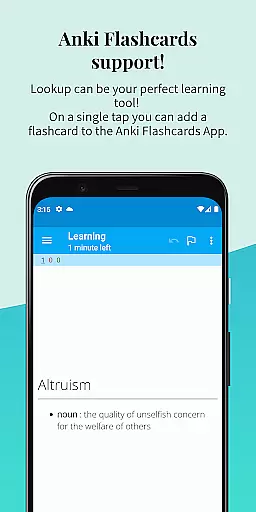
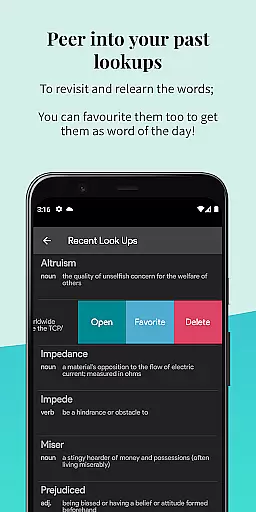
The application includes advanced functionalities such as Anki Flashcard support for vocabulary building, offline access to a comprehensive Wordnet database, and synchronization with Google Drive for backup and cross-device access. The predictive search feature enables quick word discovery while the 'word starring' function helps users maintain personalized vocabulary lists.
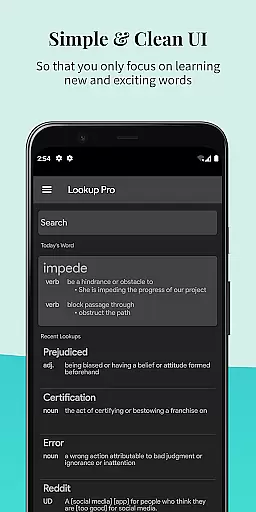
Additional notable features include dark mode for comfortable nighttime reading, text-to-speech functionality for pronunciation assistance, and a 'word of the day' feature delivered through both in-app notifications and display. The app's material design interface ensures an aesthetically pleasing and user-friendly experience, while the ability to add personal notes to word entries allows for customized learning and better retention.
Look Up - Pop Up Dictionary Pro offers an extensive offline word database that includes 0.22 million words and phrases, ensuring users have access to a comprehensive resource without needing an internet connection. This vast repository covers seven languages, enhancing its utility for linguists, students, and avid readers alike.
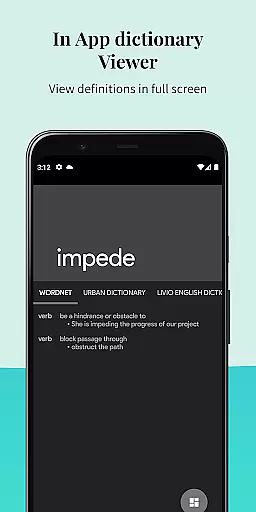
The dictionary supports legitimate content sources by integrating with platforms like Urban Dictionary, Google Define, Vocabulary.com, Wikipedia, and Cambridge. These integrations not only enrich the user experience but also assure the credibility and authenticity of the information provided.
Users benefit from fast and predictive searching capabilities, which make finding definitions both efficient and intuitive. The availability of such a robust and verified lexicon means that individuals can rely on Look Up for accurate and authoritative references, thus improving their reading and learning experiences significantly.
One of the standout features of Look Up is its versatile format compatibility, allowing users to search for words in three distinct ways. Whether it's copying a word, pressing the lookup button after selecting text, or sharing the selected word directly to the app, Look Up ensures seamless interaction across different Android versions.
In addition to supporting multiple search methods, Look Up enhances user convenience through integrations with popular e-reading tools such as Moon Reader and Anki Flashcards. Such compatibility extends the appu2019s functionality beyond mere definitions, offering enriched context and study aids.
Furthermore, Look Up embraces modern usability trends with features like dark mode for comfortable nighttime reading and the ability to sync data to Google Drive. By combining these practical functions with support for various input formats, Look Up caters to diverse user preferences and technological environments, making it an indispensable tool for anyone engaged in literary pursuits.
Comprehensive offline database
Multi-language support
Seamless app integrations
User-friendly interface
Effective learning tools
Limited modern Android support
Occasional sync issues
Some features feel outdated
Interface could be more modern
Text-to-speech limitations

Bilingual dictionary with English translations of Modern Standard Arabic words.
 4.30
4.30
"Five Dr. Seuss titles in one omBook!"
4.60
Contains the 365 daily readings and everything other thing needed for catholics
4.70
Novels, audiobooks, ebooks & fanfiction. Read anytime, anywhere!
3.40
Audiobook player with cross-device progress sync, playlists, and widget support.
4.80
CleverBook Pro makes the popular guide for the game even better!
4.00
Mirror Bible - eye-opening paraphrase translation of the NT by Francois du Toit
4.30
A wonderful reader for good time spend.
4.20
Calculate, Knowledge, Homework
4.40
Bible Study App with Audio Book, Verse of the Day, and Devotionals.
4.80
Personalized Chat with Bible
4.80
World's most comprehensive dictionary app: 13 languages, all online or offline!
4.80
Read unlimited novels, audiobooks, stories & Unlock ebooks, fanfiction and more!
4.70
The Original & Authentic Crystals, Gemstones, Rocks & Minerals Encyclopedia.
4.60
Full text, sheet music, and recordings of the print edition
4.60
Offline translator from english to spanish, and from spanish to english.
4.50
Holy Bible with verses and audio for studying and prayer
4.30
ISAIAH EXPLAINED with Avraham Gileadi Ph.D.
4.00
Enjoy your favorite books
3.50


User Reviews