

Peerspace is a leading platform for booking unique and inspiring spaces by the hour, designed specifically for events, meetings, and creative projects. With an extensive network of venues ranging from modern lofts to professional photo studios, this app opens up a world of possibilities for both hosts and guests. Whether you're planning a corporate event or looking to rent out your property, Peerspace provides all the tools necessary to make the process seamless.
The app's intuitive interface allows users to browse through thousands of spaces across various cities, connect directly with hosts, and manage bookings efficiently. Hosts can list their properties for free, set their own pricing, and choose which types of activities they want to host. Meanwhile, guests can easily find and book spaces that suit their specific needs, ensuring memorable experiences in extraordinary locations.
Peerspace is particularly useful for freelancers, small business owners, and event planners who require flexible and creative environments for their projects. By facilitating direct communication between hosts and guests, the app ensures smooth transactions and personalized service. Its mobile functionality enables users to manage bookings and communicate with hosts on the go, making it an essential tool for modern professionals seeking convenience and versatility.
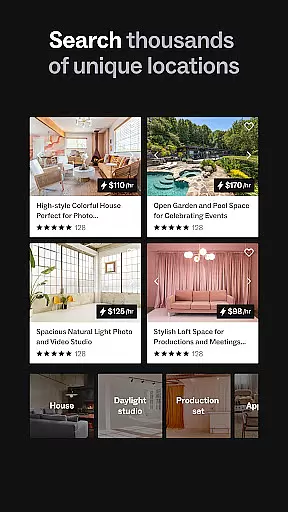
Peerspace offers a comprehensive suite of features designed to enhance the experience of both hosts and guests. One of its standout capabilities is the ability to browse and book a wide variety of spaces, including lofts, galleries, and studios, directly from your mobile device. This feature empowers users to find the perfect venue for their specific needs, whether it's for a photoshoot, meeting, or special event.
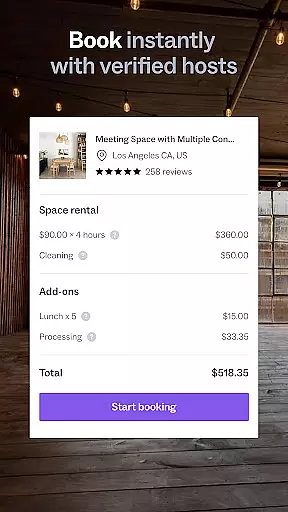
In addition to its robust search functionality, Peerspace provides tools for hosts to manage their listings effectively. Hosts can set custom hourly rates, specify allowed activities, and communicate directly with potential guests. The app also includes a secure payment system that ensures hosts are paid promptly and reliably. For guests, features like real-time messaging and automatic notifications streamline the booking process and keep users informed every step of the way.
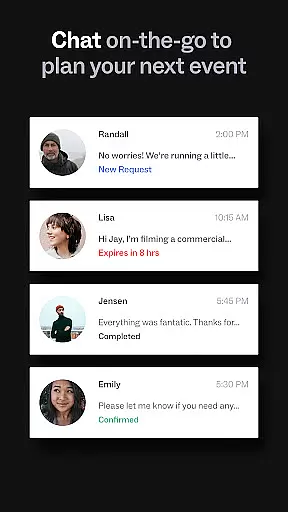
Another key advantage of Peerspace is its user-friendly mobile interface, which allows for seamless management of bookings and communications while on the move. Users can send messages, receive updates, and modify reservations directly from their smartphones. This level of accessibility and control makes Peerspace an invaluable resource for professionals who need to coordinate events and manage schedules efficiently.
Task creation and detail customization are essential features for event planning apps like Peerspace. This functionality allows users to tailor their event bookings with precision, ensuring that every aspect of the event is accounted for.
Peerspace offers a streamlined process where users can browse unique spaces and customize booking details according to their specific needs. Whether it's adjusting the booking duration, specifying setup requirements, or detailing special requests, users have the flexibility to create tasks that align perfectly with their event goals.
The benefit to users is significant; they gain control over their event planning process, which leads to more successful and personalized events. With clear communication channels between hosts and guests, expectations are set accurately, resulting in smoother operations on the day of the event.
Reminder settings play a crucial role in ensuring timely notifications and updates regarding upcoming events booked through Peerspace. This feature helps both hosts and guests stay informed about important dates and times related to their bookings.
With Peerspace, users receive automatic notifications for new messages and booking requests directly through the app. This ensures that no critical information is missed and allows for prompt responses to inquiries or changes in plans. The reminder system also supports seamless coordination between all parties involved in an event.
Ultimately, this feature enhances user experience by providing peace of mind that everything is on track. It reduces stress associated with event management and empowers users to focus on other aspects of their events knowing they will be reminded of key actions at appropriate times.
User-friendly interface
Wide variety of spaces
Secure payment system
Free listing for hosts
Real-time messaging
Limited rural options
Service fees apply
Variable quality
Booking competition
Dependent on host availability

The Ultimate Tournament Hub
 4.70
4.70
Local events, contests, and giveaways for local dads
3.70
TV Garden is a video player to play your own TV streams from around the world!
4.3
TV.Garden is a video player to play your own TV streams from around the world!
3.40
Digital Income Wallet of the Final Libertadores 2025
4.0
ETH Mining provides secure way to mine Ethereum & earn ETH in Cloud mining app
3.50
Microsoft Ignite is an event that showcases latest advancements in technology
4.00
Invitation Card Maker, Design & share wedding, birthday & party invites fast
4.40
Introducing the official Magic: The Gathering app for mobile.
4.20
Fantasy of Lights Event App
5.00
For weddings, parties & events
4.60
Everything you need for the Best Thursday Ever.
4.40
Manage all your events, leads, ticketing, payments and check-ins.
4.30
Microsoft Build is an annual developer conference hosted by Microsoft
4.20
Buy and sell tickets to sports, concerts, theater, festivals, and comedy events
4.10
Instant photo sharing for every occasion
3.80
RAISE-365 makes fundraising easy and fun!
3.20
Create Birthday Cards in Birthday Invitation Maker and Birthday Card Creator App
3.00
Community for Mods, Addons, Melsaves, Melmods for Melon Playground
4.2


User Reviews