
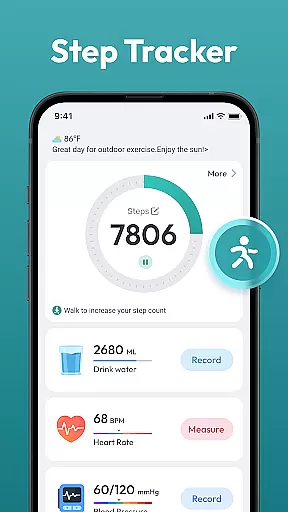
Step Counter - Pedometer App is a comprehensive health and fitness tool designed to help users track their daily physical activity. This app automatically counts steps, measures walking or running distance, and supports setting personal goals such as reaching 10,000 steps per day.
In addition to basic step counting, the app provides detailed activity tracking including daily, weekly, and monthly charts. It also offers training courses and plans tailored for different fitness levels, making it suitable for users of all ages who aim to lose weight, stay healthy, or simply monitor their activity patterns.
The app's compatibility with most Android devices without the need for additional wearable gadgets makes it an accessible solution for anyone looking to improve their overall well-being through consistent movement tracking.
Step Counter - Pedometer App stands out with its automatic step counting feature that works seamlessly whether you're walking or running. The app leverages your phone’s sensors to provide accurate data on your daily movements without requiring any manual input.
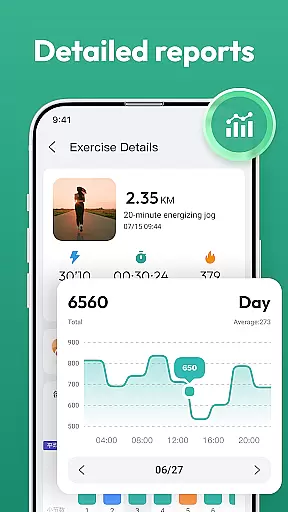
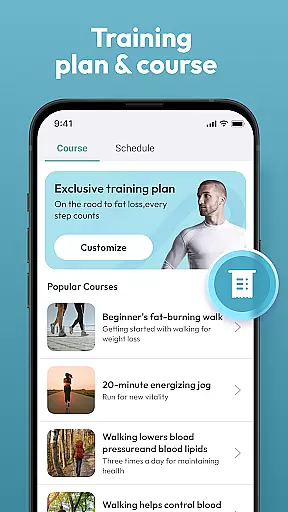
One of the key highlights is the availability of various tracking options like daily, weekly, and monthly charts which allow users to visualize their progress over time. Additionally, the app includes training programs and plans designed by fitness experts to guide users towards achieving specific health goals.
With a user-friendly interface, this app ensures ease of use while delivering essential health metrics. Users can easily navigate through different sections to access detailed insights into their activity levels, helping them maintain motivation and consistency in their fitness journey.
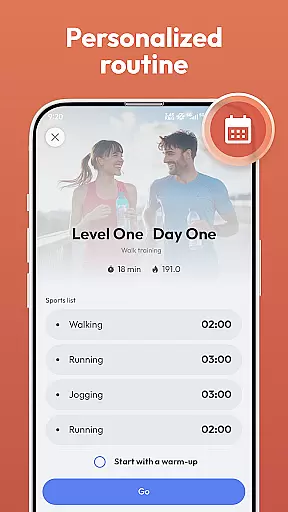
Personalized planning in a fitness app refers to the ability to create tailored workout and health plans based on individual user data. This feature is crucial as it adapts the fitness experience to match personal goals, capabilities, and progress.
Step Counter - Pedometer App offers personalized planning by analyzing daily activity data such as steps taken, distance covered, and calories burned. It supports various training courses and plans that users can choose from based on their fitness objectives, whether it's weight loss or staying active.
Users benefit from this feature by receiving customized recommendations that align with their personal health targets. The app tracks achievements over time, providing motivation through visible progress and milestones.
The true value of personalized planning lies in its adaptability. As users engage more with Step Counter - Pedometer App, the insights and recommendations become increasingly accurate, ensuring long-term engagement and success in reaching health goals.
Progress visualization is an essential aspect of any fitness application, allowing users to see their advancements over time. This visual representation helps maintain motivation and provides clear feedback on performance and goal attainment.
In Step Counter - Pedometer App, progress visualization is achieved through detailed charts that display daily, weekly, and monthly activities. Users can easily track their step counts, view trends in their physical activity, and monitor improvements in their overall fitness levels.
This feature benefits users by offering a tangible way to observe their hard work paying off. Seeing consistent progress in graphical formats encourages continued dedication to personal health goals and fosters a sense of accomplishment.
By integrating comprehensive progress visualization tools, Step Counter - Pedometer App not only enhances user experience but also promotes sustained engagement with health and fitness routines, ultimately leading to better lifestyle choices and outcomes.
Accurate step tracking
User-friendly design
No extra devices needed
Detailed progress charts
Free to use
Limited customization
Battery consumption
Requires phone carry
No advanced metrics
Basic interface

Chair Workout: Women's Edition for safe, flexible, and personalized fitness.
 4.40
4.40
Control your sleep in real-time wearing Garmin device
3.60
Meditation app, head space app provides calm music to help you meditate & sleep
5.00
When the night comes, we prepare your eyes for deep, sweet dreams
4.70
Show your support for the development of FitNotes - Gym Workout Log
4.90
Wall Pilates at home & Pilates workout for beginners for core and weight loss.
4.80
FODMAP, Gluten, Allergy, Vegan
4.50
Track sleep cycle, relax with white noise, sleep sounds & smart alarm clock
3.80
Fast Body building & Weight Loss. Home Workouts with Daily Coach, No Equipment.
4.30
Beauty Care, Makeup & Skin Care Scanner | Pregnancy App For A Mom | Healthy Baby
5.00
Power-lifting, weightlifting and Wendler 531 app to track your workout program.
4.90
sobriety counter app to help and motivate people to stop drinking alcohol.
4.90
a fun app full of surprises :)
4.70
The Official Blood Type Diet® App - know your categorized foods anytime.
4.50
Memory, mind & logic exercises. Puzzle games, IQ & brain test for kids & adults
4.50
Relax to calm sounds, white noise, music, guided meditation and bedtime stories
4.40
Your portable blood pressure tracker. Record, monitor, and analyze BP anytime.
4.30
Measure real-time wrist & ambient temperature with your Galaxy Watch (Wear OS)
3.20
Insanity blocks of intense physical activity, short breaks of 30 seconds.
4.4


User Reviews