
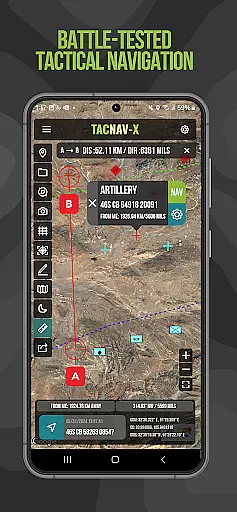
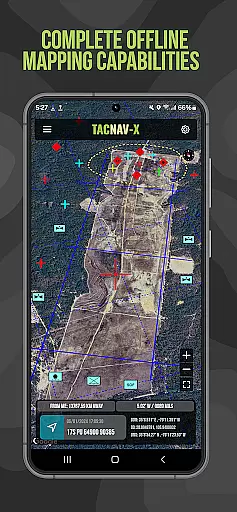
Tactical NAV is a military-grade navigation app designed for precision and reliability in challenging environments. Developed during a combat deployment in Afghanistan, this app provides soldiers with accurate positioning data using MGRS, UTM, and other coordinate systems. Its offline mapping capabilities ensure functionality even without cellular signals, making it ideal for tactical operations.
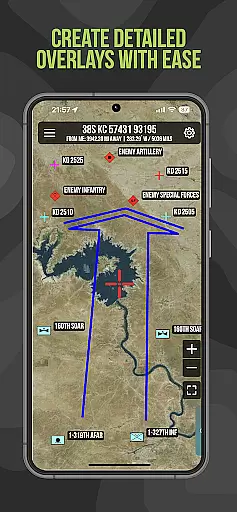
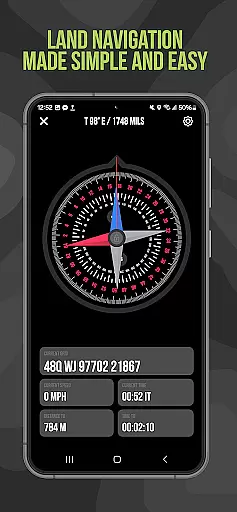
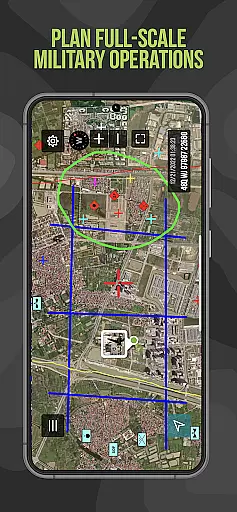
The app includes essential features such as waypoint plotting with military graphics, compass 'FastLock' for quick azimuth capture, and tactical drawing mode for mission planning. These tools are built to support both training exercises and real-world combat scenarios, enhancing situational awareness and operational success.
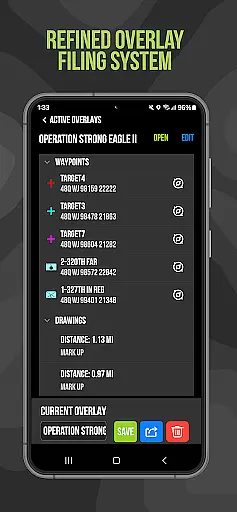
Tactical NAV stands out with its specialized military-focused features. The app offers pinpoint accuracy matching the AN/PSN-13 Defense Advanced GPS Receiver (DAGR), ensuring reliable navigation. Its tactical drawing mode allows users to create detailed overlays and plan missions effectively, while the 'Go to Grid' feature enables precise grid-based planning.
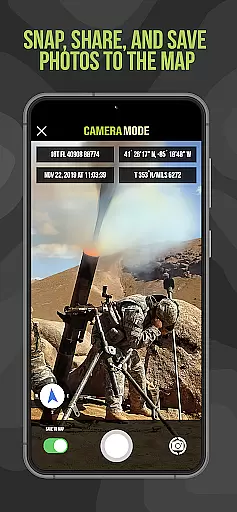
Additional functionalities include photo integration onto maps for increased situational awareness and location sharing via email or text. Offline mapping ensures operational security by not emitting cellular signals. These robust features collectively empower service members to execute their missions with confidence in diverse environments.
Map accuracy is a critical feature for any navigation application, especially one designed for military use like Tactical NAV. This app offers precision targeting and mapping capabilities that are essential in austere and contested environments where every millimeter counts.
Tactical NAV's performance matches that of the AN/PSN-13 Defense Advanced GPS Receiver (DAGR), ensuring users can rely on its accuracy within 1mm of officially approved systems issued by the DoD. The app supports various coordinate systems including MGRS, UTM, BNG, and USNG under the WGS-84 standard, providing flexibility and compatibility with military operations worldwide.
For soldiers in the field, having an accurate map means enhanced situational awareness and mission success. With Tactical NAVu2019s offline mapping mode, service members can operate without emitting cellular signals, maintaining stealth while still accessing vital geographic information. This level of precision empowers military personnel to plan missions effectively and make informed decisions during both training exercises and real-world combat scenarios.
Route planning is a fundamental aspect of navigation, particularly for military operations where strategic movement is key. Tactical NAV equips users with advanced tools such as waypoint plotting functionality with military graphics, which adheres to FM 1-02.2 standards, allowing for detailed mission planning and execution.
The 'Go to Grid' feature enables precision in planning routes, drawing overlays, and dropping waypoints, facilitating complex maneuvers across varied terrains. Additionally, the Compass u201cFastLocku201d function captures quick and precise azimuths, ensuring that soldiers can lock onto their bearings swiftly and accurately.
With location sharing capabilities via email and text, team members can stay coordinated even when dispersed over large areas. Snap-and-save photograph functionality further enhances situational awareness by allowing troops to mark significant points on the map visually. These robust route-planning features support troops in navigating challenging landscapes efficiently while maintaining operational security.
Highly accurate GPS
Offline map access
Military-grade features
User-friendly interface
Regular updates
No DoD endorsement
Limited civilian use
Premium features cost
Complex for casual users
Specialized market

Offline maps for phone and smart watch: topographic maps, satellite images...
 3.30
3.30
Fully offline 1:50k New Zealand topographical map North Island
4.3
GPX Viewer PRO shows tracks, routes and waypoints from gpx and kml files.
4.60
CamSam PLUS - The speed and red light camera warning system!
4.40
Find EV & Tesla charging stations with PlugShare
4.70
Track accurate speed & distance with GPS Speedometer. Check speed limit & time.
4.50
Use GPS maps or search by property owner, address or parcel to view parcel data
4.30
Explore Earth with live GPS, satellite view & street navigation
3.60
Track friends in real-time and explore worldwide live cameras.
4.60
Offline maps & GPS for hiking, travel, fieldwork & outdoor adventures
4.70
Find trails, organize your locations and navigate with offline maps.
4.60
Voice GPS with driving directions, offline maps navigation GPS for safe travel
4.50
Route tracker, Speedometer, Odometer, Fuel, HUD mode, save route as .GPX
4.40
Phone Tracker and GPS Location Sharing
4.20
GPS Navigation: Get map directions and find the shortest routes to avoid delays!
4.00
Route Planner is travel map to get turn by turn navigation & driving directions
3.90
Discover over 800 points of interest along the canal.
3.70
Play in the outdoors with Android as your Handheld GPS and offline topo maps!
3.50
Your guide to the recreational opportunities of the Bureau of Land Management!
3.40


User Reviews