
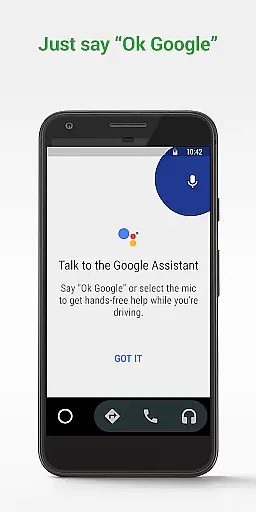
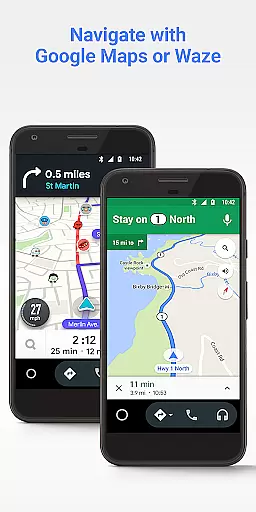
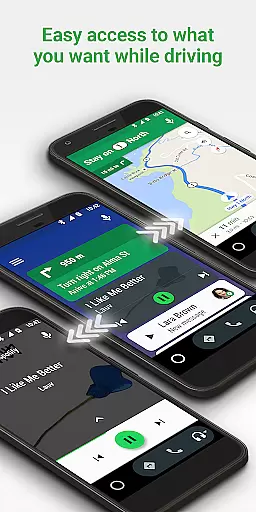
Android Auto is a driving companion app designed to keep users focused and connected while on the road. It offers a simplified interface with large buttons and voice actions, making it easier to use your favorite apps while driving. The app integrates with Google Maps, Waze, and the Google Assistant to provide real-time navigation, traffic alerts, and hands-free control.
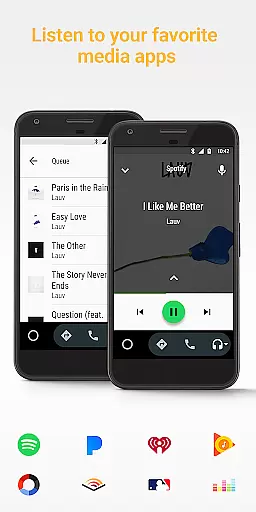
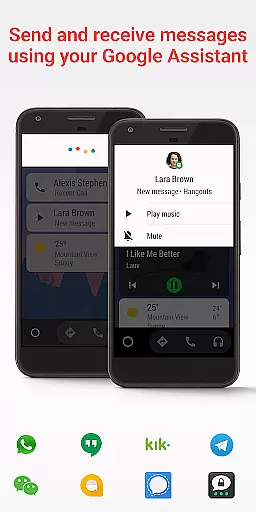
With Android Auto, you can manage your infotainment system like never before. The app supports a wide range of music, radio, news, and messaging services including Spotify, WhatsApp, and many others. It also helps you stay organized by checking your calendar and setting reminders. Designed for safety and convenience, this app ensures you can stay connected without taking your eyes off the road.
Android Auto stands out with its powerful integration capabilities. The app allows you to route destinations using Google Maps or Waze with real-time GPS navigation and traffic alerts. You can make calls, send messages, and access your contacts using just your voice through the Google Assistant.
The app provides extensive media support, allowing you to listen to your favorite music and podcasts from multiple platforms. Android Auto also includes features like 'Do Not Disturb' mode to minimize distractions while driving. With compatibility across over 400 car models, this app continues to expand its range of supported applications, ensuring a comprehensive and growing user experience.
Android Auto provides users with essential vehicle data through seamless integration with compatible car models. This feature allows drivers to access important information such as fuel levels, tire pressure, and engine status directly from the simplified interface of their car's infotainment system.
The application ensures that all vehicle information is displayed in an easy-to-read format, utilizing large buttons and clear indicators. This design choice minimizes distractions, allowing drivers to quickly check crucial details without taking their eyes off the road for extended periods.
By consolidating vehicle data into one accessible location, Android Auto enhances the driving experience. Drivers can make informed decisions about maintenance and performance, leading to safer and more efficient journeys. The real-time updates provided by this feature ensure that users always have the latest information at their fingertips.
While Android Auto itself is a free application, understanding the associated costs is essential for users. The app requires a phone running Android 6.0 or higher and an active data connection, which may involve device upgrade costs or mobile data charges depending on individual service plans.
Android Auto supports over 400 car models, making it widely accessible to drivers. However, some vehicles might need specific hardware or software updates to enable full functionality, potentially incurring additional expenses. These costs are clearly outlined by manufacturers, ensuring users can make informed decisions about integrating Android Auto with their vehicles.
The application also provides access to various media and navigation services, some of which may require subscriptions. By displaying these pricing details transparently within the app, Android Auto empowers users to manage their driving-related expenses effectively while enjoying a connected driving experience.
User-friendly interface
Voice-activated controls
Wide app compatibility
Real-time navigation
Enhanced safety features
Limited to Android devices
Requires USB connection
Dependent on data connection
Not all cars compatible
Some features may vary

OBD diagnostics, Live Data, DPF regeneration for BMW
 4.00
4.00
OBD1 ECMs application. Data log or tune directly from your phone or tablet!
4.60
Theme for Car Launcher
4.3
Monitor specific TOYOTA parameters by adding this plugin to Torque Pro.
2.00
Theme for Car Launcher
4.1
AI Powered - Automotive Mechanic Assistant
4.30
The ExtraMile App allows you to pay for fuel from the comfort of your car!
4.70
View your car’s service records and find out when maintenance is due.
4.70
A smarter way to park and reserve your spot ahead of time.
4.40
Get more out of your AAWireless adapter with this companion app | aawireless.io
4.80
Car Values, Research and More
4.80
MySubaru: Download. Connect. Love.
4.70
Your go-to app for car, truck & SUV parts, DIY tools, and expert repair help.
4.70
Listings of Tesla's with FSD - Included package
4.60
Shop cars & see your financing
4.60
OBDII - ELM327 Terminal tool for 96-00 Volvos
4.50
Instantly redesign your car with AI. From sporty to futuristic, try it all.
4.50
Your car is talking. Start listening.
4.30
Earn and save with Fuel Rewards®
3.20


User Reviews