
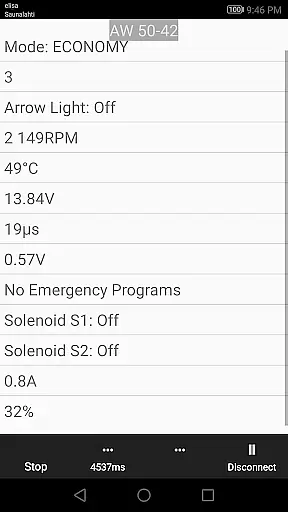
850 OBD-II is a specialized diagnostic tool designed for Volvo vehicles from 1996-2000, with extended support for other models. This app works seamlessly with ELM327 Bluetooth, WiFi, or USB dongles to provide advanced vehicle diagnostics and programming capabilities beyond standard OBD-II functions. It allows users to directly read individual modules, helping pinpoint issues more accurately.
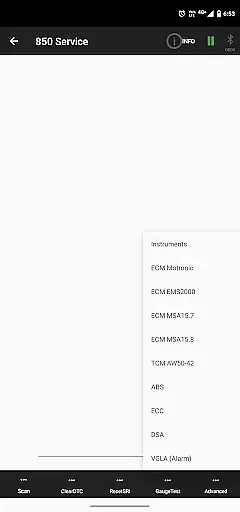
The application's comprehensive module coverage includes ABS, TCM, ECM, ECC, and more, making it an invaluable tool for both professional mechanics and car enthusiasts. With its ability to reset service lights, clear fault codes, and display real-time sensor data, 850 OBD-II offers practical solutions for maintaining vehicle health and performance.
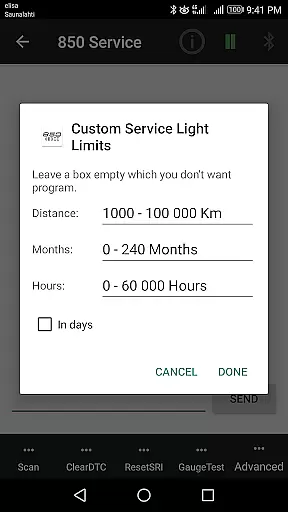
850 OBD-II stands out with its extensive feature set tailored for Volvo owners. The app provides advanced functionalities such as Service Light (SRI) reset, Fault Code (DTC) reading and clearing, and live real-time sensor data monitoring. These features allow users to gain deeper insights into their vehicle's performance and quickly address any issues that arise.
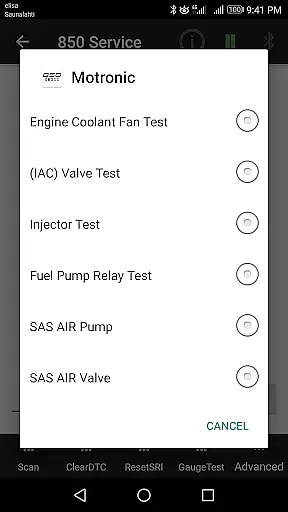
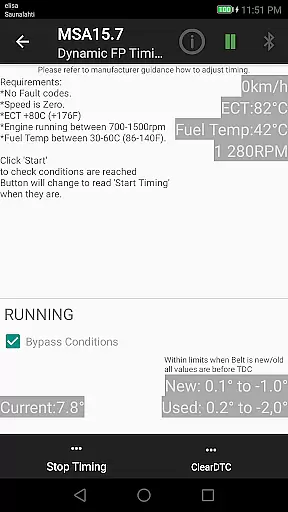
One of the key highlights is the app's capability to program and adjust module parameters via advanced commands. Whether it's testing injectors in Motronic M4.4 or performing TDi Fuel Pump Dynamic Timing in MSA15.7, the app empowers users with precise control over their vehicle's systems. Additionally, the app supports reading basic OBD-II information and translating Volvo-specific DTCs, ensuring comprehensive diagnostic coverage.
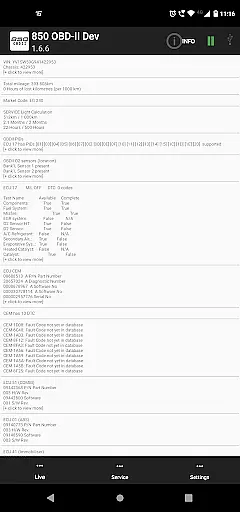
Accessing detailed vehicle information is crucial for effective diagnostics and maintenance. The 850 OBD-II app excels in this area by providing comprehensive data about individual modules within supported Volvo models. This includes reading part numbers of ECUs, configurations, and even advanced commands like Injector testing and TDi Fuel pump Dynamic Timing.
The app goes beyond standard OBDII capabilities to offer users specific insights into their vehicle's systems. For example, it can read Volvo-specific DTCs across multiple systems such as ABS/BCM, SRS (airbag), Instrument panel (COMBI), and various engine management systems. This level of detail helps both professional mechanics and car enthusiasts pinpoint issues more accurately.
Users benefit from the ability to access live scrolling values from different vehicle modules. Whether monitoring real-time sensor data from the ABS system or checking parameters from the ECC (air conditioning) module, the app provides a complete picture of the vehicle's operational status. This functionality enables proactive maintenance and more informed repair decisions.
By supporting multiple communication protocols and offering extensive module coverage, the app ensures that users can retrieve the most relevant and up-to-date information about their vehicle's condition. This comprehensive approach to vehicle data collection makes the 850 OBD-II app an invaluable tool for maintaining and troubleshooting Volvo vehicles.
While primarily focused on vehicle diagnostics, the 850 OBD-II app maintains excellent price transparency regarding its capabilities and requirements. The app clearly states its compatibility with ELM327 adapters (version 1.4b or greater) and outlines which vehicle systems are accessible through the interface. This upfront information helps users understand what they need to effectively use the application.
The description explicitly lists supported vehicle models and years, including 850/900 series, S40/V40 models up to 2004, and P2 platform vehicles from 2000 onwards. By detailing these specifications, the app prevents potential buyers from purchasing an incompatible product and ensures they know exactly what to expect from their investment.
Furthermore, the app provides clear information about its main features, such as Service Light reset, Fault Code reading, and Live data monitoring. Each feature is explained in detail, allowing users to understand the full scope of functionality before downloading. The inclusion of advanced commands and component tests is also well-documented, demonstrating the app's value proposition.
All necessary permissions and hardware requirements are clearly stated, including Bluetooth and Wi-Fi support conditions. This transparent approach to pricing and feature disclosure ensures that users can make informed decisions about whether the app meets their diagnostic needs without any hidden surprises or additional costs.
User-friendly interface
Comprehensive module support
Real-time sensor data
Advanced programming options
Regular updates based on feedback
Requires specific hardware (ELM327)
Limited to compatible vehicle models
Some features may not work with all firmware versions
No warranty for accuracy
Potential bugs due to limited testing scope

Ultimate OBD2 Car Scanner: Diagnostics, Service and Modification Tool
 4.30
4.30
Taximeter; the professional's choice
4.30
Theme for Car Launcher
4.2
Monitor specific TOYOTA parameters by adding this plugin to Torque Pro.
2.00
Discover new and used cars in Syria easily! Browse ads and connect with sellers.
3.70
Boost profits and hit your goals faster with GigU's amazing tools for gigworkers
4.00
Car Sounds Engine Sounds app welcomes Auto Lovers to feel Car Simulator Sound
4.20
1M+ high-quality auto parts at your fingertips. Fitment guaranteed.
4.70
Quick and easy car diagnostics to get you the right fix.
4.70
Lexus app currently supports 2010 or newer vehicles (2018 or newer for Hawaii).
4.80
Practice the drills within MotoJitsu Master Riding Program Volume 1 & 2!
4.80
Get price alerts, vehicle history details and more for cars near you!
4.50
On the CarShield app, you can view contracts, make payments, & request roadside.
4.40
Instant diesel savings. No credit checks or fees. Nationwide growing network.
4.40
A smarter way to park and reserve your spot ahead of time.
4.40
OBD diagnostics, Live Data, DPF regeneration for BMW
4.00
Simplify your drive
3.90
BlueDriver® is a Premium Diagnostic OBD2 Scan Tool. www.BlueDriver.com
3.90
Mobile Phone Parking - So easy to park
3.70


User Reviews