
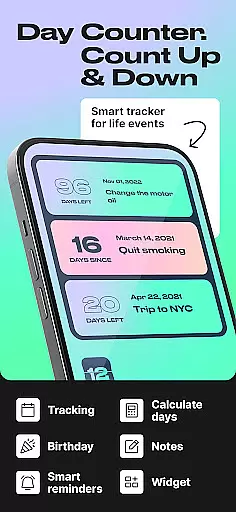
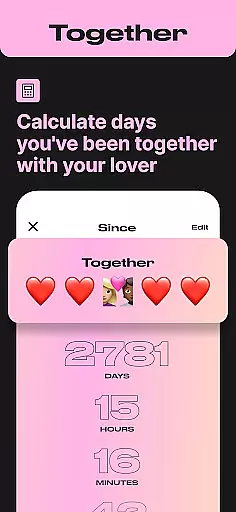
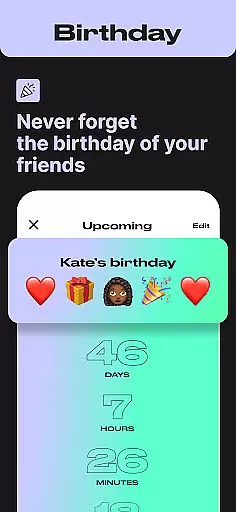
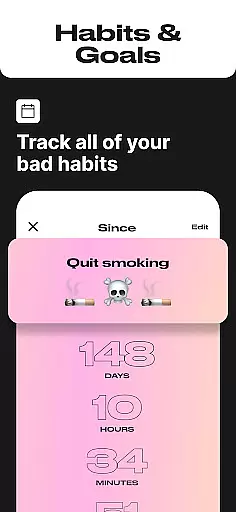
Day Counter is an intuitive Events app designed to help users effortlessly track important dates and milestones. With its dual functionality of count-up and countdown modes, the app allows you to monitor both upcoming events and past memories with ease. Whether it's personal goals, work deadlines, or special occasions like birthdays and anniversaries, Day Counter ensures you never miss a significant moment.
The app stands out with its unlimited counters feature, enabling users to manage multiple events simultaneously. Its clean and minimal design provides a distraction-free experience while custom notifications ensure timely reminders. From tracking sobriety milestones to monitoring habit streaks, this versatile app proves invaluable for both productivity and personal growth.
Use Day Counter as your personal productivity assistant to stay organized at work or in daily life. The app's ability to review past events by week, month, or year makes it perfect for long-term goal tracking. Its practical applications extend from professional time management to celebrating personal achievements, making it an essential tool for anyone looking to take control of their schedule.
Day Counter offers a comprehensive set of features that make event tracking both efficient and enjoyable. The app's dual-mode functionality allows users to switch between counting up for ongoing events and counting down for approaching deadlines. This flexibility extends to its unlimited counters capability, where you can create and manage as many events as needed, from work projects to personal celebrations.
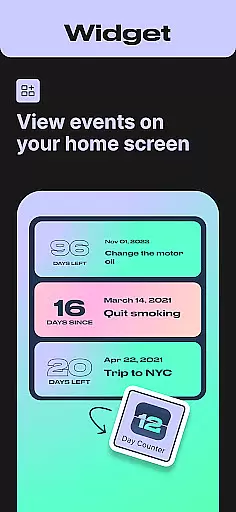
One of the standout features is the customizable notification system. Users can set personalized alerts for each counter, ensuring they never miss important milestones. The app also includes various display options through widgets, allowing quick access to your most crucial countdowns directly from your home screen. These widgets come in different sizes and styles to suit individual preferences.
For those focused on productivity, Day Counter provides detailed analytics of past events. You can review your time management patterns by week, month, or year, helping you optimize future planning. The app's minimalistic design ensures these powerful features are presented in a user-friendly interface, making it accessible for both casual users and productivity enthusiasts alike.
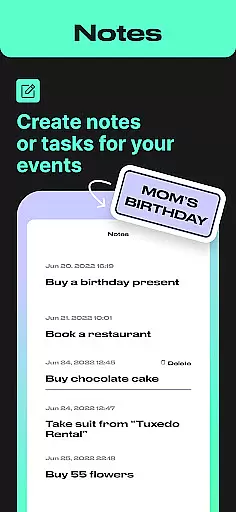
Task creation and detail customization are essential features for any event management app. Day Counter excels in this area by offering users the ability to create unlimited counters for various events, from personal milestones to work deadlines. Each counter can be customized with specific details such as event names, dates, and even personalized notifications.
The app's intuitive interface allows users to easily set up countdowns or count-ups for any occasion. Whether it's tracking days until a vacation, monitoring progress on a new habit, or celebrating sobriety milestones, Day Counter provides the tools needed to manage these tasks efficiently. The clean and minimal design ensures that users can focus on their goals without distractions.
By enabling detailed customization options, Day Counter empowers users to tailor each counter to their unique needs. This flexibility not only enhances user engagement but also increases the likelihood of achieving personal and professional objectives. With features like custom notifications and widgets, staying on top of important events has never been easier.
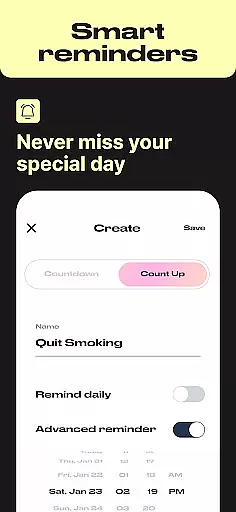
Reminder settings play a crucial role in ensuring that users never miss an important milestone or event. Day Counter offers robust reminder functionalities that allow users to set personalized notifications for each counter they create. These reminders can be tailored to notify users at specific times leading up to or following an event, ensuring timely awareness and preparation.
The app supports multiple reminder configurations, giving users the flexibility to choose how and when they receive alerts. Whether it's a birthday countdown, a work deadline, or a personal goal, Day Counter ensures that users stay informed and prepared. The ability to customize notification preferences adds an extra layer of convenience and reliability to the overall user experience.
With its comprehensive reminder system, Day Counter helps users maintain focus on their long-term goals and daily habits. By providing timely and relevant alerts, the app enhances productivity and supports better time management. Users can trust that they will always be reminded of significant dates and events, allowing them to celebrate achievements and prepare for upcoming milestones effectively.
User-friendly interface
Unlimited event tracking
Customizable notifications
Clean and minimal design
Versatile functionality
Limited advanced analytics
No team collaboration features
Premium features locked behind paywall
Occasional widget refresh issues
Basic customization options

The calendar app in this 2026 year see all dates.
 4.20
4.20
Browse events, find transportation, keep up with the latest news from your team
4.5
Create invitation cards for birthdays, weddings, Christmas and more.
4.80
The KRUU app - plan, celebrate, remember
4.80
The world's largest selection of tickets is now at your fingertips
3.90
ETH Mining provides secure way to mine Ethereum & earn ETH in Cloud mining app
3.50
Meet people over dinner
4.40
Discover events, experiences, and things to do near you - Anytime, Anywhere!
4.70
Discover events & experiences in NYC, LA, Chicago, DC, Miami and more!
4.70
Invitation card maker for birthday party & Wedding. Digital greeting card editor
4.90
Clubs, Festivals, Discounted Tickets, Guest Lists & VIP Tables
4.90
Beautiful invitation cards + easy RSVP tracking for any event. Design Invites.
4.80
The Ultimate Tournament Hub
4.70
Greeting card maker with photos best app| Birthday cards| All wishes eCards FREE
4.50
Connect with an ecosystem of 5M+ eventgoers and organizers.
4.50
Invitation Card Maker, Design & share wedding, birthday & party invites fast
4.40
Rocket Monkey - Space rocket launch schedule for launch sites around the world
4.20
Instant photo sharing for every occasion
3.80
No invest, Easy way to earn USDT through crypto cloud mining
3.80


User Reviews