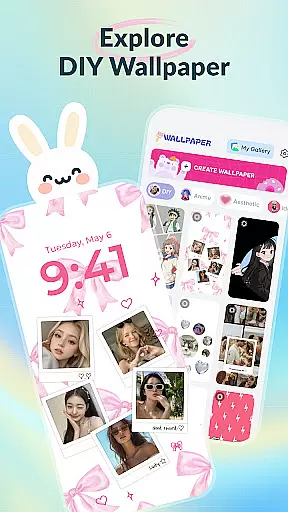
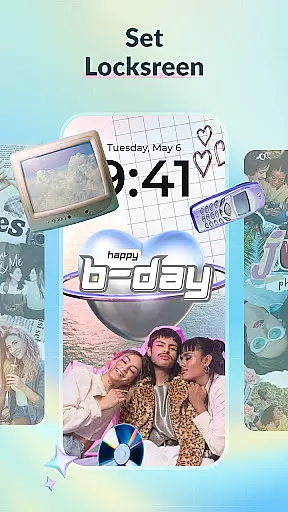
DIY Wallpaper & Collage Craft is a creative app that allows users to design personalized wallpapers and collages. With features like DIY Frame Wallpaper, Collage Wallpaper Craft, and a Curated Wallpaper Gallery, it offers tools for creating unique phone backgrounds.
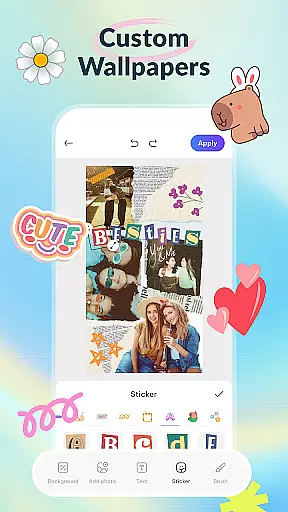
The app provides dynamic and static frames, custom backgrounds, and stickers in the DIY Frame section. The Collage Wallpaper feature lets users freely import photos, add stickers, text, and artistic filters. Additionally, the Curated Wallpaper Gallery offers trendy and diverse ready-to-use wallpapers.
This app is perfect for those looking to express their individuality through their phone's appearance, offering endless possibilities for customization.
DIY Wallpaper & Collage Craft stands out with its powerful customization features. Users can create live or static frame wallpapers using their photos and an extensive library of frames and templates.
In Collage Wallpaper Craft, users experience complete creative freedom. They can import unlimited photos, layer them, and enhance their creations with stickers, text, drawing tools, and artistic filters, allowing for truly unique designs.
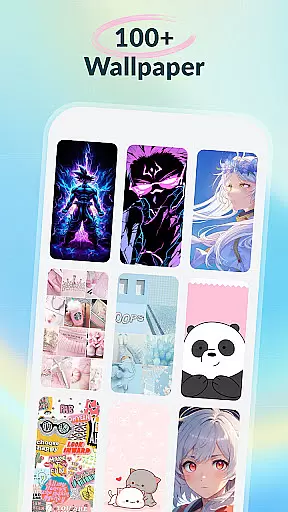
The Curated Wallpaper Gallery is regularly updated with fresh, trendy wallpapers across various themes such as aesthetics, anime, animals, dark mode, and fun categories, ensuring there's something for everyone.
Customization is at the heart of DIY Wallpaper & Collage Craft, offering users a vast array of options to personalize their device's appearance. With features like DIY Frame Wallpaper, users can choose from dynamic and static frames, custom backgrounds, and an extensive sticker library to create unique designs.
The app allows seamless photo importation, ensuring that personal images fit perfectly within chosen templates. Users can experiment with colors, patterns, and textures to set the mood for their wallpapers, making each creation truly one-of-a-kind.
In addition to frames, the app provides creative freedom through its Collage Wallpaper Craft section. Here, individuals can freely import unlimited photos, arranging, resizing, rotating, and layering them as envisioned. This level of customization ensures that every user's collage wallpaper is a distinct reflection of their personality and style.
DIY Wallpaper & Collage Craft excels in theme compatibility, ensuring that all created wallpapers and collages are fully compatible with various devices and screen sizes. The app offers a curated gallery featuring diverse themes such as aesthetic vibes, anime magic, adorable animals, dark mode delights, and fun-filled designs.
Users can explore this gallery to find trendy, ready-to-use wallpapers that cater to different preferences and moods. Each theme is designed to be visually cohesive and optimized for display across multiple devices without losing quality or impact.
With regular updates incorporating the latest trends from mobile culture, including TikTok aesthetics and meme crazes, DIY Wallpaper & Collage Craft guarantees that users always have access to fresh and relevant content. This commitment to staying current enhances the overall experience by providing endless possibilities for personalization.
User-friendly interface
Extensive sticker library
Versatile customization options
Frequent updates with new content
Completely free to use
May overwhelm new users
Design tools could be complex
Limited advanced photo editing
Some features might require learning
Performance may vary on devices

A Colorful and Minimal icon pack in an Outline Style - Over 13,600 icons!
 4.70
4.70
3D, live, and moving wallpapers & themes in 4K and HD for your device.
4.50
Wallpaper HD 4K Live - Thousands of high-quality Anime backgrounds for you.
4.80
Unique Fonts, typefaces and stylish text. Fonts for Instagram, Whatsapp & others
4.20
Turn text & photos into stunning AI videos, art, and creative visual stories.
4.50
Zip lock screen with magic wallpaper to decorate your phone with fun zipper lock
4.60
Design your screen with unique, vibrant clocks
3.80
set a new experience for the Android mobile phone
4.20
Create stunning widgets with Widget 2026: Aesthetic Widgets for Android!
4.60
Shimeji adds cute animated characters to your screen, lively and fun.
4.70
Classic analogue watch face. For wear os devices.
4.60
Yandex Browser — stylish and secure, with voice search and data compression
4.40
A light in the dark, a unique style and an andless cutomization!
4.30
More than 3000+ themes and 9000+ wallpapers for everybody!
4.10
Realistic animated snow on your wrist, with 10 images landscapes to choose from
4.00
Crystal-clear, square icon provides a sleek and sophisticated visual upgrade
4.00
Adorable pets roam and play right on your phone screen!
3.30
Struggling to find apps? Use this app to locate and open any app on your phone!
2.20
Prank your friends with realistic broken screen and cracked HD effects!
4.2


User Reviews