
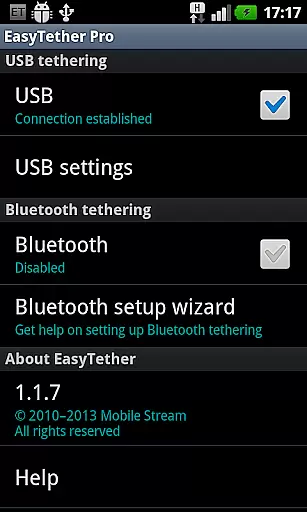
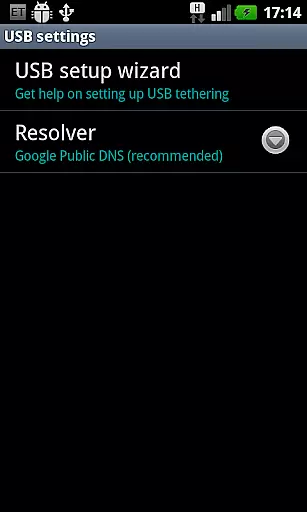
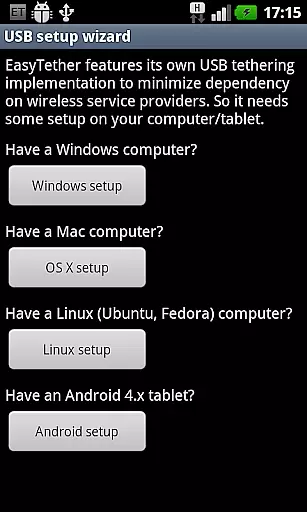
EasyTether Pro is a premier communication app designed to share your smartphone's Internet connection with other devices such as computers or tablets. It offers versatile tethering options including USB and Bluetooth, ensuring compatibility across Windows, Mac OS X, Linux systems, and Android 4.x tablets. The app stands out by not requiring root access or additional tethering plans, making it an accessible solution for users who need reliable connectivity on the go.
With support for gaming consoles like PS3, Xbox, and Wii through Internet connection sharing, EasyTether Pro extends its utility beyond traditional computing devices. Whether you're working remotely or enjoying entertainment, this app provides a seamless experience without recurring charges. Its one-time fee structure and broad device compatibility make it a valuable tool for enhancing productivity and connectivity in various scenarios.
EasyTether Pro boasts an array of features that cater to diverse tethering needs. The app supports both USB and Bluetooth tethering, allowing users to connect their devices via their preferred method. For USB connections, it is compatible with Windows, Mac OS X, and Linux operating systems, while Bluetooth tethering works seamlessly with Windows computers and Android 4.0.3+ tablets. This flexibility ensures that users can maintain connectivity regardless of their setup.
One of the standout features of EasyTether Pro is its ability to function without root access or specialized tethering plans, democratizing Internet sharing for all users. Additionally, the app facilitates Internet connection sharing with gaming consoles such as PS3, Xbox, and Wii through Windows or Mac systems. With a one-time payment model, users can enjoy unlimited tethering without worrying about hidden fees or carrier restrictions, providing exceptional value for those seeking consistent and reliable connectivity solutions.
Real-time messaging speed and reliability are crucial for seamless communication. EasyTether Pro excels in this area by ensuring that your internet connection is shared instantly and consistently between devices.
The app uses advanced tethering technology to maintain a stable connection, whether through USB or Bluetooth. This ensures that there are no interruptions while you're working or gaming on your connected device.
Users can expect fast setup times with the intuitive wizard guiding them through each step. Once configured, the connection remains robust, providing reliable access to the internet without noticeable latency issues.
This level of performance makes it ideal for activities requiring constant connectivity like online gaming or video conferencing, where delays could disrupt the experience significantly.
Media sharing support is an essential feature for users who need to transfer files between their mobile device and computer or tablet. EasyTether Pro facilitates this process efficiently by supporting various types of media transfers over its tethered connections.
Whether you're transferring documents, images, or videos, the app ensures that these files move smoothly across devices without loss of quality or speed. Its compatibility with multiple operating systemsu2014including Windows, Mac OS X, Linux, and Androidu2014makes it versatile for different user needs.
In addition to basic file transfers, EasyTether also supports more complex tasks such as PS3, Xbox, and Wii tethering via Internet connection sharing features on compatible platforms. This broadens its utility beyond simple web browsing to encompass entertainment purposes as well.
Overall, EasyTether's comprehensive media sharing capabilities make it a valuable tool for anyone looking to enhance their digital workflow or enjoy multimedia content across multiple screens seamlessly.
User-friendly interface
No root access required
One-time payment
Broad device compatibility
Reliable connectivity
Limited free version
Carrier restrictions may apply
Bluetooth tethering limited to specific devices
Setup wizard could be more intuitive
Removal of previous versions necessary

We’re taking the yada yada out of wireless—now we’ve taken it out of your app.
 4.70
4.70
Secure Messaging App to Enhance Messenger Texting Experience and Organize SMS.
3.50
Quickly and easily identify and block unknown callers
3.70
Caller ID App! Add names & photos to unknown calls & Call Recording
4.40
RemoteHams.com Android RCForb Client Pre-Release
4.30
SMS Messenger is a lightning-fast messaging app.
4.20
BE PRIVATE
Anonymous. No Trace. Fast.
4.20
Fast internet with AI, Adblock & VPN. Browse on a safe, incognito web browser.
4.70
Share the moment!
4.10
Identify unknown numbers, block spam calls, customize calls with cool themes.
4.60
Manage BoostMobile Account
4.60
Faster version of Messages. Messenger for your contacts.
4.50
Call Blocker app: Identify unknown callers, block spam calls, fraud & robocalls
4.30
Simplify texting with Messages SMS, offline messaging, themes & smart tools!
4.30
Use this SMS app standalone or as a TREK: Total Interface companion.
4.30
Messenger app for faster and simpler SMS text messaging, and personalized themes
4.10
Measure BHP, Torque & 0-60 Clear car OBD faults View engine data in Google Earth
4.00
Manage and Fund Calling Accounts and Schedule and Join Video Sessions
3.60
Fast, Simple And Secure Application That Provides SMBv3 Server On Your Device
3.30


User Reviews