
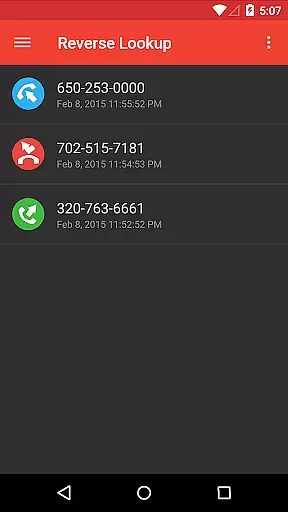
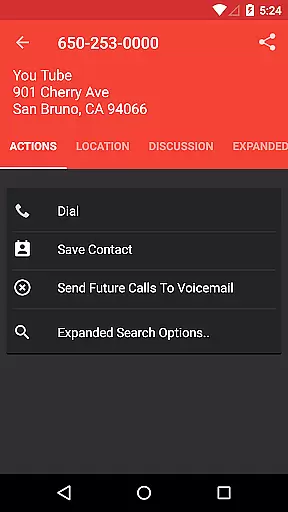
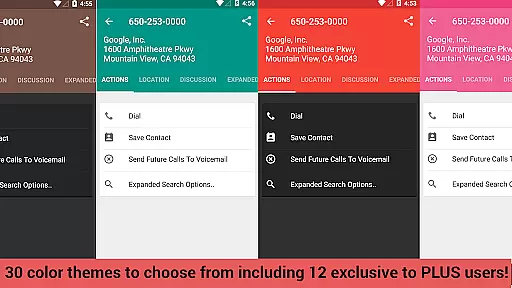
Reverse Lookup+ is a powerful communication tool designed to help users identify unknown callers and protect themselves from spam calls. The app provides detailed caller information by accessing publicly available data published by phone companies, including the caller's location when possible. This premium version is completely ad-free, offering uninterrupted usage while directly supporting ongoing development efforts.
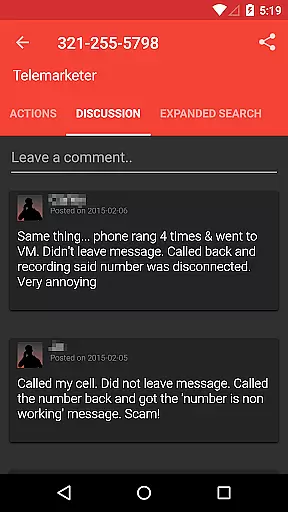
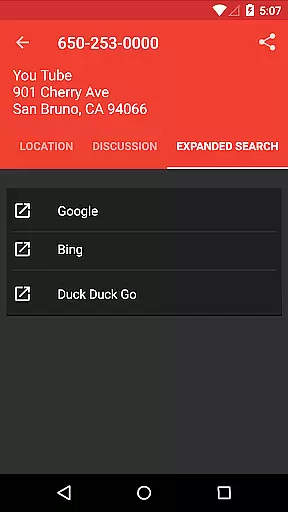
In addition to basic caller identification, Reverse Lookup+ offers advanced features such as community comments for shared insights, one-tap Google search expansion, and easy contact saving. Users can also map caller locations and create 'send to voicemail' contacts for known spammers. The application maintains user privacy through transparent permission usage and ensures all features work seamlessly across supported Android devices.
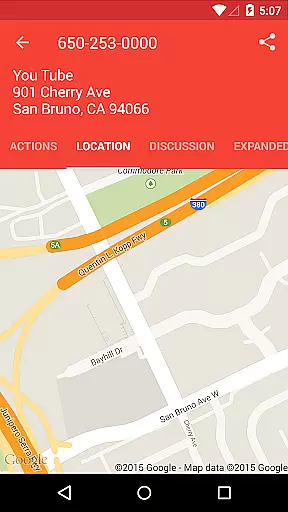
Reverse Lookup+ distinguishes itself through its comprehensive feature set that goes beyond basic caller ID functionality. The app's community-driven approach allows users to view and contribute comments about specific numbers, creating a valuable knowledge base for identifying potential spam callers. Its integration with popular search engines enables quick information expansion, while the built-in mapping feature visualizes caller locations based on available data.
The application implements smart filtering using device contacts and call logs, ensuring relevant notifications only for truly unknown numbers. Advanced customization options include setting preferred notification behaviors and managing 'send to voicemail' preferences. All these features are delivered through a robust architecture that requires minimal permissions, focusing primarily on essential functions like internet access for database lookups and basic phone state monitoring for real-time notifications.
Real-time messaging speed and reliability are crucial for effective communication applications like Reverse Lookup+. This app ensures that users receive instant notifications when unknown or suspicious calls come in, allowing them to take immediate action. The app's integration with your phone's system enables it to monitor incoming calls and cross-reference them against its database efficiently.
The application leverages internet connectivity to access lookup databases swiftly, ensuring that the information provided is both timely and accurate. By filtering out known contacts and only alerting you to unfamiliar numbers, it minimizes unnecessary interruptions while maximizing security. This selective notification process enhances the overall reliability of the messaging experience by focusing on what truly matters to the useru2014identifying potential threats or nuisances quickly.
Moreover, Reverse Lookup+ offers customizable settings so users can tailor how they receive messages based on their preferences. Whether opting for real-time alerts during a call or post-call summaries, the app adapts to individual needs without compromising performance. Such flexibility not only improves user satisfaction but also reinforces trust in the appu2019s ability to deliver essential communications promptly and dependably.
Media sharing support within communication apps such as Reverse Lookup+ extends beyond simple text-based interactions by enabling richer forms of engagement. While primarily designed for identifying unknown callers and blocking spam, this app incorporates features that facilitate media sharing indirectly through enhanced caller insights. For instance, users can map a caller's location if available, providing visual context alongside traditional call details.
In addition to geographical data, Reverse Lookup+ allows users to expand searches via popular search engines like Google with just one tap. This feature enriches the media-sharing aspect by integrating external resources seamlessly into the appu2019s interface. Users benefit from accessing diverse information sources without leaving the application, thus streamlining their investigative efforts regarding suspicious calls.
Furthermore, the app supports saving caller details directly as contacts, which may include profile pictures or other relevant media attached to those entries. By offering these comprehensive tools, Reverse Lookup+ empowers users not only to manage unwanted communications effectively but also to enrich their contact lists with valuable supplementary information. Ultimately, this multifaceted approach enhances the overall utility and appeal of the app, making it an indispensable tool for modern mobile communication management.
Comprehensive caller details
Active community reporting
Ad-free experience
Real-time spam protection
Transparent permission usage
Limited cellphone data
No GPS tracking
Premium price point
Occasional outdated information
Device compatibility issues

Tether to Windows, OS X, Linux PCs or Android tablets. No root. No tether fees.
 3.90
3.90
We’re taking the yada yada out of wireless—now we’ve taken it out of your app.
4.70
Secure Messaging App to Enhance Messenger Texting Experience and Organize SMS.
3.50
Enjoy secure messaging & calling. Safe Messenger: group chats, calls, messages.
4.20
Messenger for SMS - texting message app, faster, simpler & safer, for you.
4.70
Message and video call your family and friends in HD!
3.80
Send SMS and chat messages easily with a fast text messaging app for Android.
4.10
Faster version of Messages. Messenger for your contacts.
4.50
Smart and simple anti-wiring application - IMSI-catchers catcher
4.40
A browser that does more than load page, like keeping your privacy safe.
4.70
Identify unknown numbers, block spam calls, customize calls with cool themes.
4.60
Welcome to the future of phone service.
4.60
Build your web browser around you with private search, and more.
4.60
Create a secure hotspot on-the-go with Portable WiFi - Mobile hotspot.
4.40
RemoteHams.com Android RCForb Client Pre-Release
4.30
Share the moment!
4.10
Caller ID, Spam Call & SMS Blocker
3.80
Pure modern IRC experience for Android
3.70
Official NDI app: turn your phone into a professional live-streaming IP camera.
3.20


User Reviews