

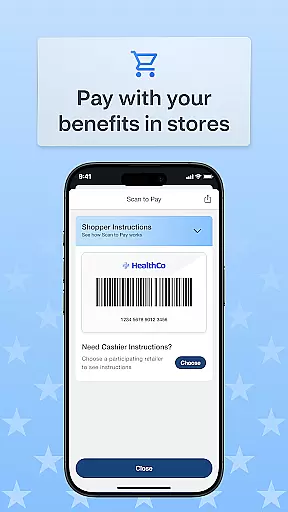
OTC Health Solutions is a mobile application designed to provide users with convenient access to their over-the-counter (OTC) health benefits. The app enables secure management of OTC funds and activities, allowing users to utilize their benefits at CVS stores or through online shopping.
With real-time updates on fund balances and transaction history, users can effectively track and control their health benefits. Whether shopping in-store or ordering for home delivery, the app ensures a seamless experience in managing personal healthcare needs.
This application is particularly useful for individuals who frequently use OTC medications and want to efficiently manage their health benefits while staying informed about their spending and available resources.
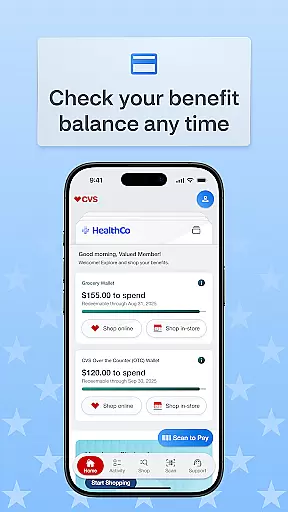
The OTC Health Solutions app offers a comprehensive set of features tailored to enhance user experience in managing health benefits. One key feature is the real-time balance updates which allow users to stay informed about their fund status and recent activities.
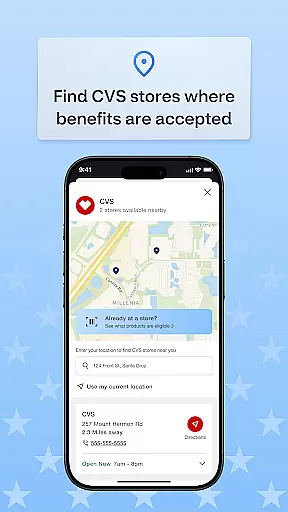
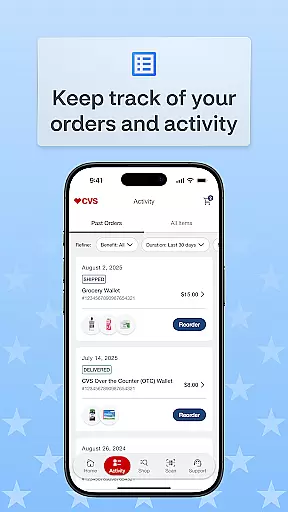
Users can also view detailed transaction histories, enabling them to track how their benefits are utilized and monitor the status of their orders. Additionally, the app provides tools to locate nearby CVS stores where benefits can be redeemed in-store or used for online purchases.
These features collectively ensure that users have flexible and convenient options for accessing their benefits, whether they choose to shop in person, order online, or opt for home delivery services.
Personalized planning in the OTC Health Solutions app allows users to tailor their health and over-the-counter benefits according to their specific needs. This feature is crucial for ensuring that individuals can maximize their benefits while maintaining control over their health choices.
The app provides real-time balance updates on funds and activity, enabling users to make informed decisions about their purchases. By having access to up-to-date information, users can plan their expenses and benefit usage effectively, ensuring they never overspend or miss out on available resources.
Additionally, the ability to view transaction history and track order status empowers users to monitor their spending patterns and manage their benefits more efficiently. This level of transparency not only enhances user satisfaction but also promotes responsible financial behavior.
Ultimately, personalized planning within the OTC Health Solutions app offers a significant advantage by providing tailored recommendations and insights that help users optimize their health benefits, leading to better overall wellness management.
Progress visualization in the OTC Health Solutions app plays a vital role in helping users understand how they are utilizing their health and over-the-counter benefits. By presenting data in an easily digestible format, this feature ensures that users can quickly grasp their current status and make necessary adjustments.
One key aspect of progress visualization is the presentation of transaction histories, which allows users to see a detailed record of their past activities. This includes tracking orders placed both online and in-store at CVS locations, giving users a comprehensive overview of their spending habits.
Moreover, the app's ability to display real-time balance updates adds another layer of clarity, as users can visualize exactly how much of their allocated funds remain available. This immediate feedback loop encourages proactive management of oneu2019s benefits, fostering a sense of accountability and control.
In summary, progress visualization within the OTC Health Solutions app enhances user engagement by offering clear, actionable insights into benefit utilization, ultimately contributing to improved health outcomes and financial prudence.
User-friendly interface
Secure benefit management
Real-time fund tracking
Convenient store locator
Multiple shopping options
Limited to CVS stores
Requires internet access
No offline functionality
Potential privacy concerns
Dependent on third-party services

Weight loss app: home workout for women to lose weight & burn calories.
 4.80
4.80
Create powerful subliminal audio with custom affirmations and background music.
4.00
Power-lifting, weightlifting and Wendler 531 app to track your workout program.
4.90
HRV4Training helps you optimize goals and improve performance. No sensors needed
3.30
Track heart rate & HRV in 30s! Get live health insights and anomaly alerts
4.40
Monitor, analyze, track, and convert blood sugar & help you control diabetes.
4.10
Download MadMuscles to start your positive body transformation!
4.30
GloryFit is a companion app for the smart bracelet.
3.60
Lazy home workouts with your virtual fitness coach for weight loss.
4.30
Easy reconstitution calc for mixing peptides and creating protocols
4.70
When the night comes, we prepare your eyes for deep, sweet dreams
4.70
Effortlessly and naturally release anxiety by harnessing the power of your brain
4.60
Get lasting results with Chair Yoga, Wall Pilates, and Walking workouts!
4.60
The simplest way to track your 21 Day Program containers, exercises, and water.
4.50
FODMAP, Gluten, Allergy, Vegan
4.50
Chair Workout: Women's Edition for safe, flexible, and personalized fitness.
4.40
beat yesterday.
4.00
Your Health Has Met Its App (℠)
3.90
Make sense of your health data.
3.80


User Reviews