
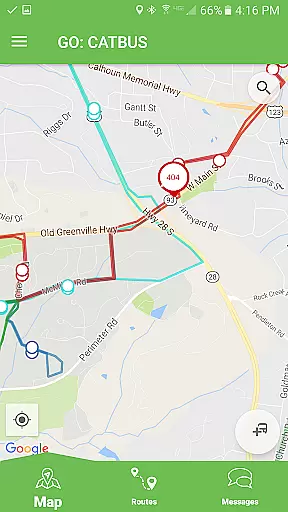
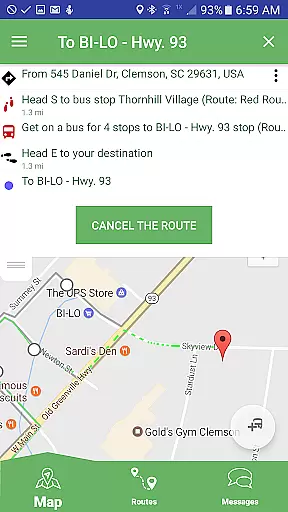
Passio GO! is a comprehensive transit tracking application designed to enhance the public transportation experience for users. The app allows you to track and view all available routes simultaneously, providing real-time updates on bus locations. With its intuitive interface, users can easily select individual routes and navigate to specific stops or follow a particular bus. This ensures that commuters are always informed about their transportation options.
In addition to route tracking, Passio GO! offers detailed schedule information, ensuring that users know exactly when the next bus will arrive at their stop. The app also provides important details about each stop location, helping users plan their journeys more effectively. One of the standout features is the ability to receive alerts about service changes or delays, as well as directly provide feedback to improve the system. This makes Passio GO! an invaluable tool for anyone relying on public transit for their daily commute.
Passio GO! boasts a variety of features that make it an essential app for public transit users. One of the key functionalities is the ability to track multiple routes at once, giving users a comprehensive overview of the transit network. This feature is particularly useful in urban areas where multiple routes may be operational simultaneously. Users can zoom in on specific routes, accessing detailed information about each one, including schedules and stop locations.
The app also excels in user-specific navigation. Whether you need to reach a particular stop or follow a specific bus, Passio GO! provides accurate directions and real-time updates. It displays the next bus arrival times and offers insights into each stop's amenities and accessibility. Additionally, the alert system keeps users informed about any disruptions or changes in service, while the feedback mechanism allows them to report issues or suggest improvements directly through the app.
Another notable feature is the app's user-friendly design, which simplifies the process of managing daily commutes. By integrating real-time data with user-centric tools, Passio GO! ensures that commuters have all the information they need at their fingertips. This combination of real-time tracking, detailed scheduling, and direct communication channels sets Passio GO! apart from other transit apps.
Access to detailed vehicle information is crucial for users who want to make informed decisions about their transportation needs. Passio GO! provides comprehensive data on all available routes, allowing users to track and view multiple transit options simultaneously. This feature ensures that commuters have a clear understanding of their travel choices.
The app enables users to select individual routes and access specific details such as schedule information and real-time bus locations. By offering insights into the next arriving bus and details about stop locations, Passio GO! empowers users with the knowledge needed to plan their journeys effectively. The ability to navigate directly to specific stops or follow an individual bus enhances the overall user experience.
With Passio GO!, users benefit from receiving timely alerts and the option to provide direct feedback. This interactive approach not only keeps passengers informed about any changes or delays but also allows them to contribute to improving the service. Detailed vehicle information combined with user engagement creates a robust platform for efficient transit tracking.
Price transparency in transportation apps like Passio GO! is essential for users to understand the cost associated with their travel plans. Although the app does not focus on pricing, it provides valuable information that can influence a user's decision on which route to take based on schedules and availability. This indirect approach to cost management helps users optimize their travel budget.
Passio GO! offers features such as viewing all routes at once, selecting individual routes, and navigating to specific stops. These functionalities allow users to compare different transit options efficiently. While the app may not display explicit prices, the ability to see schedule information and track buses contributes to a transparent travel planning process.
By providing real-time updates on bus arrivals and stop locations, Passio GO! ensures that users are well-informed about their transit choices. The inclusion of alerts and feedback mechanisms further enhances the sense of transparency and trust. Users can rely on the app to make cost-effective decisions without hidden fees or surprises during their commute.
User-friendly interface
Real-time tracking
Detailed schedule info
Alert notifications
Direct feedback option
Limited to transit
Depends on data accuracy
No offline mode
Occasional bugs
Region-specific

OBD1 ECMs application. Data log or tune directly from your phone or tablet!
 4.60
4.60
Theme for Car Launcher
4.5
Better fuel to help keep you on the road
3.20
DMV Test Pro offers all the updated FREE DMV tests online.
4.60
Digital Car Key/Launcher, Screen Mirror, Android Dashboard, Remote Wireless Link
4.40
Control maps, media and messaging, with the Google Assistant while you drive
4.10
Car Values, Research and More
4.80
Find, search, and browse 40,000+ used cars, SUVs, and trucks.
4.50
Shop, finance, or sell today.
4.80
Take Control of Your Car
4.80
Get price alerts, vehicle history details and more for cars near you!
4.50
On the CarShield app, you can view contracts, make payments, & request roadside.
4.40
A smarter way to park and reserve your spot ahead of time.
4.40
AI Powered - Automotive Mechanic Assistant
4.30
AlfaOBD software for Fiat Group cars native diagnostic
3.70
Wonder how much horsepower and torque your car/truck makes? Look no further.
3.40
The Smarter Way Forward
3.30
O'Reilly Pro will streamline your parts lookup and ordering process!
3.20
Earn and save with Fuel Rewards®
3.20


User Reviews