
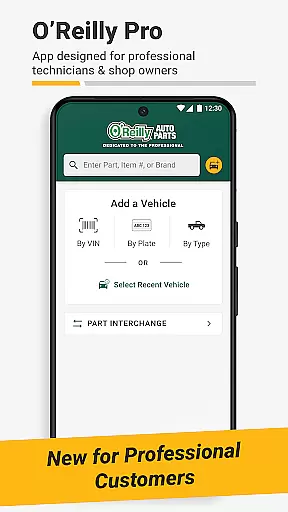
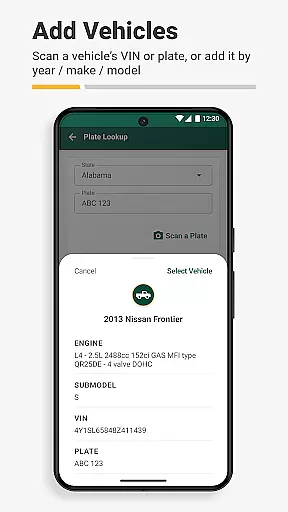
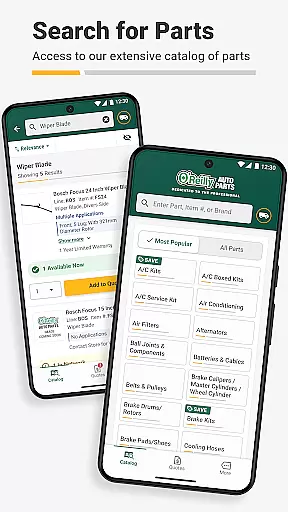
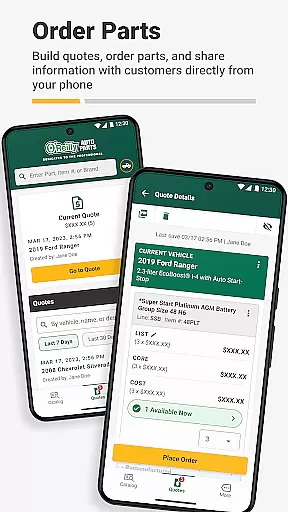
O'Reilly Pro is a comprehensive mobile application tailored for automotive repair professionals, streamlining vehicle service and parts management. The app offers efficient tools such as VIN scanning and license plate decoding, enabling quick identification of vehicles and seamless parts lookup. With real-time inventory access, users can order parts for delivery or pickup, directly from their mobile devices.
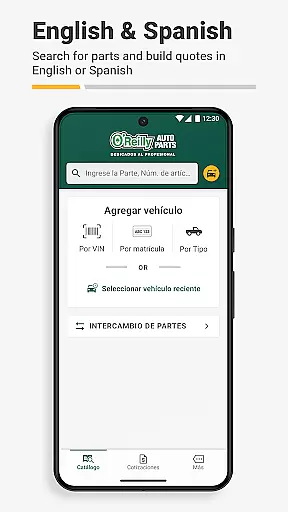
Designed to enhance productivity, O'Reilly Pro supports both English and Spanish languages, adapting to user preferences automatically. It features professional support options, quote generation for customers, and an interchange system for cross-referencing part numbers. These capabilities ensure that auto repair shop owners, service writers, and mechanics can focus more on their customers while managing their operations efficiently.
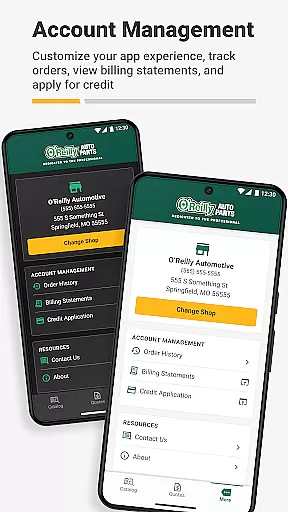
The app's value lies in its ability to integrate various aspects of automotive repair management into one platform. By providing instant access to a comprehensive parts catalog, simplifying ordering processes, and offering professional account management, O'Reilly Pro significantly reduces the time spent on administrative tasks. This allows automotive professionals to dedicate more time to their core services, ultimately improving customer satisfaction and business efficiency.
O'Reilly Pro stands out with its robust feature set designed specifically for automotive professionals. One of its key features is the VIN scanner and license plate decoder, which simplifies vehicle identification by quickly decoding essential information. This functionality not only saves time but also enhances accuracy in parts ordering and service management, ensuring that professionals can serve their customers more effectively.
Another significant feature is the comprehensive parts lookup and ordering system. Users can search for parts using keywords, part numbers, or navigate through a simple catalog. The app provides real-time inventory updates, showing local store, hub, and distribution center availability along with delivery times. This ensures that the right parts are ordered and received promptly, minimizing downtime in repair operations.
Additionally, the app includes an interchange system for cross-referencing part numbers from original equipment manufacturers (OEMs) and other brands. This feature guarantees that users always find the correct part for any job. Professional support is readily available via email or phone, and the ability to send quotes to customers through text or email further streamlines communication. These features collectively contribute to a more organized and efficient workflow for automotive repair professionals.
Detailed vehicle information is crucial for automotive professionals who need to identify and service vehicles accurately. The O'Reilly Auto Parts Professional Mobile App offers advanced tools that streamline this process significantly.
The app includes a VIN scanner and license plate decoder, which allow users to quickly decode essential vehicle details. These features ensure that mechanics and repair shop owners can efficiently identify the correct parts needed for each specific vehicle, reducing errors and saving valuable time.
By syncing with desktop systems and providing comprehensive vehicle data, the app enhances service accuracy. Users can manage their service needs more effectively, ensuring that every repair job is completed with precision and speed.
This functionality not only improves operational efficiency but also boosts customer satisfaction by minimizing delays and ensuring accurate part selection. Automotive professionals can rely on the app's detailed vehicle information to maintain high service standards.
Price transparency is a key factor in building trust with customers and ensuring smooth operations in the automotive repair industry. The O'Reilly Auto Parts Professional Mobile App addresses this need by offering clear and accessible pricing information.
Through the app, users can view local store, hub, and distribution center availability along with delivery times. This visibility allows automotive professionals to provide accurate quotes to their customers, ensuring there are no hidden surprises when it comes to costs.
The ability to track orders and view previous purchases further enhances price transparency. Users can easily monitor the status of their orders and access historical data, empowering them to make informed decisions about future purchases.
By promoting open communication and providing detailed cost breakdowns, the app helps automotive businesses foster stronger relationships with their clients while maintaining operational efficiency.
User-friendly interface
Real-time inventory updates
Efficient vehicle identification
Comprehensive parts catalog
Multilingual support
Limited to automotive professionals
Requires professional account
No offline functionality
Dependent on network connectivity
Initial setup can be complex

* This app needs an adapter cable and a certain OBD2 adapter to work *
 4.20
4.20
Play what you want through Android Auto
4.90
A full featured, real-time transit locator system
4.30
The Texaco App allows you to pay for fuel from the comfort of your car!
4.80
Read and delete OBD codes with any ELM327 OBD scanner. Coding functions included
3.40
Discover new and used cars in Syria easily! Browse ads and connect with sellers.
3.70
Instantly redesign your car with AI. From sporty to futuristic, try it all.
4.50
Quick and easy car diagnostics to get you the right fix.
4.70
Shop, finance, or sell today.
4.80
Take Control of Your Car
4.80
Oil change service & coupons for car maintenance at Valvoline Instant Oil Change
4.70
Shop cars & see your financing
4.60
Instant diesel savings. No credit checks or fees. Nationwide growing network.
4.40
Realtime Charts is a plugin for the Torque Pro App (OBD 2 & Car)
4.20
Monitor your behind-the-wheel behavior to become a safer driver and save.
4.10
BlueDriver® is a Premium Diagnostic OBD2 Scan Tool. www.BlueDriver.com
3.90
Blink Charging Mobile app makes finding an EV charger an intuitive experience.
3.80
The Smarter Way Forward
3.30
Earn and save with Fuel Rewards®
3.20


User Reviews