
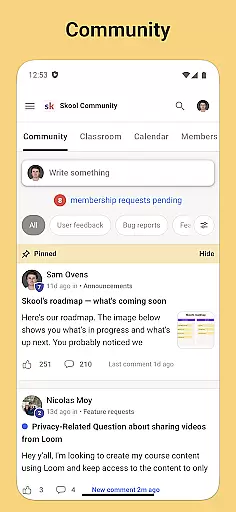
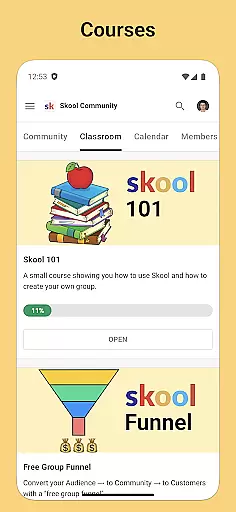
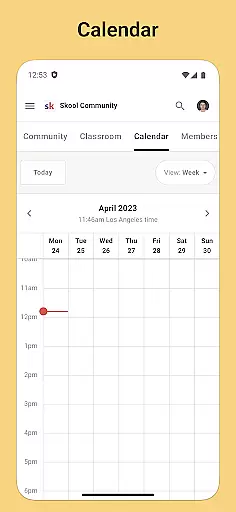
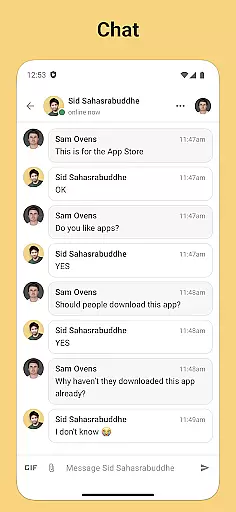
Skool is a dynamic social platform designed to keep users engaged with their online communities through an accessible mobile experience. The app brings together essential features for community interaction, including group discussions, courses, event tracking, and direct messaging. With Skool, users can actively participate in discussions via posts and comments while receiving real-time updates through push notifications. Whether you're looking to contribute to community conversations or simply stay informed about upcoming events, Skool ensures that you remain connected wherever you go.
The app's integration of learning tools adds another layer of value, allowing users to engage with video and text-based lessons directly within the platform. This makes it particularly useful for educational groups or professional networks where knowledge-sharing is key. Additionally, its calendar feature helps users organize their schedules around community events, ensuring they never miss important dates. Skool's combination of communication, education, and organization tools creates a comprehensive solution for anyone seeking to maintain strong ties with their communities.
Skool offers a robust set of features tailored to enhance community engagement on the go. One standout capability is its group discussion functionality, which supports both posts and comments, enabling meaningful interactions among members. Users can also access structured learning content through the Courses feature, which includes video and text-based lessons ideal for collaborative education environments. These features are further complemented by the Calendar tool, which provides a clear overview of community-related events, helping users prioritize their participation effectively.
Another notable aspect of Skool is its seamless communication system. The Chat feature allows users to send direct messages (DMs) to others in their communities, fostering one-on-one connections alongside broader group discussions. Push notifications ensure that no updates are missed, whether they pertain to new posts, upcoming events, or private messages. By combining these functionalities into a single platform, Skool delivers a versatile solution for staying connected, making it especially valuable for active community members who rely on consistent communication and collaboration.
User profile customization is a crucial aspect of any social platform, allowing users to express their individuality and establish their digital identity. Skool offers a comprehensive profile system that enables users to showcase their interests, achievements, and affiliations within their communities.
The app provides various customization options, including profile pictures, bios, and links to personal websites or social media accounts. This flexibility ensures that members can create a profile that truly reflects their personality and professional background.
Authenticity verification is equally important in building trust within online communities. Skool implements a robust verification process that helps confirm the real-world identities of its users. This feature not only enhances security but also fosters genuine interactions among community members.
By combining extensive customization features with thorough authenticity checks, Skool creates an environment where users feel confident in their connections and engagements. This dual approach significantly improves the overall user experience and strengthens community bonds.
Discovering new connections is fundamental to expanding one's network and enriching the community experience. Skool excels in this area by offering intelligent algorithms that suggest relevant connections based on shared interests, community participation, and engagement patterns.
The app analyzes user activity across different features such as community discussions, course enrollments, and event attendance. These insights help identify potential valuable connections that users might otherwise miss.
Skool's connection discovery goes beyond simple suggestions by providing context for each recommendation. Users can see mutual interests, common communities, and shared activities, making it easier to initiate meaningful conversations and build lasting relationships.
This sophisticated approach to connection discovery transforms how users interact within the platform. By facilitating purposeful networking opportunities, Skool helps create vibrant communities where members can grow both personally and professionally.
User-friendly interface
Real-time notifications
Integrated learning tools
Event tracking system
Direct messaging option
Limited customization options
Occasional notification delays
Restricted third-party integrations
Higher data usage
Learning curve for new users

Watch, Edit, Upload and Share Gaming Clips
 4.00
4.00
A gathering place for 300 million people's life interests and hobbies
4.30
Get notifications of FREE Stuff for Nextdoor, Letgo, offerup & TrashNothing
4.70
Dating & make friend to chat, meet, flirt, and make real connections!
4.60
Random chat & meet online. Find your soulmate or someone special and have fun!
3.90
live inside your fandom
4.60
Connection Beyond Content
4.50
Connect and share ideas
4.10
Create & share photos, stories, & reels with friends you love
3.90
The hottest live chat app so far. Video chat and meet great people...
4.60
Date single & make friend
4.60
Live pics from your friends - Only the photos you want to see
4.60
This version of Facebook uses less data and works in all network conditions.
4.60
A little connection can go a long way
4.60
Unlimited calls & texts | WiFi voice line plus group txt | Call & text now
4.50
Watch 24/7 live stream, and make real friends nearby
4.30
Positive social
4.20
Meet online & chat with people! Talk, have fun, make connections in real time!
4.00
Swipe, Meet & Chat Real People
3.80


User Reviews