
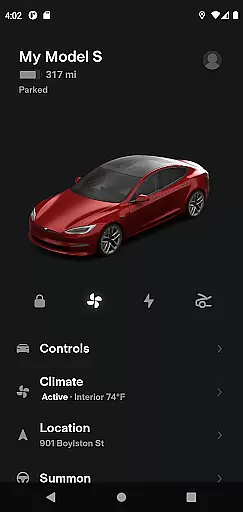
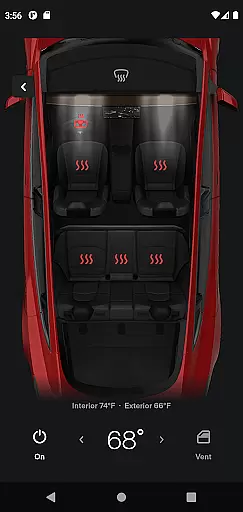
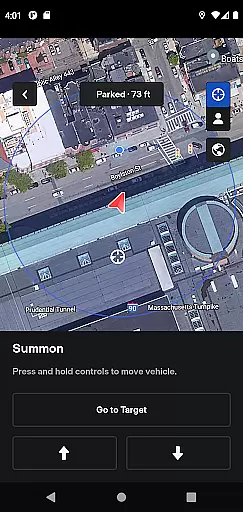
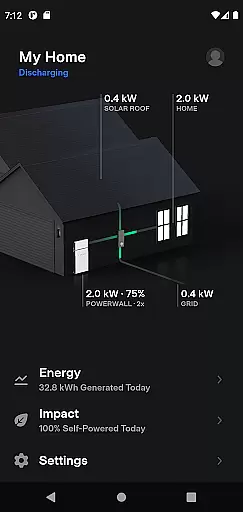
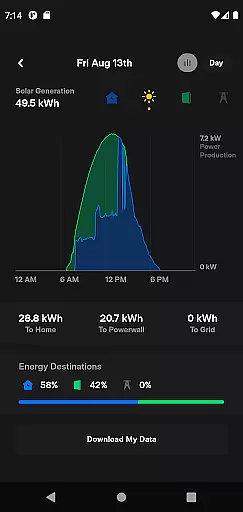
The Tesla app is a comprehensive lifestyle tool that allows vehicle owners to maintain constant communication with their Tesla cars and Powerwalls. This application provides real-time control over various vehicle functions, including charging management, climate control, security features like locking and unlocking, and location services. Additionally, it offers unique features such as remote software updates, media control for passengers, and even solar energy monitoring for homes equipped with Powerwall 2.
Designed for Tesla owners, the app enhances convenience by allowing users to manage their vehicles from anywhere. Whether you want to pre-condition your car's temperature remotely or summon it out of a tight parking spot using Autopilot, this app ensures your vehicle is ready when you are. The ability to monitor solar energy storage and usage adds an eco-friendly dimension to its functionality, making it an essential companion for modern, tech-savvy users.
The Tesla app stands out with its extensive range of features tailored for both vehicle and home energy management. One of its key functionalities is the real-time monitoring of your car's charging progress, enabling users to start or stop charging sessions remotely. This feature is complemented by advanced climate control options, which allow you to heat or cool your vehicle before use, regardless of its location.
Security is another critical aspect covered by the app, offering remote lock and unlock capabilities along with the ability to locate your vehicle using GPS. For entertainment, the app lets passengers control media playback directly from their phones. Moreover, Tesla owners can take advantage of unique features like Summon, which moves the car in tight spaces autonomously, and Over-the-Air (OTA) software updates that keep the vehicle up-to-date with the latest improvements. These innovative features collectively enhance user experience while maintaining top-notch security and convenience.
The Tesla app offers an extensive range of features that cater to various aspects of a user's lifestyle, ensuring comprehensive coverage of needs for both vehicle and home energy management.
With functionalities ranging from real-time vehicle charging monitoring to climate control and even Powerwall energy management, the app provides a holistic approach to modern living.
Users can seamlessly interact with their Tesla products, making it convenient to manage everyday tasks such as locating their car, controlling media, or monitoring solar energy usage.
This broad spectrum of services enhances the user's lifestyle by integrating advanced technology into daily routines, offering both convenience and efficiency in managing personal and household resources.
The Tesla app is developed directly by Tesla, a renowned leader in electric vehicles and renewable energy solutions, which guarantees the authenticity and reliability of its content.
All features are designed and maintained by experts who specialize in automotive technology and energy systems, ensuring accurate and credible information is delivered to users.
By providing direct communication with Tesla vehicles and Powerwalls, the app ensures that all interactions and data presented are genuine and verified by Teslau2019s team of professionals.
Users can trust that they are receiving expert-validated content that reflects the latest advancements in automotive and energy management technologies, enhancing their overall experience and confidence in using Tesla products.
User-friendly interface
Comprehensive vehicle control
Remote software updates
Energy monitoring tools
Advanced security features
Limited to Tesla owners
Requires stable internet
Powerwall 2 needed
Dependent on vehicle model
Premium feature costs

Design and brew great homebrewing beer, mead, cider and wine recipes on the go!
 3.60
3.60
The all-new Cync app. The simple, connected app for Cync and C by GE.
4.50
Stay connected with your loved ones & vehicles | Share live GPS location updates
4.60
Bring the warm colors of fall directly to your wrist with Autumn Leaves!
4.3
The go to app for taking unlimited notes!
4.50
Play. Earn. Repeat. Get rewarded for playing mobile games. Welcome to Mobius!
4.80
Simple, stylish & fresh watch face. Customize colors, gradients & complications.
4.70
Retro animated weather with hourly forecast Watch Face for Wear OS
4.60
Subwoofer school’s in session! You’ve now enrolled into KICKER U.
3.80
Get the news, events and savings that matter to you with AARP Now.
4.80
Discover your Nationality, Family Origin, and Ancestry from one selfie
4.50
Spiritus Ghost Box is an Audio and Visual ITC tool for paranormal research.
4.00
Spirit Communicator is a real paranormal ghost hunting app with many fun modes.
3.90
Unique informative Dial with Live Moon Phase at a glance!
3.60
BILT interactive 3D instructions help you get the job done right
3.50
The Miracle Box includes methods used by Steve Huff of Huff Paranormal.
3.20
Duo Watch Face (animated)
4.5
Immerse yourself in the serenity of lavender fields and white butterflies
4.3
Customize your Wear OS watch with festive Christmas figures and colors!
4.2


User Reviews