

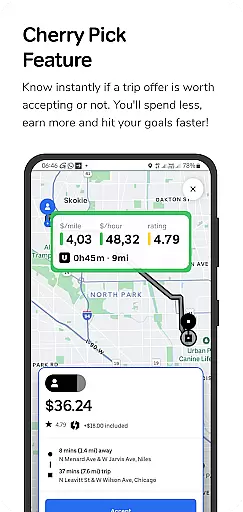
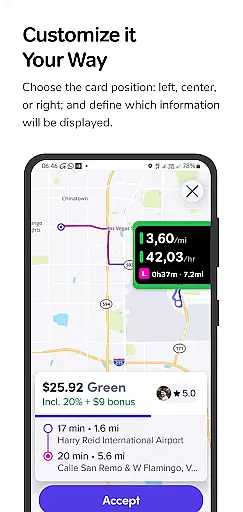
GigU is the ultimate smart assistant for rideshare drivers in the US, designed to optimize earnings on platforms like Uber and Lyft. The app's standout feature is Cherry Pick, which instantly evaluates trip offers, helping drivers make informed decisions that maximize income while minimizing time and expense.
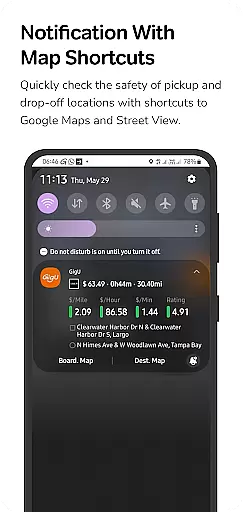
The app provides live smart indicators showing key metrics such as earnings per mile and hour, along with a color-coded grading system for trip offers. Additional features include voice notifications, quick map shortcuts for safety checks, and a detailed trip history. GigU prioritizes user security and privacy, never requiring passwords from rideshare accounts and using accessibility services solely for the Cherry Pick feature.
With its data-driven approach, GigU empowers drivers to hit their financial goals faster while maintaining complete control over which trips to accept. This makes it an essential tool for professional rideshare drivers who want to work smarter, not harder.
GigU offers a comprehensive suite of features tailored to enhance rideshare driving efficiency. Its Cherry Pick functionality uses advanced algorithms to analyze trip profitability in real-time, displaying critical metrics through live smart indicators. These include earnings per mile, per hour, and per minute, giving drivers clear insights into each ride offer's value.
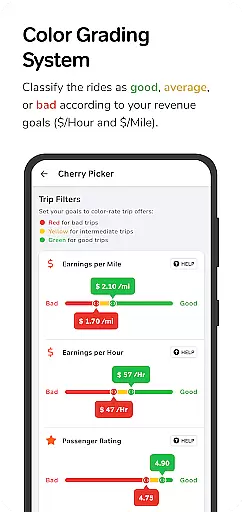
The app employs a unique colored grading system that categorizes trips based on user-defined preferences, ensuring quick decision-making. It also integrates with Google Maps and Street View for instant location safety checks. Voice notifications allow hands-free operation, while the detailed trip history provides a record of all scanned ride offers. All these features are powered by optional accessibility services that strictly adhere to privacy standards.
By combining data analytics with user-friendly tools, GigU creates a seamless experience that helps drivers optimize their work schedules and increase overall profitability without compromising privacy or security.
GigU provides comprehensive trip details that every rideshare driver needs to make informed decisions. The app's Live Smart Indicators display crucial metrics such as earnings per mile, hour, and minute, giving drivers clear insights into their potential income for each ride offer.
The innovative Colored Grading System rates trips using a color-coded approach based on user-defined preferences. This feature ensures drivers can quickly assess the value of a trip at a glance, making the decision-making process both fast and straightforward.
With Quick Maps Shortcut Notifications, GigU enhances safety and convenience by providing instant access to Google Maps and Street View for pickup and drop-off locations. This allows drivers to evaluate the safety of their routes before accepting a ride.
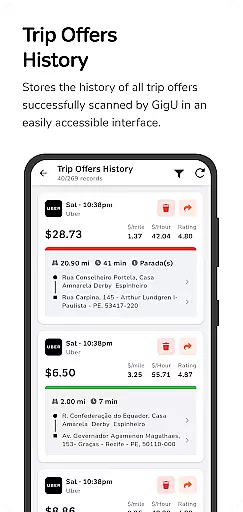
The app maintains a complete Trip Offers History, documenting all successfully scanned ride offers. This record-keeping feature helps drivers track their earning opportunities and analyze patterns in ride offers over time.
One of GigU's core strengths is its ability to provide complete price transparency for rideshare drivers. The Cherry Pick feature instantly evaluates each trip offer, clearly indicating whether it's worth accepting based on the driver's personal earning goals and preferences.
The app's Voice Notification system delivers audible alerts about ride profitability without requiring drivers to look at their phones. This hands-free approach to decision-making ensures maximum safety while maintaining full transparency about potential earnings.
GigU's calculation system works seamlessly with major ridesharing platforms like Uber and Lyft, providing accurate earnings projections without compromising security or privacy. The app doesn't require users' ridesharing passwords, maintaining a strict policy of not collecting personal information.
By offering detailed breakdowns of potential earnings and helping drivers hit their financial targets faster, GigU establishes a new standard in rideshare price transparency. This empowers drivers to optimize their working hours and maximize their overall earnings efficiently.
Instant trip evaluation
Increases driver earnings
User-friendly interface
Strong privacy protection
Comprehensive analytics
Limited to rideshare drivers
Requires Android device
Premium features may cost extra
Dependent on third-party apps
Learning curve for new users

Taximeter; the professional's choice
 4.30
4.30
Practice the drills within MotoJitsu Master Riding Program Volume 1 & 2!
4.80
A full featured, real-time transit locator system
4.30
myAudi offers users services and Audi connect services for Audi drivers
4.10
Instantly redesign your car with AI. From sporty to futuristic, try it all.
4.50
Your Path to Driving Licensing Success Begins Here! Develop your driving skills.
4.40
Monitor your behind-the-wheel behavior to become a safer driver and save.
4.10
Your car is talking. Start listening.
4.30
Easy connect & control your cars from afar. Remote Lock & unlock car and carplay
4.60
Marathon ARCO Rewards members earn rewards & apply the rewards for fuel savings!
4.80
Your go-to app for car, truck & SUV parts, DIY tools, and expert repair help.
4.70
OBDII - ELM327 Terminal tool for 96-00 Volvos
4.50
Find, search, and browse 40,000+ used cars, SUVs, and trucks.
4.50
Get price alerts, vehicle history details and more for cars near you!
4.50
By enthusiasts, for enthusiasts
4.00
BlueDriver® is a Premium Diagnostic OBD2 Scan Tool. www.BlueDriver.com
3.90
Mobile Phone Parking - So easy to park
3.70
O'Reilly Pro will streamline your parts lookup and ordering process!
3.20
DIY Vehicle Wheel Alignment
4.0


User Reviews