
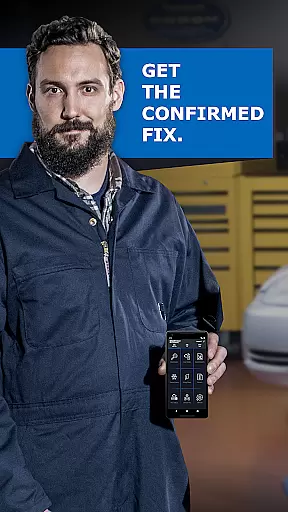
BlueDriver OBD2 Scan Tool is a professional automotive diagnostic application that transforms your smartphone or tablet into an advanced scan tool. Designed for both professional mechanics and DIY enthusiasts, it works in tandem with the BlueDriver Bluetooth Sensor to provide comprehensive vehicle diagnostics. The app allows users to read and clear diagnostic trouble codes, generate detailed repair reports, and access advanced data such as Mode 6 test results and live data graphing.
This application stands out through its extensive coverage of enhanced diagnostics for major car brands like GM, Ford, Toyota, and more. Its wireless Bluetooth connectivity ensures ease of use without any physical cables. With features like smog readiness checks, freeze frame data, and multi-PID interactive graphing, BlueDriver equips users with the necessary tools to understand their vehicle's condition thoroughly and make informed repair decisions.
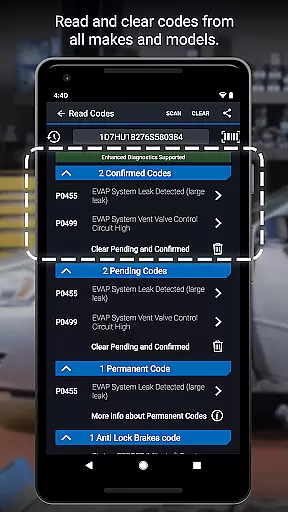
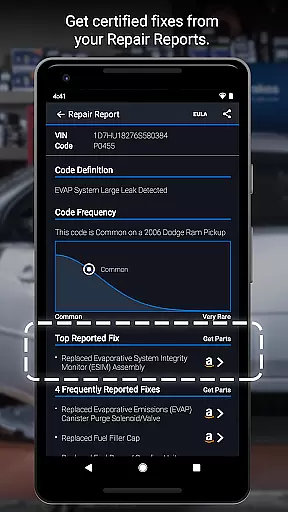
BlueDriver offers an impressive range of features designed to provide a complete diagnostic solution. One of its core functionalities is the ability to read and clear various trouble codes including check engine, ABS, airbag, and transmission codes. This feature empowers users to quickly identify issues and reset their vehicle's system after repairs. Additionally, the app generates professional-grade Repair Reports specific to the user's vehicle, which can be saved and shared easily.
Another standout feature is the wireless scanning capability enabled by Bluetooth connectivity. Users can connect their device to the BlueDriver Sensor effortlessly, eliminating the need for cumbersome cables. The app also provides access to Mode 6 on-board monitoring, live data graphing, and smog readiness checks. These features ensure users have a thorough understanding of their vehicle's performance metrics. Furthermore, the availability of likely fixes explained in plain language makes complex automotive problems more approachable for everyday users.
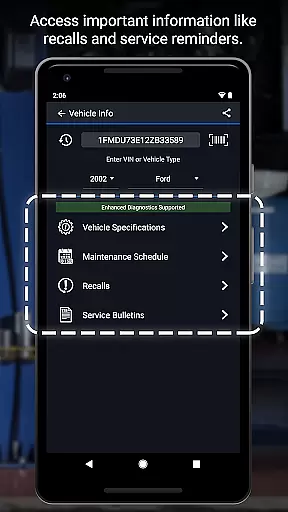
BlueDriver OBD2 Scan Tool provides comprehensive access to detailed vehicle information, empowering users with precise diagnostic data. This includes the ability to read and clear trouble codes for various systems such as check engine, ABS, airbag, and transmission.
The app goes beyond basic diagnostics by offering Mode 6 on-board monitoring test results, smog readiness checks, and freeze frame data. These features allow users to understand their vehicle's health in greater depth, ensuring informed maintenance decisions.
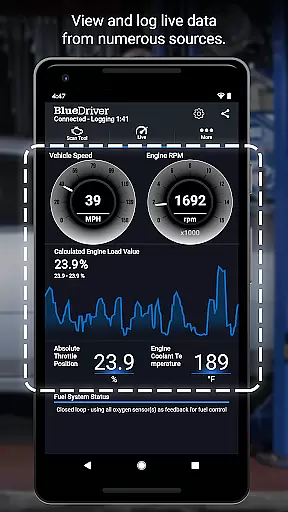
With live data graphing capabilities, users can view real-time performance metrics through multi-PID interactive graphs. This functionality enables both professional mechanics and DIY enthusiasts to monitor vehicle parameters dynamically.
The application's enhanced diagnostics coverage spans multiple manufacturers including GM, Ford, Toyota, and Nissan, with specific model-year variations. This extensive compatibility ensures that users receive accurate information tailored to their particular vehicle make and model.
BlueDriver distinguishes itself through its transparent pricing model, offering a subscription-free diagnostic solution. Unlike many competitors, the app itself is free to install and use, requiring only the purchase of the BlueDriver Bluetooth Sensor for full functionality.
The company maintains clear pricing communication by selling the required sensor separately, either through in-app purchases or via their official website. This approach allows users to understand exactly what they need to invest in before using the app's complete features.
Furthermore, BlueDriver provides a unique feature allowing users to preview Repair Reports without purchasing the sensor. By entering their Vehicle Identification Number (VIN) and a trouble code, potential customers can sample the app's capabilities before committing financially.
This transparent approach extends to their global database of millions of real-world fixes, ensuring that users receive cost-effective repair solutions specific to their vehicle's year, make, and model without hidden charges or recurring fees.
User-friendly interface
Comprehensive diagnostics
Wireless functionality
Detailed repair reports
Wide brand compatibility
Sensor sold separately
Limited free features
Requires account setup
Bluetooth dependency
Device compatibility issues

OBD2 car scanner and diagnostics: read Check Engine, DTC, economy....
 4.30
4.30
Ferrari inspired analog & digital watch face with quick access and premium style
4.5
Realtime Charts is a plugin for the Torque Pro App (OBD 2 & Car)
4.20
Autolist - The Largest Selection of Local Used Cars and Trucks
4.50
myAudi offers users services and Audi connect services for Audi drivers
4.10
Club Car Wash Mobile App—the fast lane to managing your wash membership.
3.30
Find Your Local Store or Shop Online for the Car, Truck, or SUV Parts You Need
4.70
7-Day Returns on All Cars
4.80
Autotrader is your online solution for buying and selling new and used cars.
4.40
Browse millions of cars, track vehicle listings or sell your car today
4.70
Listings of Tesla's with FSD - Included package
4.60
CVT diagnostics with ELM327 for Nissan-based vehicles
4.40
A full featured, real-time transit locator system
4.30
Monitor your behind-the-wheel behavior to become a safer driver and save.
4.10
By enthusiasts, for enthusiasts
4.00
O'Reilly Pro will streamline your parts lookup and ordering process!
3.20
Earn and save with Fuel Rewards®
3.20
Monitor specific TOYOTA parameters by adding this plugin to Torque Pro.
2.00
Attention! This is the theme for the Car Launcher app
4.3


User Reviews