
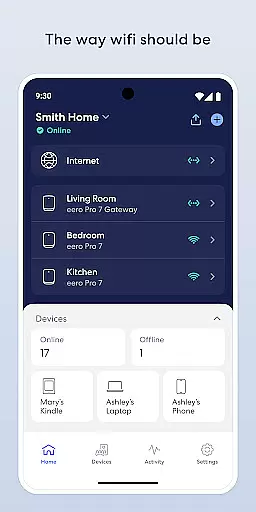
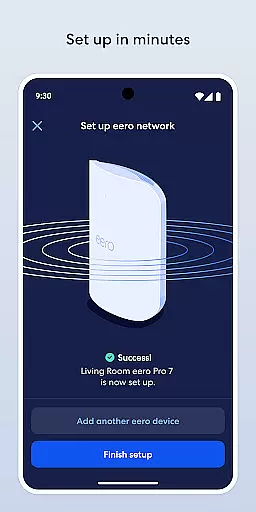
eero wifi system is a comprehensive home networking solution that provides fast and reliable internet coverage throughout your entire home. The eero app serves as the control center for this system, allowing users to easily set up and manage their network. With its intuitive interface, even non-technical users can complete setup in minutes.
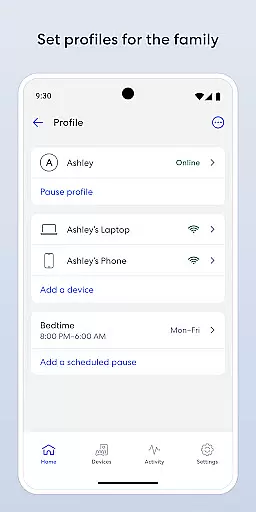
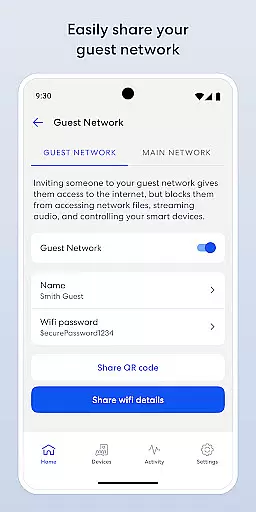
The system automatically updates itself with new features, performance improvements, and security standards, ensuring your network stays current and protected. Users can remotely view and manage their network, share access securely with guests, schedule or pause internet access for screen time management, and block devices from using the network when needed.
The eero app offers several key features that enhance the user experience. First, it enables quick setup within minutes, making it accessible for all users regardless of technical expertise. The automatic update feature ensures that users always have the latest security patches and performance enhancements without manual intervention.
Another significant feature is remote network management, which allows users to control their network from anywhere. This includes managing guest access, scheduling internet usage, and blocking unwanted devices. Additionally, eero Plus (sold separately) provides advanced security options, parental controls, and priority support from wifi experts, along with online security tools like a password manager, antivirus software, and a Guardian-powered VPN.
The eero app extends its functionality beyond just managing a wifi system to encompass a broad spectrum of lifestyle needs. With features like automatic updates, security enhancements, and parental controls through eero Plus, it ensures that users have a comprehensive tool for modern living. The app's ability to manage network access, schedule internet availability, and even block devices adds layers of convenience and control over the digital environment at home.
Moreover, the inclusion of advanced security measures such as a password manager, antivirus software, and a VPN powered by Guardian showcases the app's commitment to not only connectivity but also digital safety. This holistic approach allows users to maintain a secure and efficient home network that adapts to various lifestyle requirements, from remote work to entertainment and smart home integration.
By providing these extensive capabilities, the eero app becomes an essential component in crafting a connected lifestyle that is both flexible and secure. Whether it's ensuring uninterrupted streaming for leisure or creating a productive home office setup, the app's diverse feature set supports multiple facets of contemporary living.
Authenticity and credibility are at the core of the eero app's offerings. Developed with input from wifi experts and continuously updated with the latest advancements in network technology, the app provides users with reliable tools to manage their home networks effectively. The emphasis on frequent software updates ensures that users benefit from ongoing improvements and cutting-edge security protocols, reinforcing trust in the platform.
In addition to technical expertise, the app offers eero Plus, a subscription service that includes VIP access to a team of wifi experts. This service not only enhances the user experience through personalized support but also guarantees that any issues or queries are addressed by knowledgeable professionals. Such dedication to quality assurance and expert backing elevates the app's status as a credible source for home networking solutions.
Furthermore, the transparent communication channels for feedback and support, along with clear references to terms of service and privacy policies, underscore the app's commitment to maintaining high standards of authenticity and user trust. Users can confidently rely on the eero app to deliver genuine value and expert-driven functionalities for their networking needs.
Fast and reliable wifi coverage
Easy setup process
Automatic updates
Remote network management
Advanced security options
eero Plus subscription required
Limited customization options
Occasional connectivity issues
Higher cost compared to competitors
Dependent on external services

Cute Adorable Animals now on your wrist with our Wear OS watch face!
 4.40
4.40
What is my face shape? Find out your face shape from picture, see fitting frames
3.90
The all-new Cync app. The simple, connected app for Cync and C by GE.
4.50
Take Hobby Lobby with you wherever you go!
3.40
A uniquely designed isometric digital watch face made for Wear OS
4.4
Discounts, savings, and rewards
4.20
Your home in your hand
3.80
Make money, get paid cash rewards & gift cards for every survey. Earn today!
4.60
Decorate your home screen with custom icons, color widgets, themes & wallpapers
4.70
Daily lessons from A Course in Miracles with scheduled reminders
4.80
Stay connected with your loved ones & vehicles | Share live GPS location updates
4.60
Colorful minimal digital watch face for Wear OS
4.60
Premium floor cleaning robots
4.50
This app is intended to support professional EMDR therapy.
4.50
Earn money & gift cards when you take surveys, play games, scan receipts & more.
4.50
Redecor your home with Home AI interior design, room planner and home designer.
4.50
Mixing Colors for Menswear
4.20
Use your device sensors to detect energy and convert it into spoken words.
4.10
Big bold digital watch face with 30 colors, 6 complications and AOD.
4.0


User Reviews