

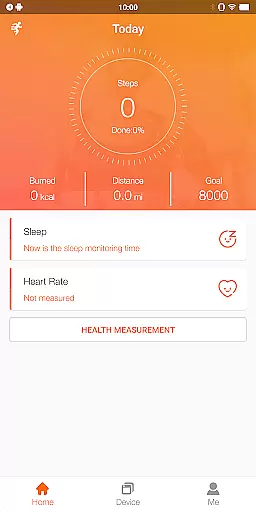
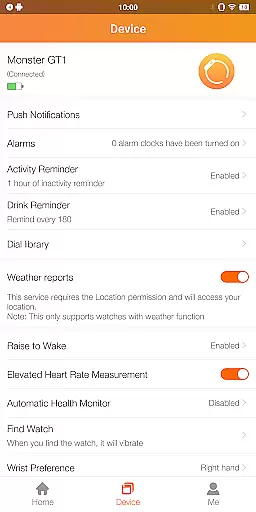
FitCloudPro is a comprehensive health and fitness application designed to seamlessly connect your smartwatch with your mobile device. This app not only manages your smartwatch but also enhances its functionality, giving you greater control over its features. Compatible with various Kumi smartwatches, FitCloudPro supports models such as the KUMI GT6 Pro, GW16T Pro, KU3 Max, and KU3 Meta.
The app excels in monitoring and recording essential health metrics including steps, calories burned, sleep patterns, heart rate, and blood oxygen levels. Beyond health tracking, it offers rich message notifications for calls, SMS, and social media platforms like Facebook and Twitter. Users can enjoy additional functionalities such as customizable watch faces, sedentary reminders, hydration alerts, and settings for brightness, vibration, and do-not-disturb modes.
FitCloudPro stands out with its robust set of features tailored for health and fitness enthusiasts. The app provides detailed health data monitoring, capturing metrics such as step counts, calorie expenditure, sleep quality, heart rate, and blood oxygen saturation. These insights help users maintain an active lifestyle and better understand their health trends.
In addition to health tracking, FitCloudPro delivers comprehensive notification management. It supports call alerts, text messages, and notifications from social media apps, allowing users to stay connected without constantly checking their phones. The app also includes various customizable watch faces, enabling personalization to match individual styles and moods. Practical features like sedentary reminders, hydration alerts, and customizable settings for brightness and vibration further enhance user convenience and comfort.
Personalized planning in FitCloudPro refers to the app's ability to create tailored health and fitness plans based on individual user data. This feature leverages the smartwatch's monitoring capabilities to gather comprehensive health metrics.
The application processes data such as heart rate, blood oxygen levels, sleep patterns, and activity to generate customized recommendations. These insights help users adjust their daily routines to optimize personal well-being.
Users benefit from personalized planning by receiving actionable advice that aligns with their health objectives. Whether aiming to improve cardiovascular health or enhance sleep quality, the app adapts to unique goals.
This level of personalization ensures that each user's experience with FitCloudPro is relevant and effective, promoting long-term engagement and better health outcomes.
Progress visualization in FitCloudPro allows users to see their health journey through detailed charts and graphs. This visual representation makes it easier to comprehend trends and improvements over time.
The app provides various visualization tools that display metrics like step counts, calories burned, and sleep quality. Users can track daily, weekly, and monthly progress, gaining motivation from tangible evidence of their achievements.
By offering clear and engaging visuals, FitCloudPro helps maintain user interest and encourages consistent use of the smartwatch. Visual feedback is crucial for understanding the impact of lifestyle changes.
Ultimately, progress visualization transforms raw data into meaningful insights, empowering users to make informed decisions about their health and fitness routines.
User-friendly interface
Comprehensive health tracking
Rich notification system
Customizable watch faces
Practical daily reminders
Limited smartwatch compatibility
Requires multiple permissions
No medical-grade accuracy
Potential battery drain
Background app usage

For Absolute Novices to Strength Training. Simple. Effective.
 4.40
4.40
sobriety counter app to help and motivate people to stop drinking alcohol.
4.90
Binaural Beats - Fully Customizable Waves - Pure Sound - No Loops
4.50
Grow with self-tests and personal routine.
4.30
Monitor, analyze, track, and convert blood sugar & help you control diabetes.
4.10
This is an application that serves as a companion app for smart watch.
4.20
Jogging app for calorie counter and distance tracker. Running app to lose weight
4.20
Monitor blood sugar, gain insights, and manage diabetes with ease.
3.20
Comprehensively record and manage your health
4.50
Easy access to health benefits
4.70
Easy reconstitution calc for mixing peptides and creating protocols
4.70
Raccoon AI Calorie Counter. Intermittent Fasting & Timer. Macro, Carb, Protein
4.50
Download MadMuscles to start your positive body transformation!
4.30
Interval timer for High Intensity Interval Training, Tabata and Circuit Training
4.20
Turn your steps into cash, gift cards & rewards with our step counting pedometer
3.80
Live Heart Rate Pro - Real Time Heart & Workout Data For Wear OS & Bluetooth BLE
3.20
Using Recognise™ has been shown to reduce pain and improve performance.
4.3
Optimization for TRT & Enhanced Athletes
4.5
A simple way to calculate peptide doses and also to convert different units.
4.3


User Reviews