
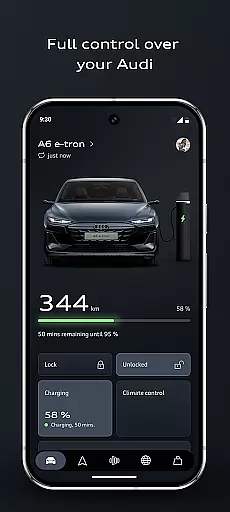


The myAudi app is your ultimate companion for managing and interacting with your Audi vehicle. This advanced application allows you to control essential vehicle functions remotely, plan efficient routes using real-time data, and receive instant answers from the AI-supported Audi assistant. Whether you drive an electric, hybrid, or combustion model, the app optimizes your driving experience through smart features like remote climate control, digital key access, and intelligent charging management.
With its sleek design and user-friendly interface, the latest version of myAudi brings noticeable improvements to familiar functionalities. From automating daily routines based on time or location to discovering new upgrades tailored to your vehicle's configuration, this app ensures that every journey is smarter, more connected, and convenient. Experience seamless integration between your smartphone and Audi car today.
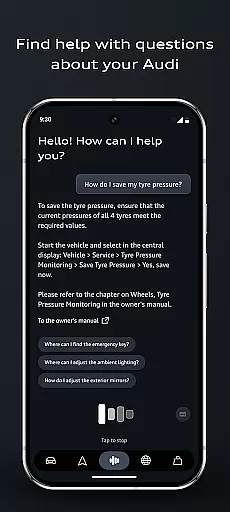
The myAudi app offers a comprehensive suite of innovative tools designed to enhance your ownership experience. One standout feature is the Audi assistant, which uses artificial intelligence to provide real-time information about your vehicle without needing a manual lookup. Another highlight is the improved route planner, which incorporates live traffic updates, range calculations, and charging schedules while sending optimized routes directly to your MMI system.
Additional functionalities include app routines for automating tasks such as preconditioning your vehicle or scheduling charges during off-peak hours. The digital key lets you lock, unlock, and start your Audi via smartphone, making shared access effortless. Remote vehicle controls allow users to locate their cars, check lights, or pre-cool interiors before driving—all contributing to a highly personalized and efficient automotive lifestyle.
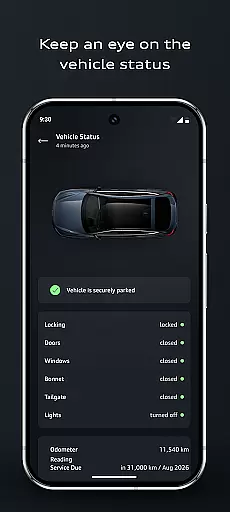
In the realm of automotive technology, access to detailed vehicle information is paramount for an enhanced driving experience. The myAudi app excels in this area by providing users with comprehensive data about their Audi vehicles. This includes real-time status updates on fuel levels, battery charge, and tire pressures, ensuring that drivers are always informed about their car's condition.
Moreover, the app goes beyond basic details by integrating AI-supported features like the Audi assistant. This intelligent tool offers clear and immediate responses to user inquiries regarding vehicle specifics, effectively replacing the traditional owneru2019s manual. With just a few taps, users can retrieve crucial information such as maintenance schedules or explanations of warning lights, all tailored to their specific model.
The significance of having such detailed insights at one's fingertips cannot be overstated. It empowers Audi owners with knowledge that not only aids in day-to-day operations but also contributes to safer and more efficient driving practices. By understanding their vehicleu2019s current state and potential needs, users can preemptively address issues before they escalate.
Ultimately, the myAudi app transforms how drivers interact with their cars by making complex technical details accessible and understandable. Whether itu2019s through smart design elements or intuitive functionalities, the application ensures that every Audi driver has a personalized and informed relationship with their vehicle, enhancing both convenience and peace of mind.
Price transparency in automotive services is essential for building trust between manufacturers and consumers. The myAudi app addresses this need by offering clear insights into various costs associated with owning an Audi. From detailing subscription fees for Audi connect services to outlining expenses related to on-demand functions, the app ensures users are never caught off guard by hidden charges.
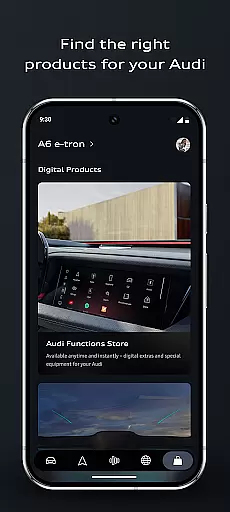
Additionally, the app provides personalized recommendations within its shopping area based on individual vehicle configurations. Users can explore different upgrades and services while being fully aware of associated costs. This level of openness allows Audi owners to make informed decisions about which enhancements best suit their needs without any financial surprises.
Transparency extends beyond mere pricing; it encompasses understanding what each service entails. For instance, when planning routes using the improved route planner, users receive information not only on travel times but also on charging schedules and range considerationsu2014factors that could influence overall trip expenses.
By prioritizing price transparency, the myAudi app fosters a sense of reliability and confidence among its users. Knowing exactly what they are paying for enables Audi drivers to enjoy their vehicles more fully, secure in the knowledge that there are no unexpected financial implications lurking beneath the surface.
User-friendly interface
AI-powered assistance
Real-time navigation
Remote vehicle management
Customizable app routines
Limited to Audi owners
Requires internet connection
Premium feature costs
Device compatibility issues
Occasional syncing delays

Theme for Car Launcher
 4.0
4.0
Listings of Tesla's with FSD - Included package
4.60
Play what you want through Android Auto
4.90
Launcher for use in the car
4.40
Simplify your drive
3.90
The ExtraMile App allows you to pay for fuel from the comfort of your car!
4.70
Car Sounds Engine Sounds app welcomes Auto Lovers to feel Car Simulator Sound
4.20
Shop cars & see your financing
4.60
Quick and easy car diagnostics to get you the right fix.
4.70
Shop, finance, or sell today.
4.80
DMV practice test 2025: Driver License permit test & written test for all states
4.70
Trip computer+car diagnostic tool with widest variety of features and dashboard!
4.70
A smarter way to park and reserve your spot ahead of time.
4.40
AI Powered - Automotive Mechanic Assistant
4.30
OBD diagnostics, Live Data, DPF regeneration for BMW
4.00
Blink Charging Mobile app makes finding an EV charger an intuitive experience.
3.80
Ferrari inspired analog & digital watch face with quick access and premium style
4.2
DIY Vehicle Wheel Alignment
4.1
Theme for Car Launcher
4.2


User Reviews