

Hush is an innovative solution designed to address audio-related issues in Android Auto. This app plays a silent audio track on repeat, allowing users to safely adjust their vehicle's volume without interruptions from other audio apps. It is particularly useful for drivers who want to use Google Maps while listening to audio from apps that don't support Android Auto.
The app ensures that non-Android Auto audio apps can play without being interrupted by Android Auto's default behavior of resuming the last used audio app. By acting as the currently active audio app, Hush provides a seamless and distraction-free driving experience. Whether you're enjoying a podcast or music, Hush keeps your audio experience consistent and enjoyable.
Hush offers several key features that enhance the Android Auto audio experience. Firstly, it plays a silent audio track continuously, preventing Android Auto from switching to other audio apps like Spotify or YouTube when adjusting the volume. This feature is crucial for maintaining focus while driving.
Additionally, Hush integrates seamlessly with your vehicle's audio system, ensuring that your preferred audio source remains uninterrupted. The app is lightweight and operates efficiently in the background, providing a reliable solution without consuming significant system resources. With Hush, you can enjoy a safer and more enjoyable driving experience without worrying about sudden audio changes.
In the realm of automotive technology, having access to detailed vehicle information is crucial for an optimal driving experience. Hush addresses a specific challenge faced by drivers using Android Auto in vehicles that lack seamless integration with non-Android Auto audio apps.
Hush provides comprehensive details about your vehicle's Android Auto settings and helps mitigate issues related to audio playback. By playing a silent audio track on repeat, it ensures that your preferred audio source remains uninterrupted, regardless of volume adjustments.
For users experiencing conflicts between different audio applications like YouTube and Spotify, Hush offers a reliable solution. This app acts as the active audio app within Android Auto, preventing unwanted switches and allowing you to enjoy a consistent audio experience while driving.
Price transparency in automotive apps is essential for users to understand the value they receive without hidden costs or surprises. Although Hush does not involve monetary transactions, its value lies in enhancing user experience through innovative solutions at no extra cost.
The app was developed to solve a persistent issue encountered by the creator in their Toyota Camry. By clearly communicating its purpose and benefits, Hush ensures users recognize its worth in improving their driving experience without any additional expenses.
With Hush, drivers can enjoy uninterrupted audio from their favorite non-Android Auto apps without worrying about unexpected charges or complications. This straightforward approach underscores the appu2019s commitment to providing clear and valuable functionality.
Enhances driving safety
Prevents audio interruptions
Seamless integration
Lightweight performance
Improves user experience
Limited to Android Auto
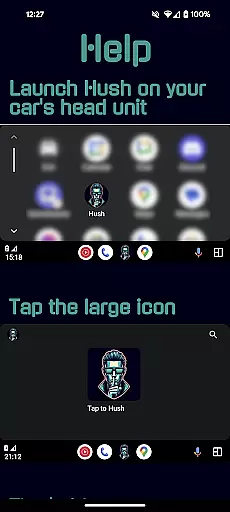
Requires manual launch
No visual interface
Specific use case
May need frequent updates

Realtime Charts is a plugin for the Torque Pro App (OBD 2 & Car)
 4.20
4.20
Practice the drills within MotoJitsu Master Riding Program Volume 1 & 2!
4.80
Wonder how much horsepower and torque your car/truck makes? Look no further.
3.40
Theme for Car Launcher
4.2
DMV Test Pro offers all the updated FREE DMV tests online.
4.60
Secure mobile payments & fuel savings at Phillips 66®, Conoco® and 76® stations
4.40
Find, search, and browse 40,000+ used cars, SUVs, and trucks.
4.50
O'Reilly Pro will streamline your parts lookup and ordering process!
3.20
Marathon ARCO Rewards members earn rewards & apply the rewards for fuel savings!
4.80
MySubaru: Download. Connect. Love.
4.70
Instant diesel savings. No credit checks or fees. Nationwide growing network.
4.40
Automotive Electrical Wiring Diagrams
4.40
Ultimate OBD2 Car Scanner: Diagnostics, Service and Modification Tool
4.30
A full featured, real-time transit locator system
4.30
Available in select states.
4.00
Discover new and used cars in Syria easily! Browse ads and connect with sellers.
3.70
Theme for Car Launcher
4.2
Theme for Car Launcher
4.2
DIY Vehicle Wheel Alignment
4.2


User Reviews