
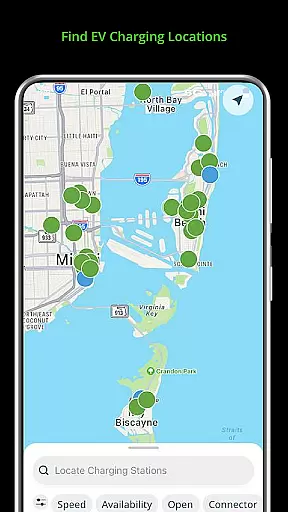
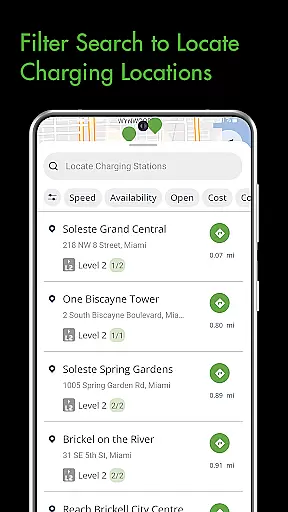
The Blink Charging Mobile App is a comprehensive solution for electric vehicle (EV) owners, designed to simplify and enhance the EV charging experience. This app allows users to locate public EV charging stations with ease, using various search criteria such as zip code or business name. It also provides real-time monitoring of charge sessions, including energy delivered and costs.
One of the standout features is the ability to manage home charging stations, like the HQ 200, directly from the app. Users can configure settings, track charging history, and receive status notifications. The app's integration with an expanding network, including SemaConnect stations, ensures that EV drivers have access to more charging options, making it a versatile tool for both urban and rural EV users.
The Blink Charging Mobile App offers a robust set of features tailored for EV owners. Users can locate EV charging stations through multiple search filters, ensuring they find the most convenient options. The app provides detailed session management, allowing users to monitor real-time data such as energy delivered, charging speed, and estimated costs.
Another significant feature is the ability to setup and manage home charging stations like the HQ 200. This includes configuring station settings, viewing charging history, and receiving status notifications. Additionally, the app supports an expanded network that now includes SemaConnect stations, offering users more flexibility and charging options wherever they are.
When it comes to managing your EV charging sessions, having access to detailed vehicle information is crucial. The Blink Charging mobile app provides comprehensive details about each charging session, ensuring users have all the necessary data at their fingertips.
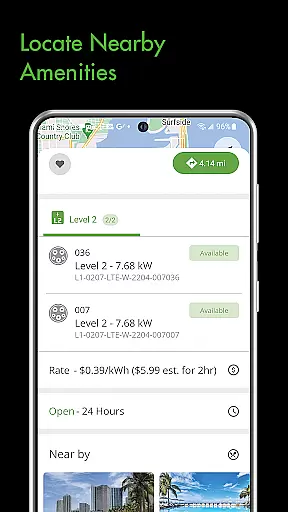
The app displays real-time information such as occupancy time, estimated charge session cost, and energy delivered. This allows users to make informed decisions about their charging needs and budget accordingly. Additionally, users can view specifics about the charging station itself, including its location and availability.
For those who want to optimize their EV charging experience, the app offers insights into the current vehicle charging speed. This feature helps users understand how quickly their vehicle is charging and adjust plans if needed. Monitoring these metrics ensures efficient energy use and maximizes convenience.
Ultimately, the detailed vehicle information provided by the Blink Charging app empowers users to manage their EV charging with precision and ease. By delivering essential data in a clear format, the app enhances the overall charging experience and supports sustainable driving habits.
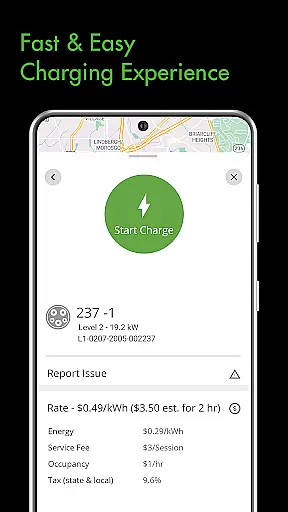
Price transparency is a key factor for EV owners when selecting a charging solution. The Blink Charging mobile app excels in this area by providing clear and upfront information about charging costs. Users can easily view the estimated cost of a charging session before initiating it.
This transparency extends to various aspects of the charging process. For instance, users can see detailed breakdowns of pricing structures at different charging stations. This includes any additional fees or discounts that may apply, allowing users to choose the most cost-effective option.
In addition to displaying costs, the app also integrates with payment systems to ensure seamless transactions. Users can manage their payment wallet directly within the app, keeping track of expenses and maintaining control over their spending.
By prioritizing price transparency, the Blink Charging app builds trust with its users. It ensures that EV owners are fully aware of the financial aspects of charging, promoting confidence and satisfaction in their choice of charging provider.
User-friendly interface
Real-time charging data
Home charger management
Expanded network access
Convenient search options
Limited to EV owners
Network dependent
Occasional bugs
Subscription fees
Device compatibility

Realtime Charts is a plugin for the Torque Pro App (OBD 2 & Car)
 4.20
4.20
Theme for Car Launcher
4.2
CVT diagnostics with ELM327 for Nissan-based vehicles
4.40
Play what you want through Android Auto
4.90
Launcher for use in the car
4.40
Car Sounds Engine Sounds app welcomes Auto Lovers to feel Car Simulator Sound
4.20
Mobile Phone Parking - So easy to park
3.70
1M+ high-quality auto parts at your fingertips. Fitment guaranteed.
4.70
Monitor your behind-the-wheel behavior to become a safer driver and save.
4.10
Lexus app currently supports 2010 or newer vehicles (2018 or newer for Hawaii).
4.80
Shop, finance, or sell today.
4.80
Oil change service & coupons for car maintenance at Valvoline Instant Oil Change
4.70
On the CarShield app, you can view contracts, make payments, & request roadside.
4.40
Automotive Electrical Wiring Diagrams
4.40
A full featured, real-time transit locator system
4.30
Boost profits and hit your goals faster with GigU's amazing tools for gigworkers
4.00
Simplify your drive
3.90
BlueDriver® is a Premium Diagnostic OBD2 Scan Tool. www.BlueDriver.com
3.90
Theme for Car Launcher
4.1


User Reviews