
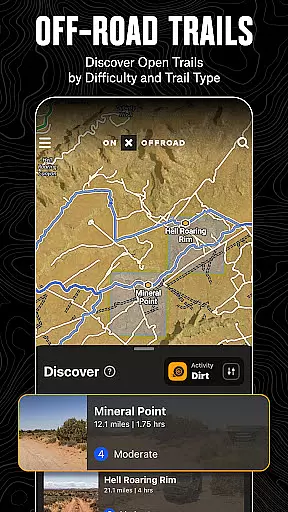
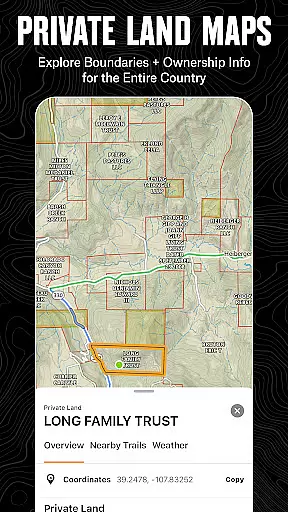
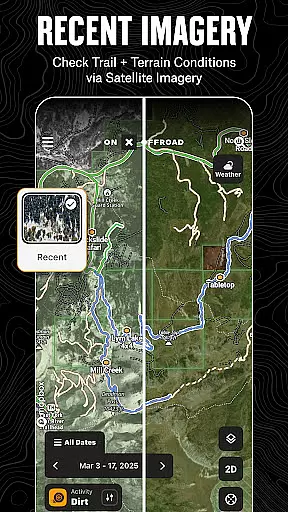
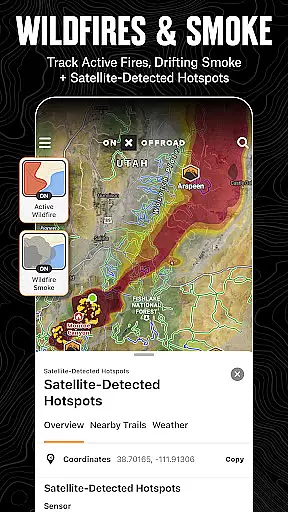
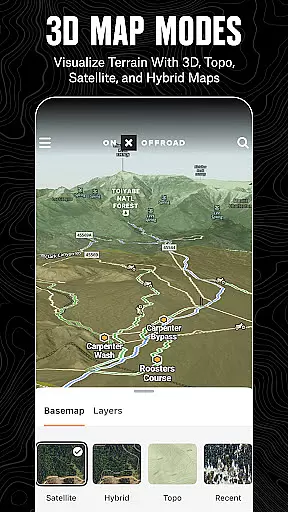
onX Offroad is a premier off-road navigation app designed for outdoor enthusiasts. With 3D trail maps, GPS mapping, and compass navigation, it helps users discover trails tailored to their preferred activities such as 4x4, SxS, dirt bikes, and more. The app provides crucial information like property lines, private landowner details, and wildfire activity, ensuring safety and compliance while exploring remote areas.
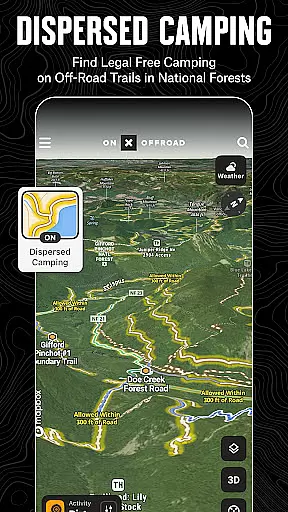
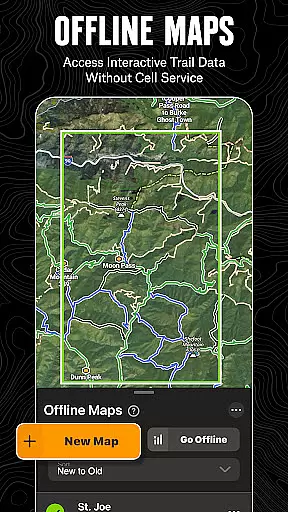
One standout feature is the Motorized Dispersed Camping Layer, which identifies legal, free camping spots in National Forests using verified USFS data. Additionally, its offline map functionality allows adventurers to save interactive maps directly to their devices, making it an essential tool for trips where cell service is unreliable. Whether you're planning your next overland expedition or tracking wildfires, onX Offroad equips users with tools to navigate confidently and return home safely.
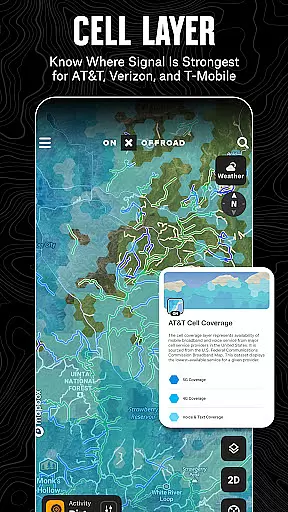
onX Offroad offers a comprehensive suite of features that cater to off-road explorers. Its OHV Trails & Map Layers allow users to filter trails by vehicle type and toggle layers for weather, land boundaries, and cell coverage. This ensures users can anticipate challenges like poor air quality from wildfire smoke using NOAA's Atmospheric Smoke Forecast data. The Cell Coverage Layers provide real-time insights into AT&T, Verizon, and T-Mobile service availability, keeping users connected even in remote locations.
The app also includes advanced route planning tools through its Offline Navigation & Route Builder. Users can create routes that automatically snap to roads and trails, view trail conditions, and access turn-by-turn voice-guided directions synced with Android Auto. Furthermore, the Trip Tracker & Recreation Points feature lets users mark waypoints for campsites, fuel stations, and fishing spots, enhancing trip organization and sharing capabilities. These robust functionalities make onX Offroad an indispensable companion for off-road adventures.
Map accuracy is crucial for any navigation app, and onX Offroad excels in this area. The application provides detailed 3D trail maps, topographic maps, and satellite imagery to ensure users have the most precise understanding of their surroundings. This level of detail allows off-road enthusiasts to navigate with confidence, knowing that the maps accurately reflect the terrain they are traversing.
The app's map data is sourced from reliable government information and data sources, ensuring that users receive verified and up-to-date geographical information. With access to nationwide property lines and public land ownership details, onX Offroad equips adventurers with the knowledge needed to stay within legal boundaries and make informed decisions while exploring remote areas.
For those venturing into less-covered terrains, the accuracy of onX Offroad's maps means identifying open trails, camping spots, and points of interest becomes a seamless task. Users can trust the app to guide them safely through unfamiliar wilderness, making it an indispensable tool for planning and executing successful off-road adventures.
Effective route planning is essential for a successful off-road experience, and onX Offroad offers advanced features to support this process. The app includes a Route Builder tool that allows users to create custom routes which automatically snap to existing roads and trails. This ensures that planned paths are not only efficient but also feasible for the chosen mode of transportation, whether it be a 4x4, ATV, or dirt bike.
onX Offroad enhances route planning by providing comprehensive trail conditions, including difficulty ratings and open/close dates. This information empowers users to select trails that match their skill level and vehicle capabilities, avoiding unexpected obstacles or closures. Additionally, the inclusion of turn-by-turn navigation with voice commands makes following the planned route straightforward, even in areas without cell service when using offline maps.
By integrating with Android Auto, onX Offroad further streamlines the driving experience, offering seamless GPS directions from the tarmac to the trails. This integration ensures that users remain focused on the road ahead while receiving timely navigational cues, ultimately leading to safer and more enjoyable journeys across the vast expanses of off-road landscapes.
Comprehensive trail filters
Verified camping data
Offline map support
Real-time wildfire updates
User-friendly interface
Premium membership required
Limited free features
Occasional GPS lag
High data usage
Steep learning curve

Explore the world with Live Satellite View, 3D Maps, GPS Navigation & Earth Map.
 2.90
2.90
Offline maps & GPS for hiking, travel, fieldwork & outdoor adventures
4.70
Explore a light pollution map to find suitable dark sky locations for observing.
4.30
Navigate with your watch and keep the phone in your pocket!
4.60
Explore Live Earth Map with 3D World Map & locate cites, mountains real time.
3.80
Simple & easy to use a compass app. Get accurate directions.
4.20
Route Planner is travel map to get turn by turn navigation & driving directions
3.90
Use GPS Maps and GPS Voice Navigation to find your way and get directions
4.10
Get matched with a nearby driver — you’ll be on your way in minutes.
4.30
LIRR and Metro-North tickets and trips
4.80
Find shortest way and save energy . Distance and area calculator.
4.70
Navigate MTA, NJ Transit, MBTA, SEPTA, BART, MARTA, CTA & 900+ cities
4.60
Turn your Android device into a real off-road GPS using off-line topo maps!
4.40
Route tracker, Speedometer, Odometer, Fuel, HUD mode, save route as .GPX
4.40
Find radar maps, GPS coordinates, altitude, offline maps, location, travel route
4.40
Number locator, real connection map
4.10
Live Satellite view app for find GPS navigation Direction and live location map
3.70
Compass is an accurate compass and a great tool for any outdoor activities
4.2
Fully offline 1:50k New Zealand topographical map North Island
4.2


User Reviews