



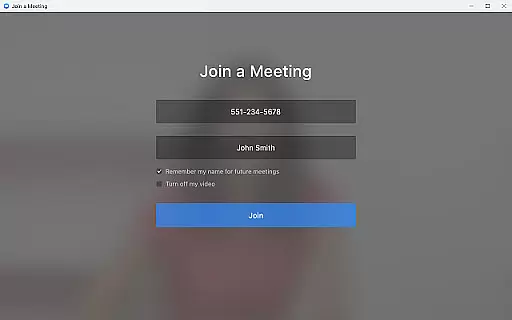

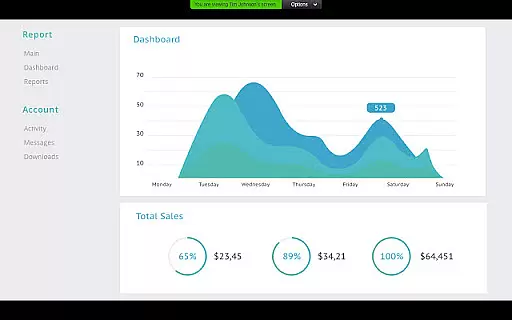
Zoom for Chromebook is a comprehensive business communication tool that combines team chat, video meetings, phone capabilities, and collaborative whiteboards into a single web application. Designed specifically for Chromebook users, it enables seamless remote work from any location. The app supports essential business functions such as scheduling meetings with one tap, receiving AI-generated meeting summaries, and engaging in both public and private team chats.
The platform also offers advanced features like virtual whiteboarding for brainstorming sessions, virtual backgrounds for professional appearances, and automatic updates to ensure you always have the latest version. Admins can remotely install and configure the app, providing centralized security management. To access premium features like AI Companion and SMS messaging, a paid Zoom One subscription may be required. Optimized for Chrome OS 91+, this app ensures businesses stay connected and productive regardless of physical location.
Zoom for Chromebook stands out with its robust feature set tailored for modern business needs. The app allows users to schedule or join video meetings instantly with a single tap, streamlining the meeting process. Its AI Companion feature provides automated meeting summaries, helping teams stay organized and informed without manual note-taking.
Communication is further enhanced through integrated team chat functionality, which supports both internal and external contacts across public and private channels. The app also includes phone capabilities, allowing users to place calls or send SMS messages directly from their Chromebook. For creative collaboration, the virtual whiteboard feature enables real-time brainstorming sessions. Additional conveniences include virtual background options for polished video presentations and automatic software updates to maintain optimal performance. These features collectively create a unified communication platform that adapts to various business requirements.
Collaborative work features are essential for modern business applications, enabling teams to work together efficiently regardless of location. Zoom for Chromebook excels in this area by integrating team chat, video meetings, phone capabilities, and whiteboard functionalities into a single web app.
The application allows users to schedule or join video meetings with a single tap, making collaboration seamless and instant. Additionally, the chat feature supports communication with colleagues and external contacts through public or private channels, ensuring that all necessary conversations can happen within the app.
One standout feature is the virtual whiteboard, which provides a space for brainstorming sessions and collaborative planning. This tool helps teams visualize ideas and work together in real-time, enhancing productivity and creativity. With these robust collaborative tools, Zoom for Chromebook ensures that teams can maintain high levels of engagement and efficiency.
Effective task management is crucial for maintaining productivity and ensuring that projects progress smoothly. Zoom for Chromebook offers several features that contribute to streamlined task management, helping users stay organized and on track.
Automated meeting summaries generated by AI Companion provide users with concise recaps of discussions and decisions made during meetings. These summaries help in tracking action items and responsibilities, ensuring nothing falls through the cracks. Furthermore, the ability to place and receive phone calls or send SMS text messages directly from the app aids in managing communication tasks efficiently.
Administrators benefit from remote installation options, allowing them to configure settings and ensure security across devices centrally. This feature simplifies the task of maintaining compliance and implementing updates, contributing to overall operational efficiency. By integrating these task management capabilities, Zoom for Chromebook empowers users to handle their responsibilities effectively and focus on achieving their goals.
User-friendly interface
Seamless integration
Robust security
Regular updates
Wide compatibility
Premium features locked
Limited free usage
Chrome OS dependent
Occasional bugs
Subscription costs

The revolutionary flexible staffing platform
 4.40
4.40
VSD Viewer - Visio Drawings Viewer for Android Preview VSD, VDX, VSDX drawings
4.10
BuildCalc - the easiest AND the most advanced construction calculator app.
4.80
viewing and sharing PDFs and other files—anytime, anywhere!
4.5
One marketplace. Hundreds of services. Unlimited possibilities. All on Fiverr.
4.40
view, manage, and share every PDF file you have
3.60
Access to Paylocity, empowering employees with information they need 24/7.
4.70
Job search app that finds jobs for you! Takes the work out of looking for a job!
4.90
Roadie connects people with stuff to send with drivers already going that way.
3.50
Create curriculum vitae, a professional cover letter creator and resume designer
4.80
Your employer must have UKG Ready software configured for Mobile.
4.60
Paychex Flex - Save Time and Stay Connected
4.60
Ship, Track, Find a Location or Get a Quote with UPS. Anytime. Anywhere.
4.60
Chat, meet, and collaborate to achieve more together, all in one place on Teams
4.60
From Gone to Back Again — In Just a Few Taps
4.50
ADP Mobile Solutions is an employee self service app
4.50
Shop, deliver, and earn with the Spark Driver™ App
4.10
enjoy effortless PDF reading anytime, anywhere
3.90
Completed Course Lectures on how to use IBM Maximo in Maintenance issues
4.4


User Reviews