
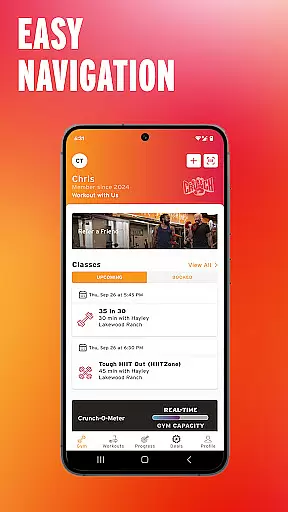
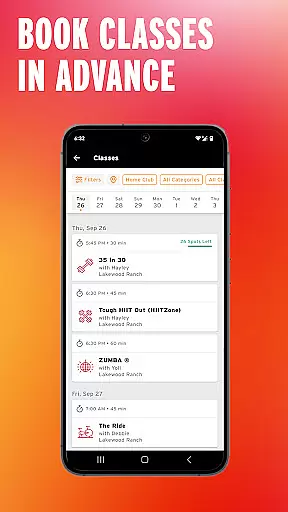
Crunch Fitness is a comprehensive mobile application designed to elevate the fitness journey of Crunch members. The app offers seamless gym check-in, progress tracking, and group class management features.
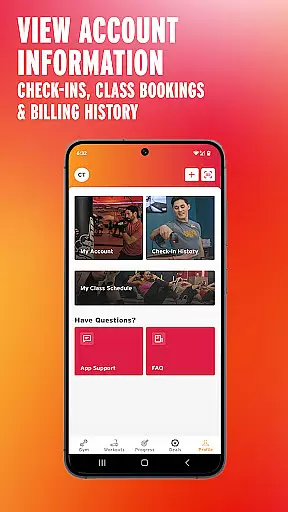
With additional capabilities such as billing history access, workout recording, and wearable integration, users can effectively manage their fitness routines. This app is ideal for those looking to maintain an organized and goal-oriented approach to their workouts.
The app provides a variety of features including easy gym check-ins, tracking of gym visits, and management of group class bookings. These tools help users stay on top of their gym attendance and class schedules.
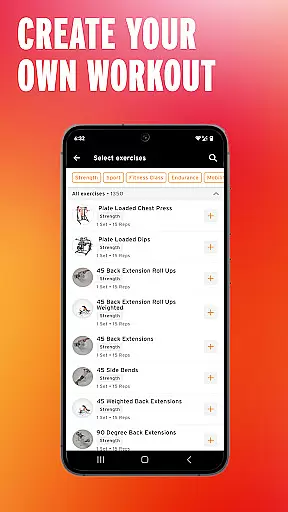
Furthermore, users can access their billing history, set personal fitness goals, and record workouts. By connecting fitness wearables, the app ensures continuous activity tracking, enhancing the overall user experience through technology integration.
Personalized planning in fitness apps refers to the ability to create tailored workout and goal-setting plans based on individual user data. This feature is crucial as it adapts the fitness experience to the unique needs and objectives of each user.
Crunch Fitness app excels in personalized planning by allowing users to set personal fitness goals and record their workouts. The integration with fitness wearables adds another layer of personalization, enabling automatic activity tracking that aligns with the user's fitness objectives.
Users benefit from this feature by receiving a fitness plan that evolves with their progress, ensuring continued motivation and measurable achievements. The app's ability to sync wearable data means users get a comprehensive view of their fitness journey.
The true value lies in the app's capacity to deliver an adaptive and responsive fitness experience, making personalized planning not just a feature but a core component of the user's daily routine.
Progress visualization involves presenting user data in graphical or statistical formats, making it easier to comprehend and track improvements over time. In fitness apps, this feature is essential for maintaining user engagement and motivation.
Crunch Fitness app offers robust progress visualization by enabling users to track their gym check-ins and review their billing history. These features provide tangible metrics of a user's commitment and financial investment in their fitness journey.
Members can visually monitor their attendance patterns and correlate them with personal fitness milestones, fostering a deeper understanding of their progress. This visual feedback loop encourages consistent gym visits and class participation.
By integrating progress visualization, Crunch Fitness app not only displays data but transforms it into a motivational tool, enhancing the overall user experience and promoting long-term fitness adherence.
User-friendly interface
Comprehensive tracking options
Seamless wearable integration
Effective goal setting
Convenient class booking
Limited to Crunch members
Occasional syncing issues
Requires stable internet
No offline functionality
Premium features locked

App to stop smoking slowly or now with a motivational badges and helpful tips
 4.80
4.80
Personal Measurements - Track your gains!
4.50
Effortlessly and naturally release anxiety by harnessing the power of your brain
4.60
Mind on steroids - relaxation, productivity, meditation and sleep!
4.60
The Sleep Miracle Sound Machine: Soothes baby to sleep with a gentle "Shhh"
3.00
Show your support for the development of FitNotes - Gym Workout Log
4.90
Make sense of your health data.
3.80
Point, scan, and unlock truth in every bite.
4.50
Comprehensively record and manage your health
4.50
Beauty Care, Makeup & Skin Care Scanner | Pregnancy App For A Mom | Healthy Baby
5.00
Home workouts for fitness & fast bodybuilding at home - no equipment needed.
4.90
Walk. Earn: Get rewarded for every step! Walk, move, and earn real rewards.
4.70
Get lasting results with Chair Yoga, Wall Pilates, and Walking workouts!
4.60
The OFFICIAL Couch to 5K® running training app! A 9 week walk-run workout plan.
4.50
SportWerks - Workout Tracker for Wear OS Watches
3.90
Dexcom G7 Continuous Glucose Monitoring
3.70
Enjoy the Gluten Free living with the best app. SCAN the barcodes & SEARCH.
3.60
GloryFit is a companion app for the smart bracelet.
3.60
Using Recognise™ has been shown to reduce pain and improve performance
4.5


User Reviews