
Files by Google is a powerful file management tool designed to help users efficiently organize, secure, and optimize their mobile storage. The app provides comprehensive features such as cleaning recommendations to free up space, advanced search capabilities for faster file retrieval, and offline file sharing through Quick Share.
In addition to its core functionalities, Files by Google offers cloud backup options, secure file protection with unique PINs or patterns, and smart recommendations that improve over time. Whether you need to manage your photos, videos, apps, or documents, this tool ensures a seamless experience across Android and Chromebook devices while maintaining high security and privacy standards.
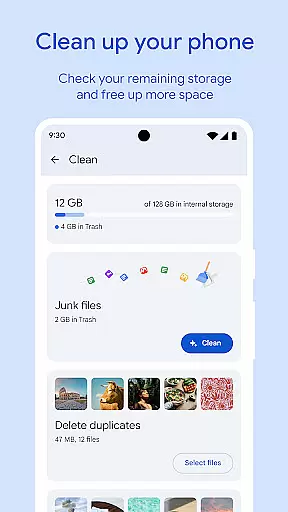
One of the standout features of Files by Google is its ability to help users free up space on their devices. It does this by identifying old photos from chat apps, duplicate files, and cached data that can be removed. This feature not only optimizes device performance but also extends its usable lifespan.
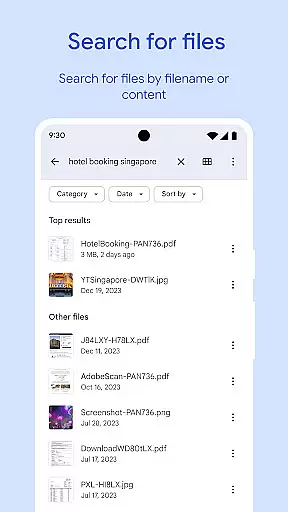
The app's search functionality allows users to find files quickly using intuitive browsing and sorting options. You can easily locate specific GIFs, recently downloaded videos, or large files taking up significant storage space. Additionally, the Quick Share feature enables fast and secure offline file transfers at speeds up to 480 Mbps, all protected by end-to-end encryption.
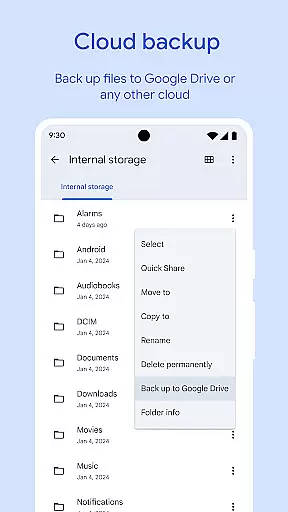
Files by Google also includes media playback controls, cloud backup solutions, and smart suggestions tailored to individual usage patterns. These innovations ensure that users have a versatile tool that adapts to their needs while providing top-notch security and efficiency.
Files by Google excels in providing accurate and effective core functions that cater to users' file management needs. The app offers precise recommendations for freeing up space by identifying old photos, duplicate files, and cache data. This targeted approach ensures users can efficiently manage their device storage without wasting time on irrelevant suggestions.
The search and browsing functionality is another demonstration of the app's commitment to accuracy. Users can quickly locate specific files, whether they are photos, videos, or documents, thanks to the app's intelligent sorting and searching capabilities. This feature saves valuable time and enhances productivity by streamlining file retrieval.
In terms of file sharing, Files by Google maintains high standards of effectiveness. With Quick Share, users can transfer files at impressive speeds of up to 480 Mbps, even without an internet connection. The transfers are secured with end-to-end encryption, ensuring both speed and security are prioritized.
Overall, the app's core functions deliver tangible value to users by addressing common pain points in file management. From optimizing storage to facilitating secure file sharing, Files by Google demonstrates a clear focus on accuracy and effectiveness, making it an indispensable tool for Android users.
A standout feature of Files by Google is its simple and intuitive interface, which makes file management accessible to users of all technical backgrounds. The app's design emphasizes clarity and ease of use, allowing users to understand their storage situation at a glance and take action effortlessly.
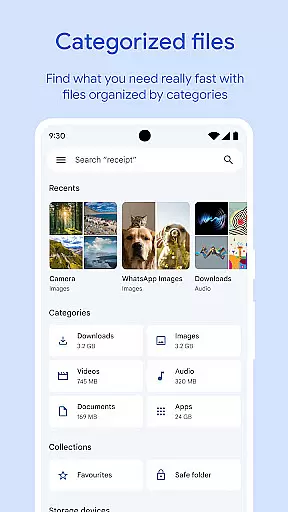
The main dashboard provides a clear overview of available space on the device, SD card, and USB drive. This transparent presentation helps users make informed decisions about managing their files. Additionally, the cleaning recommendations are presented in a straightforward manner, guiding users through the process of freeing up space without confusion.
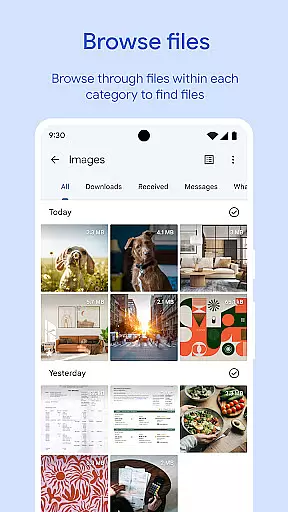
Files by Google also simplifies complex tasks like file searching and organization. The browsing feature categorizes files into intuitive groups such as photos, videos, and documents, while the search function retrieves results quickly and accurately. These thoughtful design choices reduce the learning curve and enhance user satisfaction.
By combining a clean layout with logical navigation paths, Files by Google ensures that users can perform essential file management tasks with minimal effort. This emphasis on interface simplicity not only improves usability but also encourages regular engagement with the app.
User-friendly interface
Efficient storage management
Fast offline sharing
Advanced security options
Smart personalized recommendations
Limited to Android ecosystem
Requires Google account
Occasional bugs reported
No iOS compatibility
Dependent on Google services

Connect instantly to a fast, encrypted VPN with one tap
 4.60
4.60
Enjoy smooth gameplay with Game Booster
4.90
Small and simple app to Verify Root Access and BusyBox Install!
4.70
Mirror your screen to Chromecast and Android TV - Super fast and simple
4.60
Mirror your screen to Fire TV - Super fast and simple
4.40
Connect wirelessly to your computer to watch movies, browse the web, play games
5.00
Mobile Security with Scam Protection | Malware & Virus Cleaner | Safe Browser
4.70
Screen recorder with audio to record high-quality videos and take screenshots.
4.40
The ideal app to be the digital eye of your family
3.40
Quickly switch to an encrypted DNS server on Android TV
4.50
Screen Mirroring for Roku Sticks, Roku TCL TV and Roku Hisense TV
4.50
Clean up large files and similar photos, fast and easy to use
4.40
Complete kernel toolbox with features to manage and tweak your rooted device
4.30
Quickly check the frequency of the Earth
4.30
Quickly & easily calculate the spacing of handrail balusters
4.20
Screen Mirroring with sound for Samsung TV, LG TV, Sony TV, Smart TV and Browser
4.20
A convenient photo, video, and file recovery tool.
4.00
Family Locator, Share location, StayConnect with your family in real time
3.90
Create your own live wallpaper or check out thousands already made presets
3.90


User Reviews