
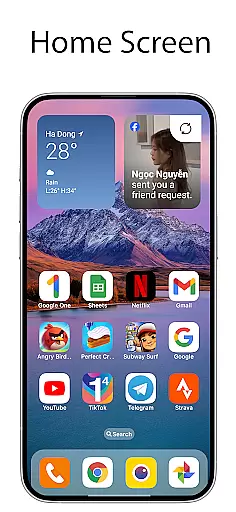
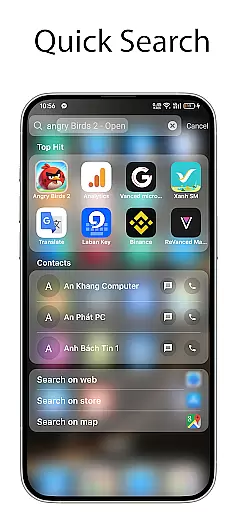
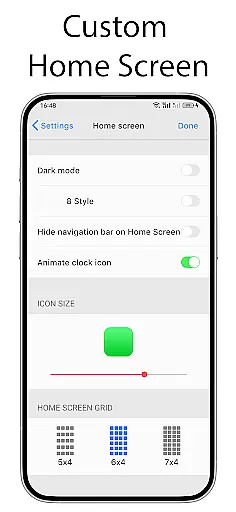
OS Launcher 18 - Phone 16 Max is a personalization app that transforms the visual appearance of Android devices into a more simple and luxurious interface. The app offers users a customized experience with redesigned app icons, wallpapers, and other specific features. It allows Android users to customize their device to resemble a Simple interface while maintaining the functionality and versatility of the Android operating system.
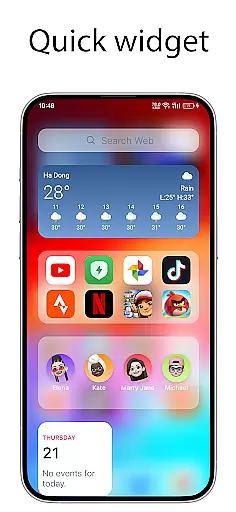
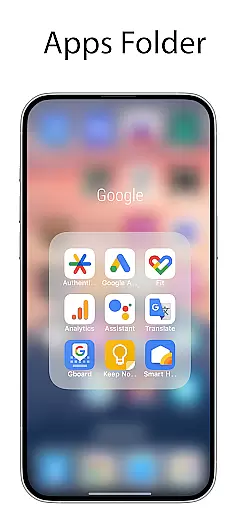
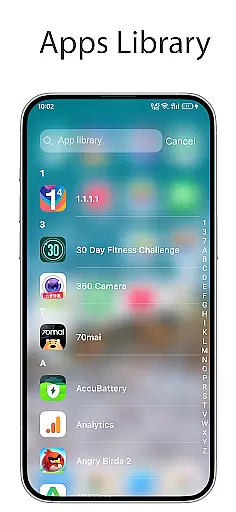
The launcher includes an Apps Library to categorize apps, a Lock App feature for added security, and a Today View that displays weather information, favorite contacts, and calendar events. Users can also create folders by dragging and dropping apps, access a beautiful weather forecast, and add various cool widgets to the home screen. With customizable icons, the ability to hide apps, and unread notification dots, OS Launcher 18 provides a comprehensive personalization suite.
This app is ideal for users who want to enhance their device's aesthetics while keeping the powerful capabilities of Android intact. Whether you're looking to simplify your interface or add luxury to your everyday device use, OS Launcher 18 caters to those needs effectively.
OS Launcher 18 - Phone 16 Max boasts a variety of features designed to enhance user experience through customization. One of its main attractions is the Apps Library, which organizes apps into categories, making navigation seamless and efficient. The Lock App feature adds a layer of security by preventing unauthorized access to specific apps, ensuring privacy.
Another standout feature is the Today View, offering users quick access to essential information such as weather updates, favorite contacts, and upcoming calendar events. The app also supports creating folders by simply dragging and dropping apps together, streamlining organization. Additionally, it provides a visually appealing Weather forecast widget packed with useful data like temperature, wind speed, and humidity.
Users can further personalize their home screens with multiple cool widgets, customizable app icons, and the option to hide apps from view. The Unread Notification Dot feature discreetly alerts users about unread messages, enhancing productivity without cluttering the interface. These features collectively offer a versatile and personalized Android experience.
OS Launcher 18 - Phone 16 Max offers a wide array of customization options that allow users to personalize their Android devices extensively. This app provides features such as customizable app icons, wallpapers, and the ability to modify both the icon and name of applications. Users can tailor their device's interface to match their personal style while retaining the core functionality of the Android operating system.
The launcher includes an Apps Library that groups apps into categories, making it easier for users to organize and access their applications. Additionally, it supports creating folders by simply dragging and dropping apps onto each other, further enhancing organization capabilities. With these tools, users have the flexibility to arrange their home screens in a way that best suits their workflow and aesthetic preferences.
For those looking to maintain privacy, OS Launcher 18 offers features like Lock App, which prevents unauthorized access to specific apps without permission. It also allows hiding apps from the home screen, ensuring sensitive information remains private. These security-focused customization options provide peace of mind while allowing full control over the deviceu2019s appearance and functionality.
Theme compatibility is a crucial aspect of OS Launcher 18 - Phone 16 Max, ensuring that users can seamlessly integrate various themes across their device. The launcher supports a range of visual themes, allowing users to apply consistent aesthetics throughout their interface. Whether you prefer a minimalist design or something more vibrant, this app ensures that your chosen theme looks great on every part of your device.
In addition to supporting diverse themes, OS Launcher 18 includes beautiful widgets that can be added to the home screen. These widgets not only enhance the visual appeal but also provide quick access to essential functions like weather forecasts, calendar events, and favorite contacts. By offering visually appealing and functional widgets, the launcher enhances both usability and personalization.
Users benefit from the Unread Notification Dot feature, which works harmoniously with different themes to alert them about unread messages. To activate this feature, users need to turn on notifications for specific apps in the settings and grant necessary permissions. This thoughtful integration of notification systems within varying themes ensures that users stay informed without compromising the cohesive look of their customized interface.
User-friendly interface
Highly customizable options
Enhanced security features
Beautiful weather widgets
Efficient app organization
Limited to Android devices
May consume additional resources
Premium features require payment
Occasional bugs reported
Learning curve for new users

Classic analogue watch face. For wear os devices.
 4.60
4.60
Adult video chat, dating, making friends, random matching
4.20
Dark icon pack based on One 8
4.80
Transfer your live wallpapers from Windows to Android using Wallpaper Engine!
4.00
Design your screen with unique, vibrant clocks
3.80
400+ Beautifully crafted widgets inspired by NOTHING.
4.70
Transform your phone with stunning video wallpapers and a unique, personal touch
3.80
Customize phone with anime themes, 3D icons, aesthetic widgets & wallpapers
4.80
Transform your phone with stylish zipper lock themes and 4D live wallpaper
4.10
Enjoy a variety of amazing live wallpapers and colorful EDGE lighting borders!
4.80
350+ widgets with a premium glass-style finish, perfect for home & lock screens.
4.70
Over 28,000 high quality icons to bring color & homogeneity to your phone.
4.60
Try creating your own keyboard with "Keyboard theme for android" app now!
4.50
Customizable screen pets that play, climb, and keep you company.
4.50 4.50
4.50
A light in the dark, a unique style and an andless cutomization!
4.30
Create unique, fun emojis with Funny Emoji Maker! Unlimited creativity!
4.00
Prank your friends with realistic broken screen and cracked HD effects!
4.3
Custom edge gestures for volume control, brightness, apps, and shortcuts.
4.1


User Reviews