



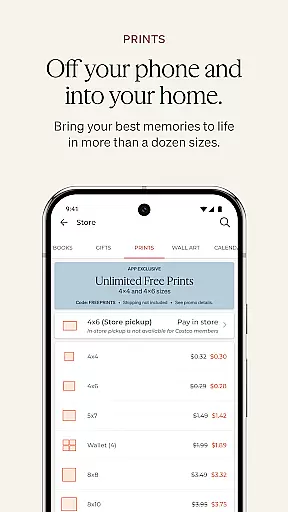

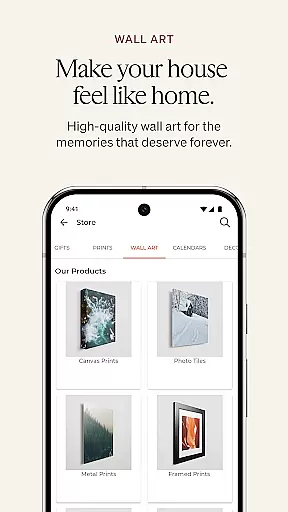
Shutterfly is a comprehensive photo editing and personalization app designed for creating meaningful gifts, cards, and home decor items. With its intuitive interface, users can easily design personalized photo books, prints, calendars, and more, all imbued with emotional significance. From wedding invitations to custom jigsaw puzzles, the app ensures every creation carries a heartfelt touch.
The app offers unique features such as return and recipient address printing, 24-Hour Photo Book Designer Service, and artistic filters that transform photos into beautiful sketches. These capabilities make it an ideal tool for those looking to save time while adding a creative flair to their projects. Whether you're crafting holiday cards or designing home decor, Shutterfly provides the tools needed to create lasting memories.
Shutterfly stands out with its diverse range of features tailored to enhance user experience. One notable feature is the 24-Hour Photo Book Designer Service, which allows users to upload photos and have a professional designer layout their book within a day. This service significantly reduces the effort required in organizing and designing photo books manually.
In addition to its designer service, Shutterfly offers improved navigation tools and artistic filters. The navigation tools simplify the process of finding new products, while the filters enable users to add a creative twist to their photos. Furthermore, seamless integration with platforms like Amazon Photos, Google Photos, Facebook, and Instagram ensures users can access their photos effortlessly, making the customization process smooth and enjoyable.
Real-time capture and preview functionality is essential for photography apps as it allows users to see exactly what the camera sees before taking a shot. Shutterfly offers this feature, ensuring that every photo taken meets the user's expectations in terms of framing, lighting, and focus.
The app provides an intuitive interface where users can adjust settings such as exposure, white balance, and focus directly on the preview screen. This immediate feedback empowers users to make necessary adjustments on the fly, resulting in higher quality photos without the need for post-processing.
Additionally, Shutterfly's real-time preview extends to its creative filters and artistic effects. Users can apply these filters and see their impact instantly, allowing them to create visually stunning images that carry emotional connections right from the moment of capture.
AI beauty and enhancement features are becoming increasingly popular in photography apps, offering users the ability to enhance their photos with natural-looking results. Shutterfly incorporates advanced AI algorithms that intelligently smooth skin tones, brighten eyes, and whiten teeth while maintaining the authenticity of the original image.
What sets Shutterfly apart is its commitment to preserving the natural essence of each photo. The AI enhancements are subtle yet effective, ensuring that edited photos do not appear overly processed or artificial. This approach respects the integrity of personal memories while still providing polished results.
Moreover, Shutterflyu2019s AI technology extends beyond simple beautification. It includes sophisticated tools for improving overall image quality, such as noise reduction, sharpening, and dynamic range optimization. These enhancements collectively contribute to creating beautiful, emotionally resonant photos that users will cherish for years to come.
User-friendly interface
Wide range of customization options
Professional photo book design service
Artistic filters for enhanced creativity
Seamless integration with multiple photo sources
Limited advanced editing tools
Some features require additional payment
Occasional app performance issues
Design templates could be more varied
Learning curve for new users

Photo editor: face & body editor, beauty cam, filters and quality enhancer.
 4.00
4.00
[3DSteroid Pro] is a stereoscopic application for Android.
4.30
1M influencer's special filter
4.60
Cut and paste photo editor & eraser to customize photos easy and swap faces fun
4.50
Virtual makeup, hair filters & body tuner—edit from face to full body!
4.20
Pet Camera
3.70
Transform Photos: Edit, Beautify and Craft Memories & Make Collages!
4.10
Pro version: AR sun/moon tracker for any date. Tool for photographers & planners
4.90
A light meter for true photographers.
4.20
Perfect body tune & face app - photo retouch, makeup, slim body & beautify face.
4.80
Photo editor: AI filters, photo enhancer, pic collage maker, AI art generator.
4.80
The original Rarevision VHS look seen everywhere!
4.70
Transform photos into videos! Create realistic or anime-style images easily!
4.50
HD Camera Pro with HD Video shooting, Panorama, Photo editor , Beauty Camera.
4.50
Edit like a pro with Hypic. Apply filters, AI effects, & magic touch.
4.40
Future baby face generator: AI kids generator, kid face! What my baby look like?
4.40
Smart, light, and fast photo and video gallery
4.30
All-in-One Editor & AI Photo Enhancer, Beautify & Retouch, Collage, Cartoonify
4.20
Turn photos into cartoons & avatars! - Photo Editor, Cartoon Face!
3.90


User Reviews