
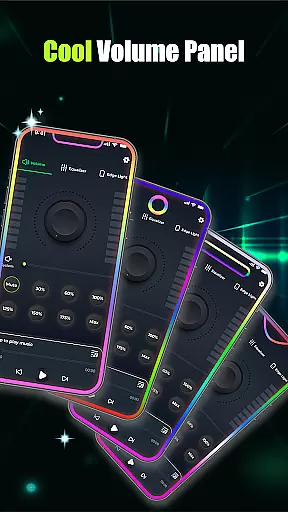
Volume Booster - Music & Sound is an advanced audio enhancement application designed to maximize your listening experience. This app allows users to amplify device volume beyond standard limits while maintaining clear, distortion-free sound quality. Whether you're using Bluetooth headphones, external speakers, or your phone's built-in speaker, the app ensures every audio element is crisp and powerful.
The application features a user-friendly interface with precise control options including volume sliders, equalizer settings, and customizable presets. It caters to various audio needs from casual listening to professional requirements, making it suitable for music enthusiasts, movie watchers, and audiophiles alike. With its comprehensive set of tools, Volume Booster transforms your regular audio playback into an immersive sound experience.
One of the key advantages of this app is its ability to boost volume across different devices and operating systems. The inclusion of advanced bass enhancement and 3D virtualization technology creates studio-quality sound that elevates your audio experience to new heights. Perfect for parties, personal listening, or professional use, this app delivers consistently impressive results.
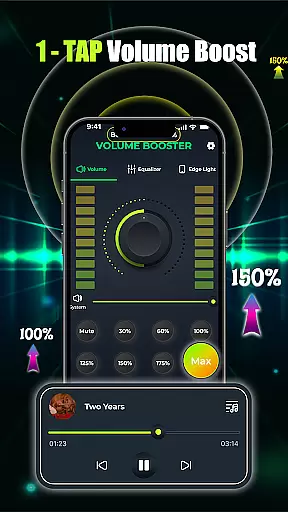
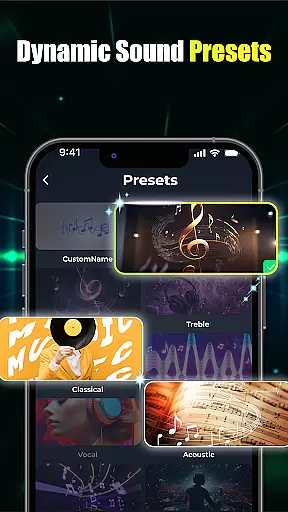
Volume Booster - Music & Sound offers an extensive range of features that cater to diverse audio enhancement needs. The app provides one-tap volume boosting functionality combined with precise slider controls and equalizer settings. Users can adjust frequency bands individually through the flat equalizer or choose from pre-set configurations optimized for different genres and audio types.
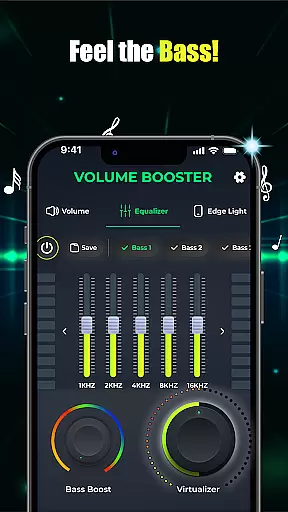
Advanced bass boost capabilities allow users to intensify low-frequency sounds, creating a more dynamic listening experience. The app includes crystal-clear custom sound presets with 3D virtualization technology, delivering studio-quality audio directly to your device. These features work together to produce rich, high-definition sound that enhances every audio source.
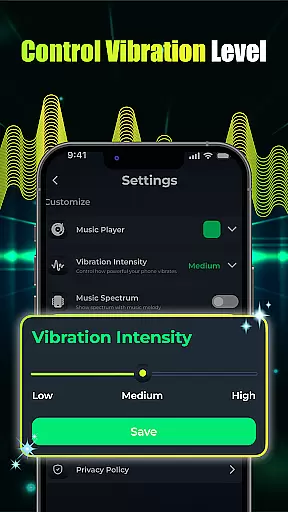
Additional notable features include a built-in music player that manages multiple audio applications simultaneously, seamless integration with device controls, and customizable visual effects. The intuitive user interface enables easy navigation and quick adjustments, while the edge light customization option adds a personal touch to your listening experience. These comprehensive features make Volume Booster an essential tool for anyone seeking superior audio quality.
When it comes to music applications like Volume Booster - Music & Sound, the size and variety of the music library play a crucial role in user satisfaction. A vast music library ensures that users have access to a wide range of songs, albums, and artists, catering to diverse musical tastes and preferences.
This application leverages an extensive music database, allowing users to enjoy an immersive audio experience with high-definition sound quality. The app not only boosts volume but also enhances every aspect of audio playback, making it perfect for various devices struggling with low sound levels.
Copyright authenticity is another vital aspect that this app takes seriously. By ensuring all music content is properly licensed and verified, users can trust that they are accessing legitimate music tracks. This commitment to copyright compliance protects both the users and the artists, fostering a legal and ethical music streaming environment.
Ultimately, the combination of a large music library and stringent copyright checks provides users with a seamless and enriching audio experience. Whether you're listening to music through Bluetooth headphones or loudspeakers, this app delivers louder, richer, and distortion-free sound, elevating your overall listening experience.
Audio quality options are essential for any music and audio application, determining how well users can enjoy their favorite tracks. In the case of Volume Booster - Music & Sound, the app offers multiple settings to enhance sound quality, ensuring users receive the best possible audio output.
The app features advanced bass boost options and customizable equalizer presets, allowing users to tailor their sound experience precisely. With one-tap volume boost and slider controls, users can adjust audio levels effortlessly, achieving studio-quality sound with minimal effort.
Moreover, the inclusion of 3D virtualization technology creates crystal-clear custom sound presets, providing an immersive listening experience. These features ensure that whether you're watching movies or enjoying music, the audio is rich, deep, and free from distortion.
By focusing on delivering high-definition audio and offering various enhancement tools, Volume Booster - Music & Sound guarantees an unparalleled auditory experience. Users can expect powerful sound and immersive audio, making every listening session enjoyable and memorable.
Maximum volume boost
Crystal-clear sound quality
Advanced equalizer settings
User-friendly interface
Multi-device compatibility
Battery consumption
Premium feature costs
Occasional distortion
Limited free presets
Interface complexity

Over 100 million tracks available for high quality streaming and download
 4.60
4.60
Most Advanced AI Song Generator and Music Creator. Rap, Pop, Rock, Gospel & more
4.70
Enhance the sound quality of your devices, listen to what you want
4.50
Save hundreds of dollars for a physical strobe tuner and instead use this app.
4.50
Permanently backup Now Playing. Maps, filters & listening stats.
4.00
AI Music Maker: Generate And Compose AI Tunes & AI Songs & AI Music & AI Melody!
4.60
Unleash your creativity! Turn simple prompts into full fledged songs.
4.70
Play your hearts out on TouchTunes jukeboxes & connect with fellow music lovers.
4.80
Travel To The Music Universe
3.40
Your song collections with lyrics and chords on Android smartphones and tablets.
4.80
More downloads than any other metronome. Includes drum machine & tempo trainer.
4.80
Brian Eno and Peter Chilvers’ acclaimed music app Bloom, radically reinvented.
4.80
Recording studio w/ 10k beats, pro vocal FX and a network of 20M rappers & fans!
4.60
Offline Music Player&MP3 Player with themes, equalizer, lyrics, music play mode
4.60
Learn the notes on the guitar fretboard fast with this easy and fun app
4.60
Advanced 10-Band Audio Graphic Equalizer Sound Booster Pro
4.30
Network/Cloud Streaming, Visualization, Graphic Equalizer and Sound Effects.
4.20
Powerful beat maker & DJ mixer to remix tracks, make music, & perform DJ mix
3.70
Control your MIDI USB or Bluetooth devices in app and avoid some trampling
3.30


User Reviews