
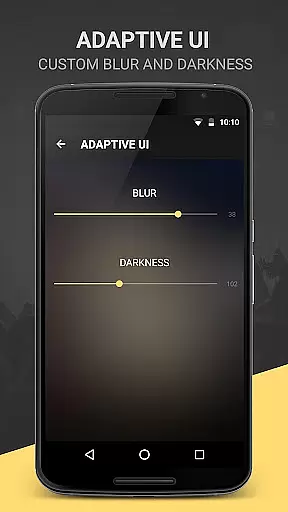
BlackPlayer EX is a premium music player designed for audiophiles who appreciate both quality and customization. This app removes ads while offering advanced features such as Chromecast support, customizable crossfading, and an impressive equalizer with bass boost capabilities.
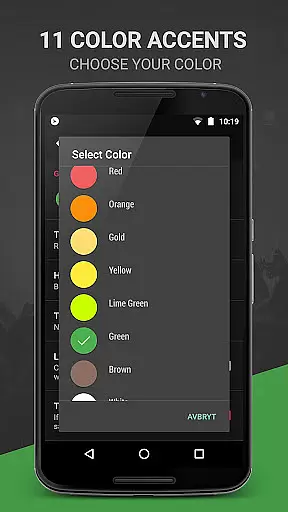
With over 11 color accents, multiple themes, and personalized library settings, users can tailor the interface to their preferences. The app supports various audio formats like MP3, FLAC, and WAV, ensuring compatibility with most locally stored music files. Its unique 'Zap' feature allows users to quickly discover music by playing random tracks for five seconds each.
Ideal for those seeking a highly customizable and ad-free listening experience, BlackPlayer EX combines functionality with aesthetics, making it a top choice in the Music & Audio category.
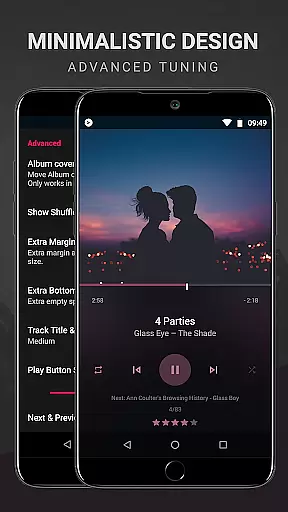
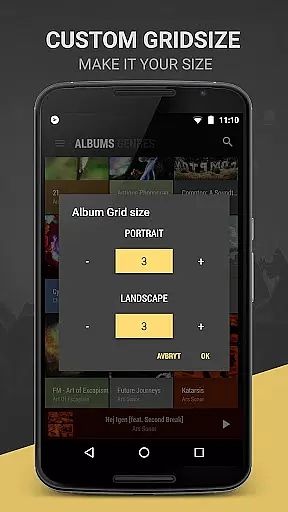
BlackPlayer EX stands out with its extensive customization options. Users can personalize everything from fonts and themes to grid sizes for artists and albums. The app includes 8 extra Now Playing themes, 6 additional fonts, and even lets you use the system font.
Advanced functionalities include Chromecast support, customizable crossfading, and a visualizer (in beta). The app also offers unique features like the 'Zap' function, which plays random tracks for quick discovery, and a floating window control widget for easy access.
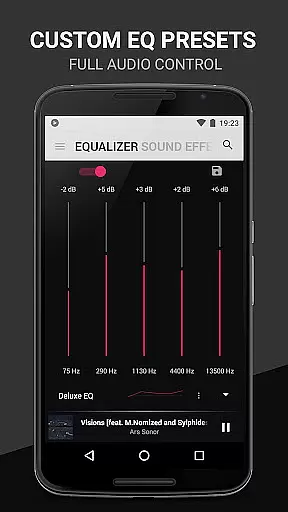
For audiophiles, the built-in equalizer, bass boost, and gapless playback provide an enhanced listening experience. With lockscreen controls, sleep timer, and weekly most-played track tracking, BlackPlayer EX ensures convenience and personalization are at the forefront of your music journey.
BlackPlayer EX offers an extensive music library that supports various formats including MP3, FLAC, and WAV files. This ensures users have a wide variety of music options at their disposal, enhancing the overall listening experience.
The application focuses on copyright authenticity by allowing users to play locally stored music files. This not only respects intellectual property rights but also provides peace of mind to users who want to ensure they are accessing legal content.
With features like customizable library pages and the ability to add or remove sections, users can tailor their music collection to suit personal preferences. The app's dedication to offering premium features first in the EX version showcases its commitment to providing a rich and authentic music experience.
Audio quality is paramount in BlackPlayer EX, which includes a built-in equalizer, bass boost, and virtualizer to fine-tune sound output. These tools allow users to adjust audio settings according to their preferences, ensuring an optimal listening experience.
The app supports gapless playback, a feature appreciated by audiophiles for maintaining sound integrity between tracks. With left/right sound balance controls, listeners can further customize their audio environment, catering to individual hearing capabilities or speaker setups.
Moreover, BlackPlayer EX offers high-quality audio formats and weekly most-played tracks tracking, indicating its focus on delivering superior sound fidelity. Users looking for enhanced audio experiences will find these options valuable for enjoying their music library with uncompromised quality.
Highly customizable
Ad-free experience
Advanced equalizer
Chromecast support
Unique 'Zap' feature
Paid version only
No cloud streaming
Beta visualizer
Limited FAQ section
Complex for beginners

Remove ads permanently from Music Visualizer
 4.0
4.0
Most Advanced AI Song Generator and Music Creator. Rap, Pop, Rock, Gospel & more
4.70
Simple & Intuitive Metronome
4.70
Your song collections with lyrics and chords on Android smartphones and tablets.
4.80
Listen radio AM / FM Stations. Live AM / FM Radio App Station. Radio Com.
4.70
Play your hearts out on TouchTunes jukeboxes & connect with fellow music lovers.
4.80
Learn and play 2M+ music tabs & chords on guitar, ukulele, bass, and more
4.30
The official Sonos app
4.10
Full featured mp3 and audio player with Chromecast and Android Auto support.
4.40
Music, News & Sports Radio Tuner App. Tune in Live FM & AM Radio Stations.
4.80
Ultimate Sonos Controller
4.70
10-Band Audio Equalizer, Sound / Bass Booster for Spotify Users & Music Players
4.40
Ringtone Maker is free app create ringtone from music files or your recording.
4.40
A High-Precision Audio Spectrum Analysis App
4.20
The original SP-1200 experience on your iPad
4.20
Turn your phone into a musical instrument from the future!
3.90
Sheet music reader, piano & music note player. Play music score & learn to read.
3.90
Learn to play the piano using falling notes!
3.80
Slow music down without changing pitch.
3.70


User Reviews